
 WinningPC

WonderFox Photo Watermark is a simple yet powerful photo watermarking tool designed to protect your images with text, logos, frames, and custom watermark templates. It also includes practical editing features like batch resizing, renaming, cropping, and image format conversion with fast processing and no quality loss.
- Product name: WonderFox Photo Watermark 8.3
- Publisher: WonderFox
- Website: https://www.videoconverterfactory.com
- License type: lifetime
- Price:
$39.90$0.0 - Platform: Windows
- License code & download – last updated: June 1st, 2026
Click here...
Unlocking content...
📝 Note: Please follow the Activation Guide to successfully claim your license.
WonderFox Photo Watermark Coupon Code Oct 2026


📄 Licensing & Support Details
- License Type: Lifetime access available for 1 PC (Personal), 3 PCs (Business), or Unlimited PCs.
- Support: 24/7 free technical support via live chat, with email responses guaranteed within 24 hours. Includes lifetime free updates.
- Guarantee: 30-day money-back guarantee.
📝 How to apply
- Hit the “Copy” button to secure this offer.
- We’ll automatically apply the coupon and send you to the checkout page, where you can grab the software for less.
How to get the WonderFox Photo Watermark License Key Free?
On the WonderFox Photo Watermark giveaway page, please click on the “Get it Now” button to get your free license code:


Download the installer for WonderFox Photo Watermark version 8.3 from the homepage.
Install the program on your computer. From the main screen, choose the “i” icon and click “Register”

Enter the WonderFox Photo Watermark license code then click the “Register” button:

In-Depth Review & Features

Key Features
- Add custom text, image, and frame overlays to multiple pictures simultaneously.
- Process up to 100 photos in exactly one minute using the dedicated batch mode.
- Save your specific location, word, and transparency settings as reusable template files.
- Access a built-in library of over 150 free watermark materials immediately.
- Manage multiple elements using a layer-based system, similar to Adobe Photoshop.
- Crop, resize, and execute batch renaming tasks across an entire folder of images.
- Convert pictures smoothly between popular formats including JPG, BMP, PNG, and GIF.
- Browse and preview your edits directly through the integrated picture viewer.
- Apply rich text effects to customized name and signature elements.
Pros and Cons
More WonderFox Photo Watermark main screenshot:
Add text watermark

Image watermark

Add effects

Frame

Frequently asked questions
Are there any active promo codes available for WonderFox Photo Watermark?
Yes! You can consistently find valid deals, promo codes, and verified coupons for this software directly on WinningPC, which partners with official channels to secure working discounts for users.
What is the biggest current discount on this watermarking tool?
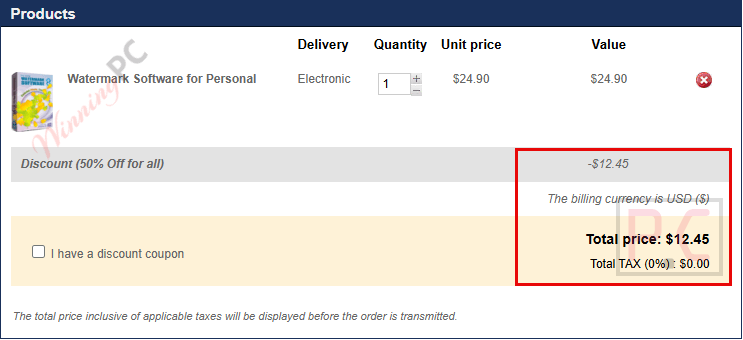
Right now, WinningPC visitors can claim a massive 69% OFF the Personal Lifetime license. This drops the regular $39.90 price tag down to an affordable $12.45.
Will adding a watermark reduce the quality of my original photos?
No. The software is built to process images with exactly zero quality loss, ensuring your photos remain as sharp as the original files.
How fast is the batch processing feature?
The batch mode is highly optimized, allowing you to successfully watermark up to 100 separate photos in roughly one minute.
Can I save my watermark design to use again later?
Absolutely. You can save your current configuration, including the text, placement, and transparency, into a template file. You can simply load this file the next time you use the program.
Does this software allow me to change the image format?
Yes, it includes a conversion feature that supports popular picture formats such as JPG, BMP, PNG, and GIF.
Do I need to design my own image watermark from scratch?
Not necessarily. While you can upload your own logos, the program also provides a free library containing over 150 pre-made watermark materials for immediate use.
Can I make basic edits to my pictures before watermarking them?
Yes, the software includes built-in photo editing functions that let you easily crop and resize your images, as well as add decorative frames.
How does the software handle multiple different watermarks on one picture?
It utilizes a layer-based architecture, much like Adobe Photoshop. This means each watermark sits on its own layer, making it easy to adjust them independently without ruining the underlying photo.
System Requirements & Details
| Feature | Specifications |
|---|---|
| Language Support | English |
| Operating System | Windows |
| Subscription | Lifetime |
| Supported Input | JPG, PNG, BMP, GIF and other common image formats |
| Supported Output | JPG, PNG, BMP, GIF and other common image formats |






I admit it is a good app and it is user-friendly.
But you guys should check out Mytoolsoft Watermark Software 5.0.15.
It is even more user-friendly and even better than Wonderfox Photo Watermark. And it is easily attainable, not like Wonderfox that gives you just 24 hours to download the giveaway.
Isn’t this the same software as Watermark Software by Aoao?
Yes, they are the same.
Licença de oferta:
WS-WSWB-6C70F00787-F106F8FAFA-2BB4FCFDF1
License Key Expired !!
Try the license key here: https://winningpc.com/watermark-software-photo-watermark-coupon-code/
It’s the same software.
Not working as well. That key is also expired.
Hello
licence key expired so I can’t activate it. Please update the licence key
Try the license key here: https://winningpc.com/watermark-software-photo-watermark-coupon-code/
It’s the same software.