
 Laura Marano

Tenorshare PDNob is a smart and easy-to-use PDF editor that helps you manage documents effortlessly. With it, you can edit, organize, annotate, convert, and share PDFs through a clean, intuitive interface.
Tenorshare PDNob is distinguished by its AI PDF feature, which allows users to ask questions and quickly receive summaries from lengthy documents (20–100 pages).. You can also create PDFs from Word, Excel, PowerPoint, or images, convert them without losing quality, and process files in bulk. Plus, its built-in OCR engine ensures accurate text recognition for scanned documents.
Tenorshare PDNob Plans & Coupon Codes

Tenorshare Sale: Earn Big with 25% OFF, BOGO Deals & iPhone 18 Giveaway
Celebrate iOS 27 and iPhone 18 with Tenorshare! Join the giveaway for a chance to win an iPhone 18 Pro, Amazon gift cards, and other prizes. Plus, save 25% on popular Tenorshare iOS tools and explore limited-time bundle deals. The sale ends on October 15, 2026.

PDNob Back to School Sale: 84% OFF
Join us in celebrating our Back to School with an 84% discount on PDNob, the most powerful PDF editor tool. Don't miss out!
Windows version

Tenorshare PDNob for Windows - 1 Year License
1 year access | 2 Users: simultaneous use on 2 Windows, or 1 of each. Includes free iOS access
Tenorshare PDNob for Windows - Lifetime License
Lifetime access | 2 Users: simultaneous use on 2 Windows, or 1 of each. Includes free iOS access
macOS version
Tenorshare PDNob for Mac - 1 Year License
1 year access | 2 Users: simultaneous use on 2 Macs, or 1 of each. Includes free iOS access
Tenorshare PDNob for Mac - Lifetime License
Lifetime access | 2 Users: simultaneous use on 2 Macs, or 1 of each. Includes free iOS access
Tenorshare PDNob Giveaway License Key Free Download
- Product name: Tenorshare PDNob for Windows
- Website: https://www.tenorshare.com/
- License type: 6-month
- Platform: Windows
- Download: pdnob-pdf-editor_8946.exe
- Giveaway page:
PDNob giveaway link
How to get the license key?
Download and install the software on your computer. Create your PDNob account or log in existing account to access all the premium features.

When login is successful, redeem the membership in the software with the redemption code.
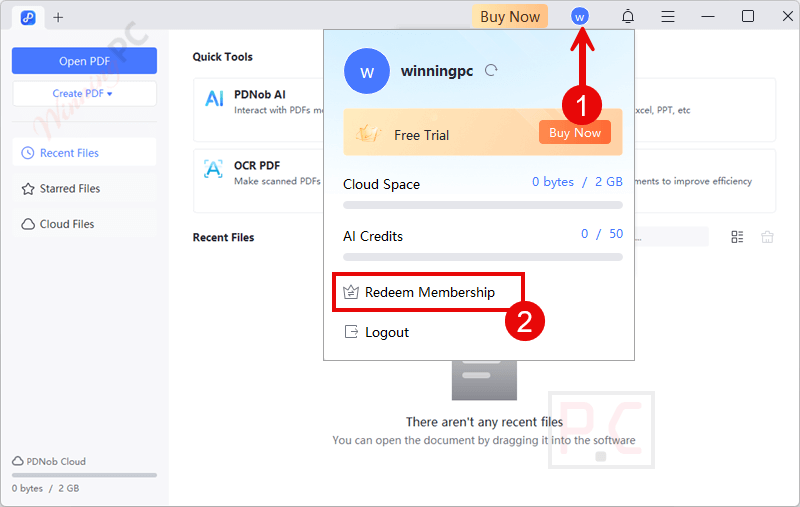
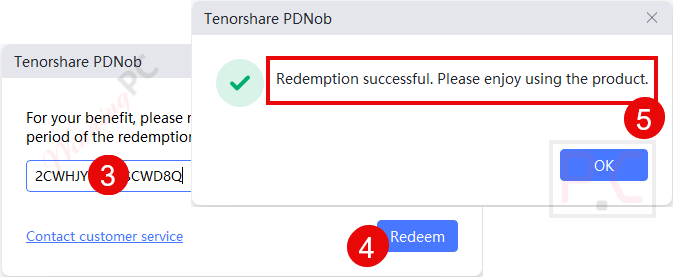
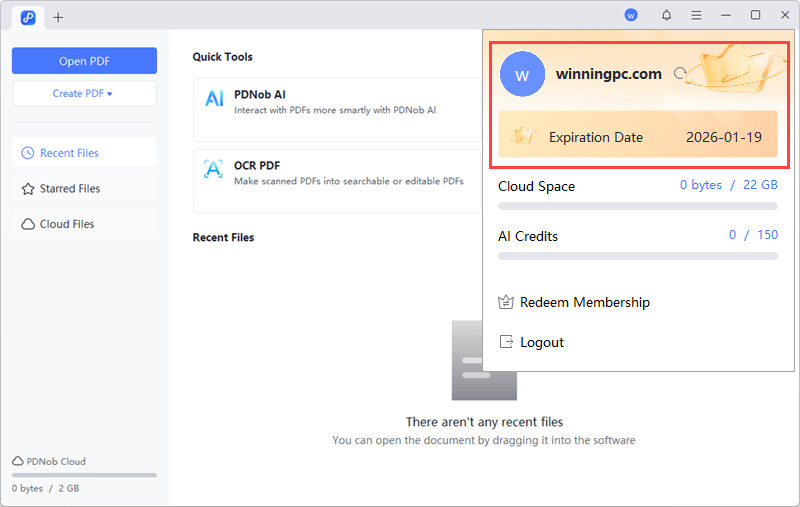
Got it for 6 months free!
Tenorshare PDNob main screenshot!
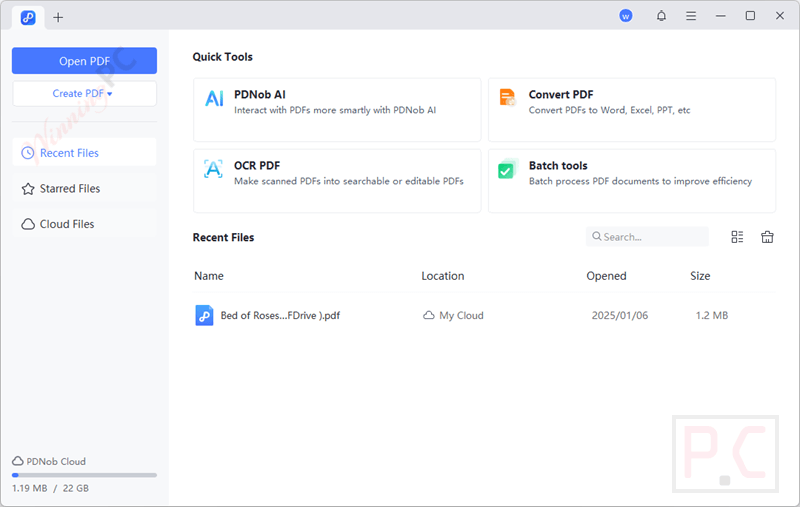
PDNob AI – Interact with PDFs more smartly
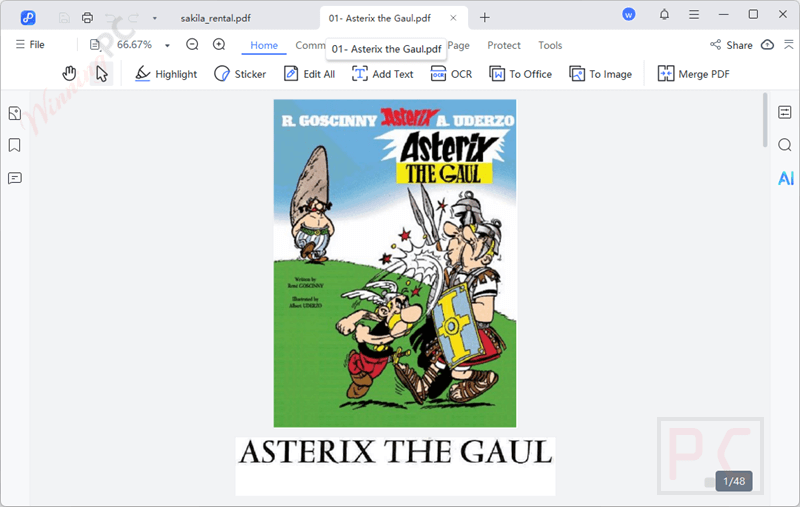
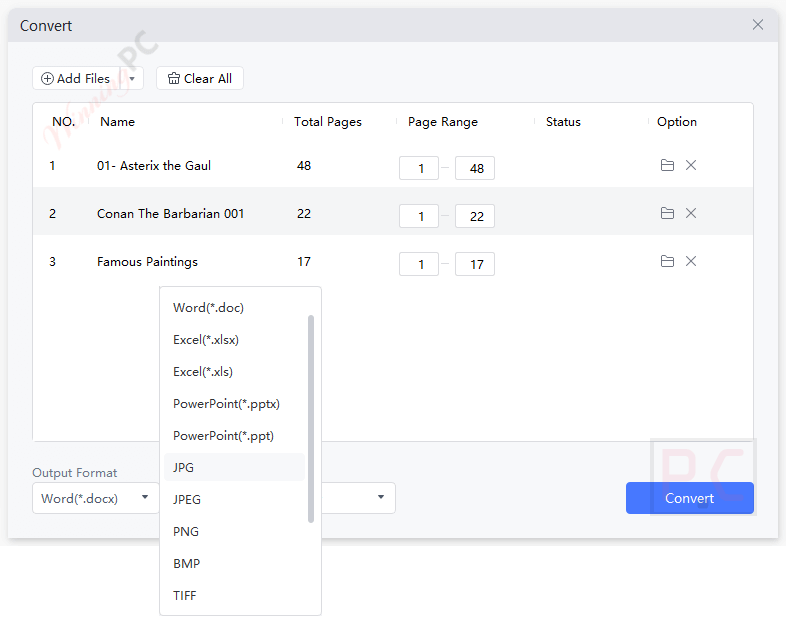
Convert PDF – Convert PDFs to Word, Excel, PPT, etc.
OCR PDF – Make scanned PDFs into searchable or editable PDFs

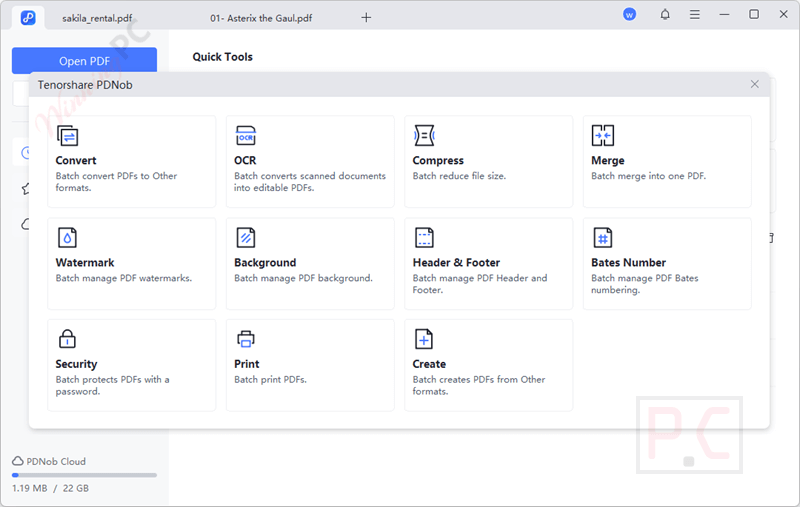
Batch Tools – Batch process PDF documents to improve efficiency
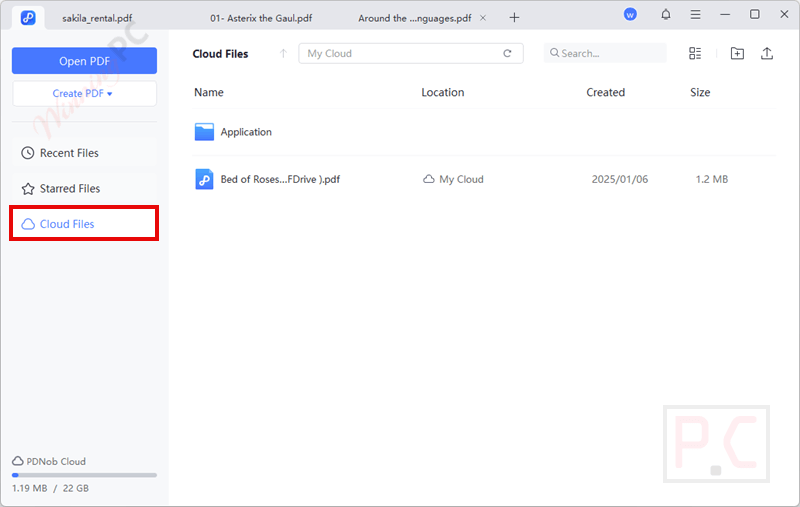
Cloud Files
Main Features
- AI-Powered PDF Summarization: Tenorshare PDNob saves time and increases productivity by using sophisticated AI skills to evaluate and condense long PDF documents into essential elements.
- Conversion Capabilities: Tenorshare PDNob supports a wide range of formats, allowing you to convert PDFs to Word, Excel, PowerPoint, images, and more. With its help, you can easily share your document and edit it across different platforms.
- Chat with PDF: Use AI-powered tools to interact with your PDFs in a Q&A session; you can quickly find information, extract insights, or clarify text.
- Editing Tools: The editing function is provided so you can edit text, images, links, and watermarks within your PDFs. The intuitive interface makes it easy to adjust fonts, sizes, colors, and other properties without compromising the original layout.
- Annotation Features: You can use the annotation tools to improve review and collaboration procedures. Enhance your PDFs with highlights, underlines, shapes, stamps, and more to make adding comments and notes easier.
- OCR Technology: Professionals may extract and alter material from non-editable PDFs thanks to the integrated OCR technology, which transforms scanned documents and images into editable and searchable text.
- Compress: This function helps you reduce the size of your PDF files without sacrificing quality or altering the original layout. With support for unlimited batch compression, you can process multiple files in one go, saving time and improving efficiency.
- Encryption: You can set a password for your PDFs with 256-bit AES password protection and customizable permissions to control comments, copying, editing, or printing. It also supports PDF/A format for safe, long-term archiving, keeping your documents both secure and compliant.
- Screenshot: You can easily capture either the entire screen or just a selected area of your computer display. Designed to suit a wide range of scenarios, from business presentations and online classes to gaming sessions, it makes recording your screen simple and flexible.
- Batch Processing: Handle multiple files simultaneously with Tenorshare PDNob’s batch processing capabilities. Whether you’re working on a large project or managing numerous documents, this feature saves time and effort.
- Security Features: Passwords, encryption, and permissions to limit printing, copying, and editing are ways to safeguard sensitive data.
- Cross-Platform Compatibility: Tenorshare PDNob is compatible with Windows and Mac, ensuring that you can use it on your preferred device. It also supports major browsers, allowing you to work on your documents from anywhere.
Frequently Asked Questions
What is Tenorshare PDNob?
PDNob is an AI-powered software designed for Windows and Mac that allows users to view, edit, annotate, organize, merge, split, and convert PDF files seamlessly
What are the differences between the free trial and the premium version?
The free trial provides limited features, such as 50 AI credits, editing with a trial watermark, and limited conversions per week. The premium version offers enhanced capabilities, including 100 AI credits per month, higher file size limits, and additional features without watermarks.
How can I convert a PDF to Word?
To convert a PDF to Word, open PDNob, click on the ‘Convert’ tab, select ‘PDF to Word,’ choose the desired file, and initiate the conversion process.
How do I secure my PDF documents with PDNob?
You can add passwords and set permissions to restrict actions like printing, copying, or editing, thereby protecting your sensitive information.
What are AI credits in Tenorshare PDNob?
AI credits are used to measure the usage of AI features within the software. Each AI interaction, such as document analysis or summarization, consumes one credit.
Are there any discounts available for purchasing PDNob?
Yes, WinningPC provides coupons that can help you acquire Tenorshare PDNob at a discounted price.
Technical Details
| Language Support | English, Français, Italian, Spanish, Swedish, and more… |
| Money Back Guarantee | 30-Day |
| Operating System | Windows 11 and 10; x64 bit masOS: 15(macOS Sequoia), 14(macOS Sonoma), 13(macOS Ventura), 12(macOS Monterey), 11.5(macOS Big Sur), 10.15(macOS Catalina) |
| Shipping | Register code will be sent to your email in minutes |
| Subscription | 1-Month, 1-Year, 3-Year |
| Support Services | Tickets |



A heartfelt thank-you to Tenorshare and WinningPC. Free tools like PDNob mean a lot to everyday users!
Thanks a ton for the PDNob access! It’s giveaways like these that show you care.
Appreciate the giveaway—PDNob seems fantastic. Excited to give it a try!
Thanks for the opportunity!
Big thanks to Tenorshare PDNob and WinningPC for this generous giveaway! You made my day!