Chris Bruner

Screen Anytime is a computer monitoring and screen recording solution used to track user activity for security and compliance purposes. It records sessions across local desktops, RDP, Citrix, and RemoteApp environments, storing activity as compressed video files to reduce long-term storage needs. Administrators can also view screens live, which is helpful for supervision or remote support in multi-device networks. The software includes a built-in web service that allows recorded sessions to be reviewed, searched, and replayed through a browser. With both recording and live monitoring options, Screen Anytime supports detailed oversight without placing heavy demands on disk space.
Stepok Screen Anytime Coupon Code Sep 2026 (100% Working)

Screen Anytime - Workstation Edition
20% off coupon code: regular price $199, discounted price $159.2
Screen Anytime - Server Edition
20% discount coupon code: regular price $599, discounted price $479.2
Key Features & Screenshots
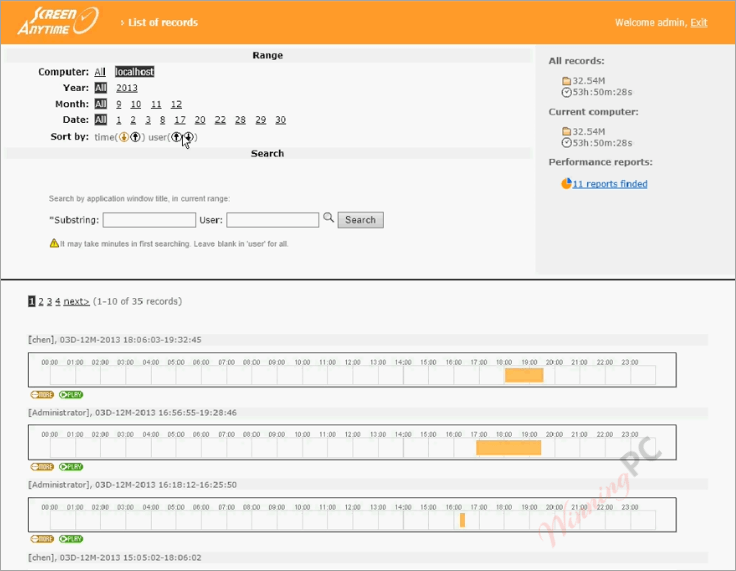
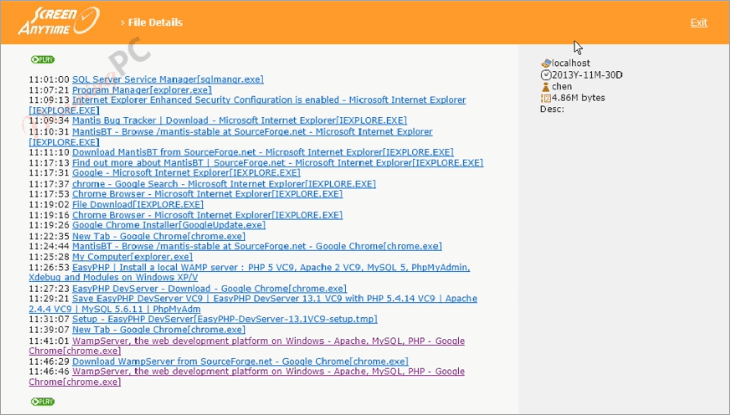
- Automatic Session Recording: automatically records all screen activity during local, RDP, Citrix, and RemoteApp sessions into video log files.
- High Compression Technology: uses Stepok Screen Codec v3 to reduce storage usage, keeping daily recordings under 300 MB.
- Network Integration: supports local or server-based storage with built-in HTTP access for reviewing, replaying, and searching recordings.
- Multi-User Session Recording: records sessions separately for each user, making it suitable for shared and networked environments.
- Centralized Management: allows administrators to manage, review, and search recorded sessions from a single interface using the server edition.
- Real-Time Monitoring: enables live screen viewing with low latency and supports remote assistance when intervention is needed.
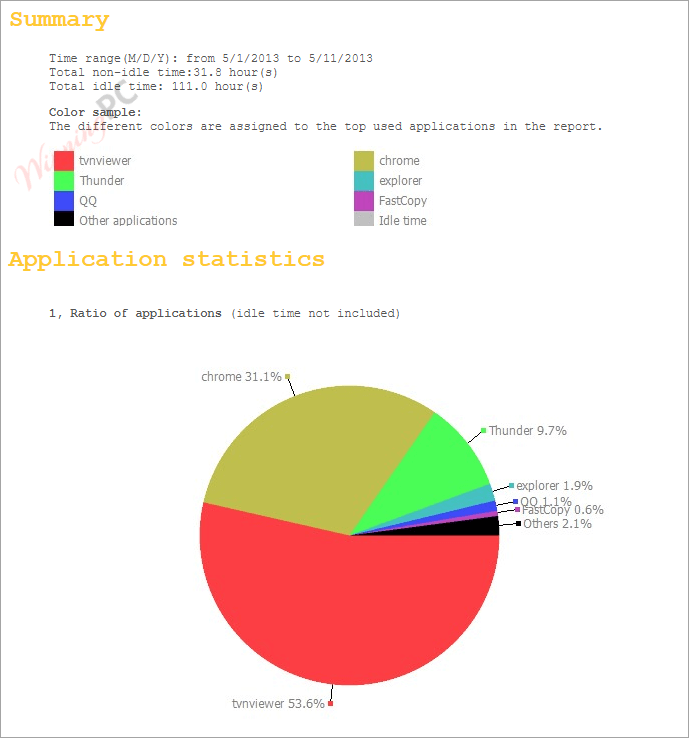
- Performance Management Tools: provides screen time limits and weekly or monthly reports with statistics to evaluate productivity and usage patterns.
- Configurable Recording Settings: lets administrators define recording rules by time period, user group, or application to match internal policies.
More screenshots
Frequently Asked Questions
Can Screen Anytime record multiple user sessions simultaneously?
Yes, it supports multi-user systems, recording activities of all Windows sessions, including local logins and remote sessions via RDP, Citrix, VNC, and RemoteApp.
How much disk space does Screen Anytime require?
This software uses advanced compression technology to minimize disk space usage. Daily recordings can stay under 300MB, depending on the environment.
Is real-time monitoring possible with Screen Anytime?
Yes, in networks established with the server and workstation editions, managers can monitor computers live with client permission. Remote assistance features allow managers to take control remotely to resolve issues with client consent.
How does Screen Anytime ensure user privacy?
It does not record keystrokes and cannot be installed silently, preventing misuse. Protective measures ensure non-administrators cannot access or control the recording process.
What are the different editions of Screen Anytime available?
Screen Anytime offers several editions: the server edition, which includes all features; the workstation edition, capable of recording, managing, and replaying locally; and the simple workstation edition, which focuses on recording and uploading modules and works in conjunction with the server edition.
How can I purchase Screen Anytime, and are there any discounts available?
You can purchase this software on WinningPC with coupon code 20***D1AD06BC, which provides a 20% discount on the software.
Technical Details
| Language Support | English, Français, Italian, Spanish, Swedish, and more… |
| Money Back Guarantee | 30-Day |
| Operating System | Windows 7/8/10/11 |
| Shipping | Register code will be sent to your email in minutes |
| Subscription | Lifetime |
| Support Services | Tickets |