Cathryn Lee
I found Passport Photo Maker while searching for professional passport photo software to create passport or visa photos at home without visiting a photo studio. This tool is easy to use for creating compliant ID photos. Designed for both individuals and photo studios and businesses to use, offering features that simplify the process of creating passport-size photos and ID pictures that comply with official requirements for various countries.
Passport Photo Maker from AMS Software has a function to automatically adjust photo dimensions using up-to-date templates for over 130 countries, including the USA, UK, Canada, Australia, France (visa), and more. I can even use it to change the background & clothes on my photos with one click to meet official dress code requirements.
Passport Photo Maker Coupon Codes (100% Working)
Passport Photo Maker STANDARD
61% promo code: regular price $45.9, discounted price $17.93
Passport Photo Maker STUDIO
61% promo code: regular price $114.9, discounted price $44.93
Passport Photo Maker ENTERPRISE
65% promo code: regular price $267.90, discounted price $94.93
Key Features and Screenshots
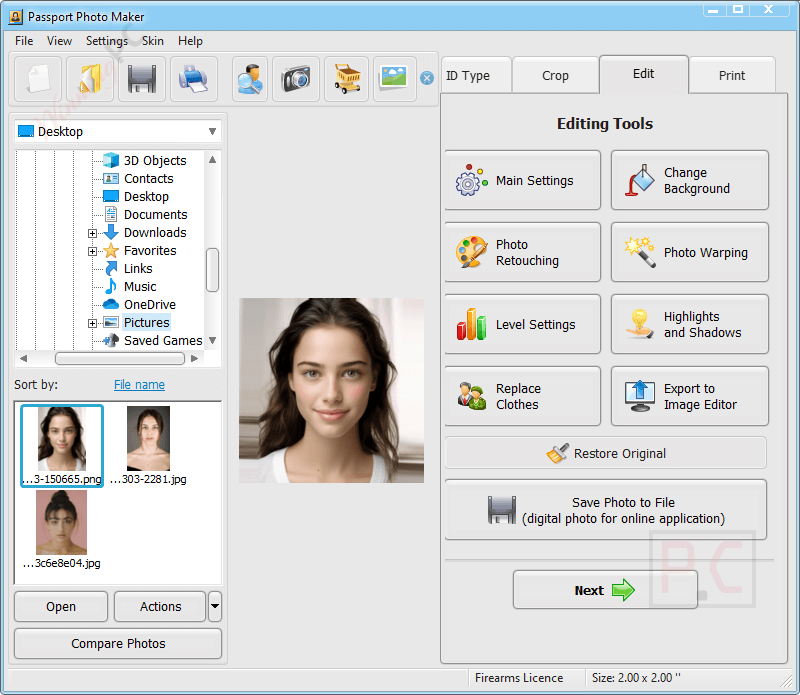
- Smart Cropping Tool: Automatically detects and crops headshots to make perfect ID photos that meet official ID photo standards.
- 130+ Country Templates: Includes up-to-date passport and visa photo formats for the USA, UK, Canada, Australia, France, Germany, Spain, Italy, and other countries.
- Document Type Support: Templates for passports, visas, driver’s licenses, baby passports, and other ID types.
- Background Replacement: One-click background change or manual adjustment with color brushes.
- Clothing Replacement: Integrated collection of formal clothing items to meet dress code requirements.
- Photo Enhancement Tools: Adjust brightness, contrast, and color balance; correct shadows; straighten headshots; rotate and remove red-eye.
- Smart Printing Module: Automatically arranges photos to fit the required number on a page, with crop marks for easy trimming.
- Custom Layouts: Create and save personalized print templates.
- Multi-Person Printing: Print different types of ID photos or photos of multiple people on the same page.
- Digital Submission Ready: Export photos for online applications such as the DV lottery, UK visa applications, and other documents.
- Order Automation: Set pricing for services like saving a photo, printing a photo, saving a print layout, burning photos to a CD, etc.
- Client Database: Store and search customer profiles for easy reprints without reshooting.
- Order Statistics: Export order data to spreadsheets for analysis.
- Activity Log: Track employee actions within the software and set a password to limit their access to some functions.
How to Use (Step-by-Step Guide)
Step 1. Install the Software
Download Passport Photo Maker from the official website and follow the installation instructions to set it up on your Windows PC.
Step 2. Add Your Photo
Launch the software. Click “Open Photo” to upload an image from your computer or capture one using a connected camera.
Step 3. Choose Document Type & Country
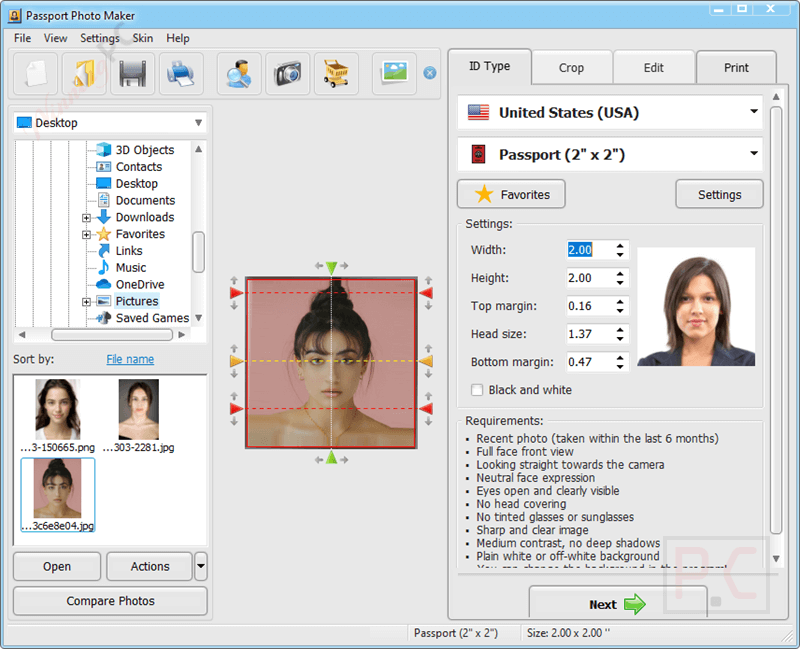
Select the document type: passport, visa, ID, or driver’s license. Choose the country (e.g., USA, UK, Canada, India, etc.). The program will apply the correct size, dimensions, and cropping settings automatically.
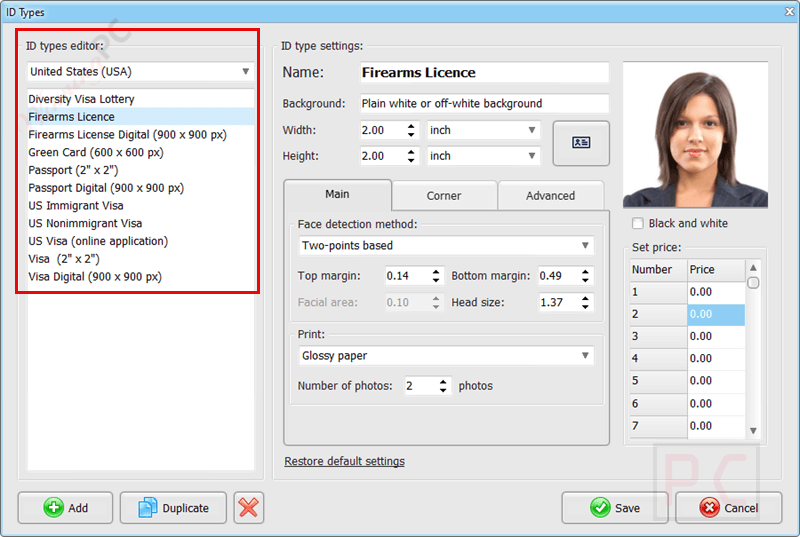
Step 4. Auto-Crop & Face Alignment
The software uses intelligent face detection to auto-crop and center the face. You can manually adjust zoom, rotation, and head position if needed.
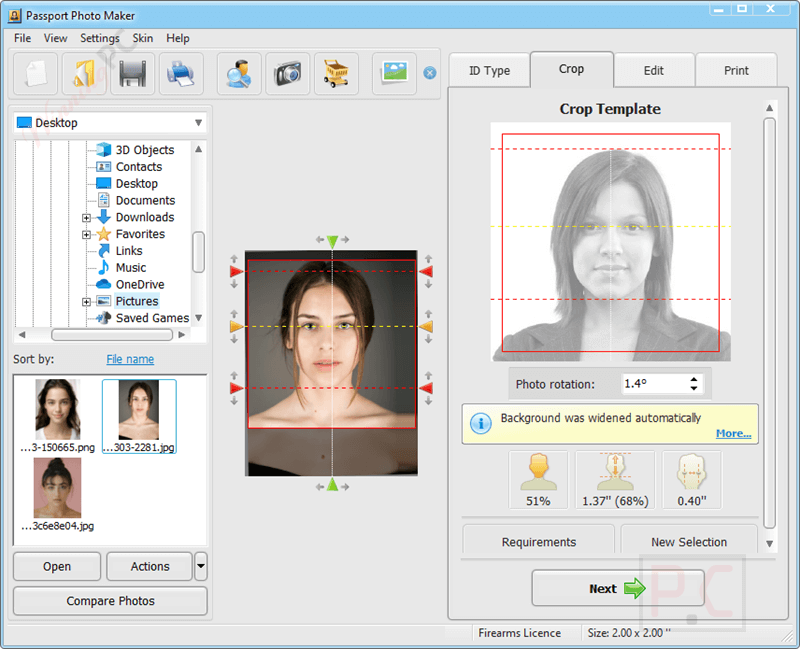
Step 5. Edit the Background (Optional)
If your background doesn’t meet the official requirements, use the: One-click background remover or the manual brush tool for more control. Replace with white, blue, or any custom background color.
Step 6. Change Clothes (Optional)
Use the Digital Clothing feature to add formal attire (shirt, suit, blouse).
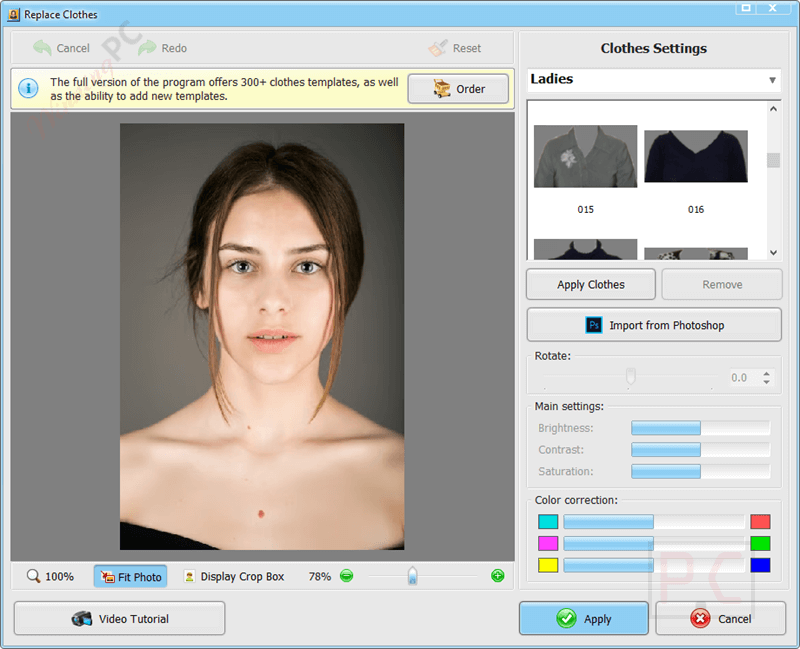
Step 7. Retouch & Enhance Photo (Optional)
Rotate or straighten the headshot. Use built-in tools to: Adjust brightness, contrast, and color balance. Remove red-eye and fix shadows.
Step 8. Save or Print Your Photo
Save the final image in formats like JPEG, PNG, or TIFF. Or go to the Print tab to print.
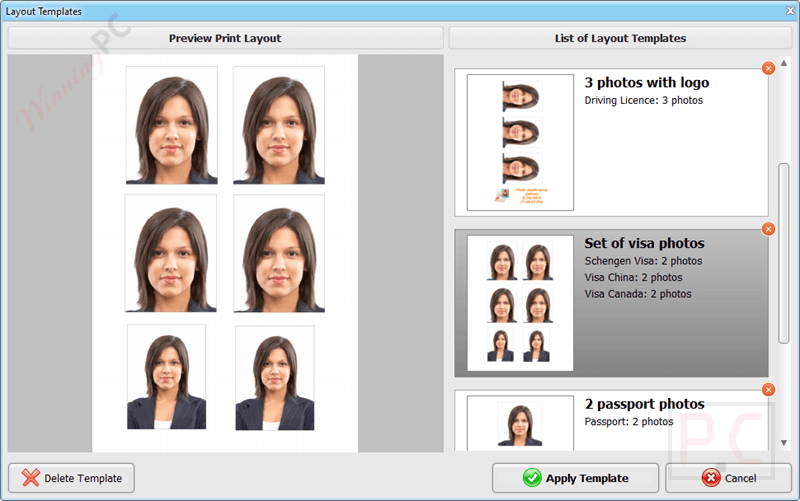
Frequently Asked Questions
Can I use it to make visa or ID photos, too?
Yes! It supports photo templates for passports, visas, driving licenses, and other official ID documents across multiple countries.
Does Passport Photo Maker automatically crop the face?
Yes, the software features automatic face detection and aligns facial features according to international biometric standards.
Can I change the background to white or blue?
Absolutely. The built-in background removal tool lets you easily switch to a white, blue, or any custom color background required by your country.
Does it support printing multiple photos on one page?
Yes, Passport Photo Maker allows batch printing and offers layout templates to fit multiple photos per sheet to save paper and cost.
Are the official photo requirements for my country included?
Yes, the software includes ready-made templates based on the latest guidelines for over 130 countries, including the USA, UK, Canada, India, and the EU.
How do I get a discount on Passport Photo Maker?
You can save up to 65% by using the WinningPC coupon code AMS-STD***B70 at checkout.
Why Choose WinningPC
- Why Trust? We are committed to providing 100% valid and verified coupon codes, so you can always shop with confidence.
- Found an Invalid Coupon or a Better Deal? If you encounter an invalid code or a better offer, please let us know. Our team updates all discount information regularly to ensure accuracy.
- Official Authorization: We only share authentic discounts from trusted software developers.
- No Fake Discounts: Unlike some sites, we never use misleading deals. The final price you see is the true discounted price.
- Secure Purchases: All transactions are processed on the official vendor’s website, ensuring authenticity and data protection.
- Extra Support: If you face order or vendor issues, contact us. We’ll liaise with the vendor to help resolve your problem quickly.
Technical Details
| Language Support | English, Français, Italian, Spanish, Swedish, and more… |
| Money Back Guarantee | 30-Day |
| Operating System | Windows 11, 10, 8, 7 |
| Shipping | Register code will be sent to your email in minutes |
| Subscription | Lifetime |
| Support Services | Tickets |