
 Chris Bruner
Vita3D is an AI 3D model generator that is AI-powered to help you generate production-ready 3D models in seconds. Using it, you can turn images, sketches, or simple text prompts into high-quality 3D assets – fast and easily. You are allowed to create 3D models, generate textures, run motion capture, and more using image-to-3D or scribble-to-3D options.
It also handles texturing automatically, turning models into realistic assets without manual steps. With built-in auto-rigging, ready-made motions, text-based animation, and video-based motion capture, Vita3D makes modelling and animation easier for creators across games, film, AR/VR, and 3D printing.
Top AI Software & Tool Coupon Codes September 2026

AIVideoBuilder - Commercial License
36% coupon code: regular price $69, discounted price $44.10

Kling AI Standard - Yearly
42% off coupon code: regular price $120, discounted price $70
Pippit AI Starter - Yearly
62% off coupon code: regular price $540, discounted price $203.88

OpenArt AI
Save up to 27% on top models like Veo 3. Upgrade to Advanced or above by Jan 31 — savings apply throughout 2026
Giveaway: Vita 3D License Code Free Download
WinningPC has collaborated with Nabla Mind to give away a free 3-month license (valued at $60) for Vita 3D. Please enter your email address in the giveaway form below to receive your free license code.
- Product name: Vita 3D – AI 3D model Generator (Online)
- Website: https://poppop.ai/ai-3d-model-generator
- License type: 3-month
- Platform: Windows
- Download:
- License code – last updated: Jan 10, 2026
The giveaway has ended!
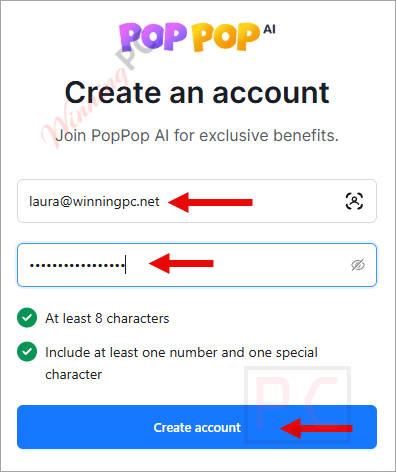
Go to this site https://vita3d.poppop.ai/home, create an account, and sign in.
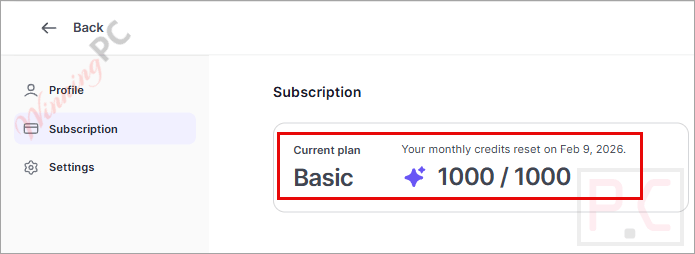
Click your icon -> Profile -> Subscription -> “Get a promo code”, then enter your code and click on the “verify” button
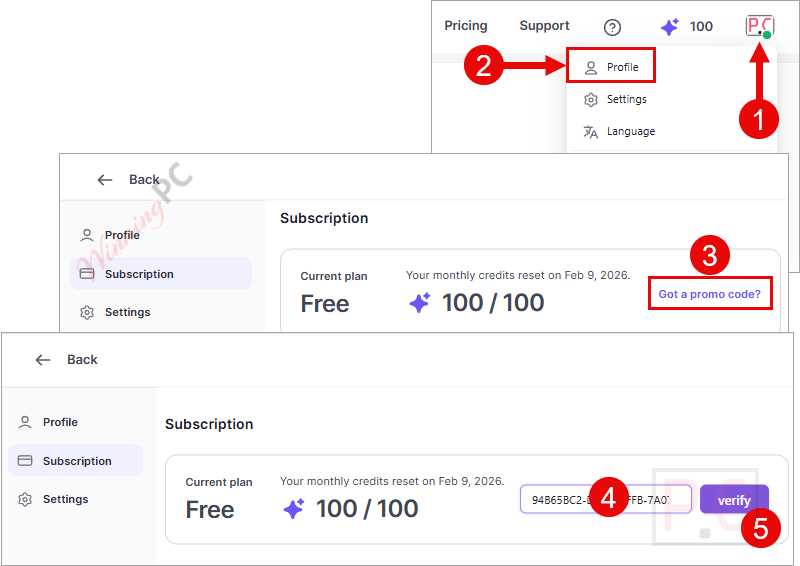
Now you can get 1000 credits with the Basic plan for free!
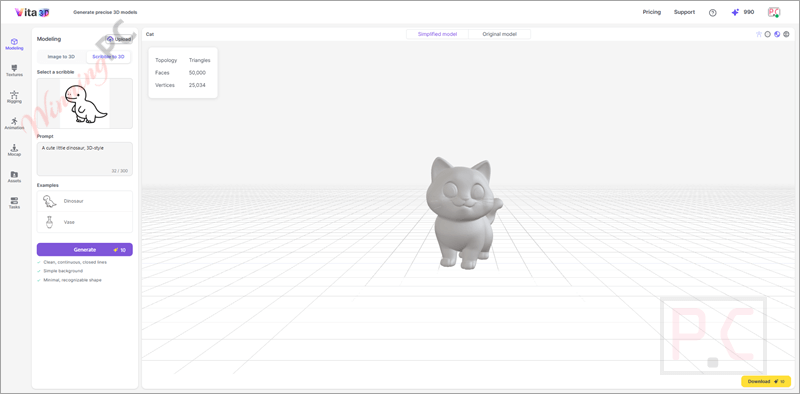
Vita 3D
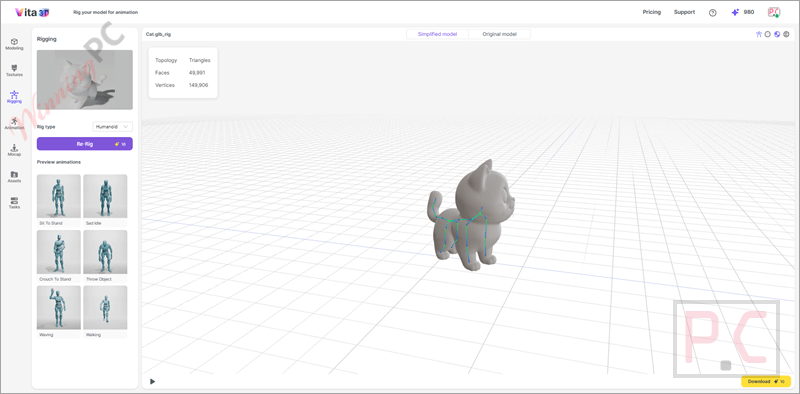
Rigging
Main Features
- Instant image-to-3D creation: Turns uploaded images into production-ready 3D models in seconds.
- Two creation modes: Supports both image-to-3D and scribble-to-3D workflows for different starting ideas.
- Scribble plus text input: Combines a hand-drawn sketch with a text prompt to shape the final 3D model.
- Automatic AI texturing: Applies realistic textures to 3D models by analyzing an uploaded image.
- Built-in AI animation tools: Makes it easy to animate generated 3D models without manual setup.
- Auto-rigging support: Automatically adds a skeleton to 3D models so they’re ready for movement.
- Motion library access: Provides a collection of ready-made animations you can apply instantly.
- Text-based motion generation: Creates custom animations by typing simple action descriptions.
- Video-based motion capture: Animates 3D models using motion extracted directly from uploaded videos.
- Asset download option: Allows downloading all generated models, textures, and animations.
- Editable export formats: Exports models in formats like GLB for further editing in tools such as Blender.
- Wide range of use cases: Fits workflows for game development, film and animation, AR projects, and 3D printing.
Frequently Asked Questions
Does Vita 3D support animation?
Yes. It includes auto-rigging, ready-made motions, and text-based animation generation.
Can I create animations using text prompts?
Yes. You can type simple actions like walking or jumping to generate animations.
Does Vita 3D support motion capture?
Yes. You can upload a video and apply its movement to your 3D model.
Can I download my finished 3D models?
Yes. All generated models, textures, and animations can be downloaded.
How can I get Vita 3D for free?
WinningPC runs a giveaway that lets you use Vita 3D for free. Just follow the giveaway instructions on our site.
Why Choose WinningPC
- Why Trust? We are committed to providing 100% valid and verified coupon codes, so you can always shop with confidence.
- Found an Invalid Coupon or a Better Deal? If you encounter an invalid code or a better offer, please let us know. Our team updates all discount information regularly to ensure accuracy.
- Official Authorization: We only share authentic discounts from trusted software developers.
- No Fake Discounts: Unlike some sites, we never use misleading deals. The final price you see is the true discounted price.
- Secure Purchases: All transactions are processed on the official vendor’s website, ensuring authenticity and data protection.
- Extra Support: If you face order or vendor issues, contact us. We’ll liaise with the vendor to help resolve your problem quickly.
Technical Details
| Language Support | English, Français, Italian, Spanish, Swedish, and more… |
| Money Back Guarantee | 30-Day |
| Operating System | Web browser (like Chrome, Edge, Firefox, or Safari) |
| Shipping | Register code will be sent to your email in minutes |
| Subscription | 1-Month, 1-Year |
| Support Services |



Apparently this is only a web application not a windows program and while this is a 1000 credits per month there is a free offering that offers 100 credits per month you could probably downgrade to after the 3 month trial giveaway expires. What you create could be scraped by the owners of the site and poached if they’re any good. So don’t put yourself up there to make a 3d model of you or your family or of anyone you don’t have the right to use their image.