On this page
Combine PDFs Coupons & Pricing
Combine PDFs
3 plans · best save 40%
Single User License
One license for one user| Free technical support and a lifetime free upgrade.
Family License
One license for 5 users | Free technical support and a lifetime free upgrade.
Company License ★ Best Deal
One license for 20 users | Free technical support and a lifetime free upgrade.
How to Use the Combine PDFs Coupon Code
- Click Copy on a plan to copy the code WIN***GPC10.
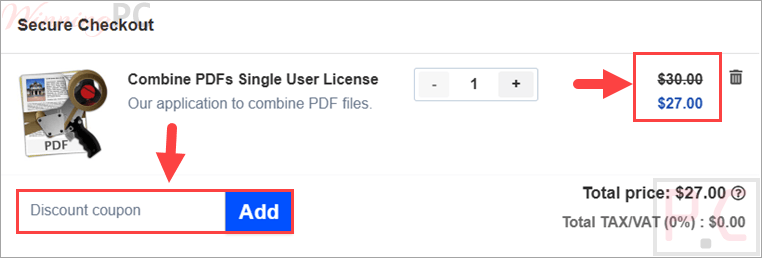
- Continue to the publisher’s checkout and enter the code in the available coupon or promotional code field.
- Confirm that the total has dropped by 40% before completing payment.
- After the order is processed, check the email address used at checkout for the license key.
Is Combine PDFs Safe and Legit?
Yes. The discount is intended for a normal paid license obtained through the software publisher rather than a modified download or an unofficial key seller.
No crack or keygen
You download the regular Combine PDFs installer and activate it using a genuine license.
Publisher-controlled order
The purchase is completed through Monkeybread Software’s official sales route, not through WinningPC.
WinningPC does not process payment
Payment details are entered at the publisher’s checkout rather than on the coupon article.
Check the final total
Confirm the reduction before submitting payment, especially when selecting the Company license.
Abex Combine PDFs Review & Features
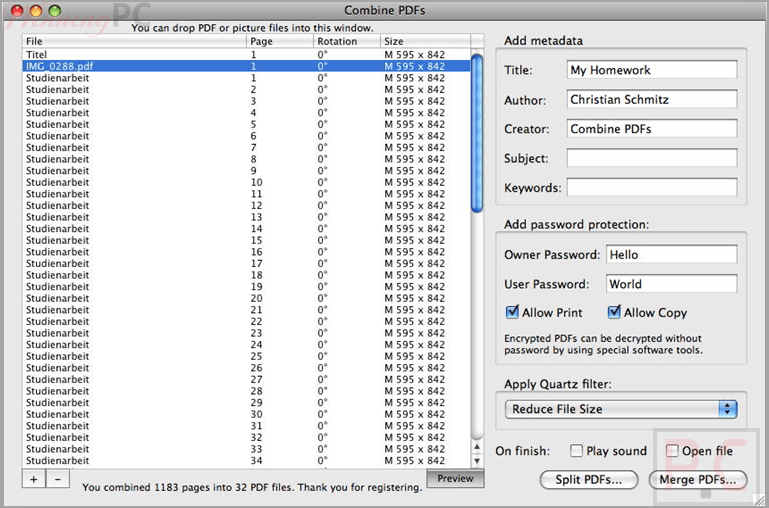
Combine PDFs makes it easy to merge PDF documents and images into a single PDF file. You can drag and drop files, reorder, rotate, duplicate, or delete pages before saving the finished document. The software also supports splitting PDFs, adding title or blank pages, inserting page numbers, editing metadata, and protecting files with passwords. With page previews and batch page management tools, Combine PDFs provides a simple way to organize and customize PDF documents for personal or professional use.
Key features
- Flexible file insertion: Add PDF pages and image files using the Add command or drag them from Finder into the precise position you need.
- Page organization: Reorder, duplicate, delete, rotate, or sort pages without rebuilding the source files.
- Merge and split controls: Export selected pages or the complete page list as new PDF files.
- Document finishing: Add title pages, blank pages, metadata, page-number overlays, and password protection.
- Processing filters: Compress pictures, convert content to gray tones, or create custom filters for repeated jobs.
What we think
Which Combine PDFs Plan Should You Buy?
| Plan | Coupon price | User allowance | Best for |
|---|---|---|---|
| Single User | $27 | 1 user | An individual using Combine PDFs on their own Mac workflow. |
| Family | $89.10 | Up to 5 users | A household where several people need access. |
| Company | $179.10 | Up to 20 users | A small business or workgroup that needs broader user coverage. |
Screenshots
Frequently Asked Questions
What is the cheapest Combine PDFs license?
The lowest coupon price is $27. That is the Single User License after applying code WIN***GPC10, the regular $30 price.
Does Combine PDFs work on Apple Silicon Macs?
Yes. Version 5.6 added Apple Silicon support, and the 5.6.1 download is offered as a 64-bit build for Intel and Apple Silicon.
Can Combine PDFs merge pictures with PDF pages?
Yes. The application accepts PDF pages and image files, then lets you place them in the page list before exporting a new PDF. The exact supported image extensions are not specified.
Can I split a PDF instead of merging it?
Yes. You can export selected pages or all listed pages into new PDF files, which makes the application useful for both merging and basic splitting.
Is Combine PDFs available for Windows?
No. Combine PDFs is a macOS-only application. Windows users will need a different PDF merger or editor.
Can I move an old Mac App Store license?
Yes. Keep the App Store build in the Applications folder, launch the website version once so it can copy the receipt, and then replace the old application after the license has moved.
System Requirements & Details
| Feature | Specifications |
|---|---|
| Operating system | macOS only: Version 5.6.1 64-bit: OS X 10.10 to macOS 12.x. Version 5.2.7 32-bit: OS X 10.7 to macOS 10.14. |
| Processor | Intel or Apple Silicon for version 5.6.1. |
| Supported input formats | PDF files and picture/image files. |
| Supported output formats | PDF. |
| Download size | Approximately 36 MB for version 5.6.1; approximately 16 MB for version 5.2.7. |
| Other requirements | An email address is needed for license-key delivery. Some saved setups may work better with the non-sandboxed website version. |