
Corbett Backup & Restore Wizard Coupons & Pricing
Corbett Backup & Restore Wizard
3 plans · best save 63%
Personal License ★ Best Deal
One license for 5 machines | 24/7 customer support
Business License
One license for 25 machines | 24/7 customer support
Enterprise License
One license for 100 machines | 24/7 customer support
How to Use the Corbett Backup & Restore Wizard Coupon Code
- Click the Copy button on this page. The code is copied to your clipboard automatically.
- A new tab opens on Corbett Software’s checkout page.
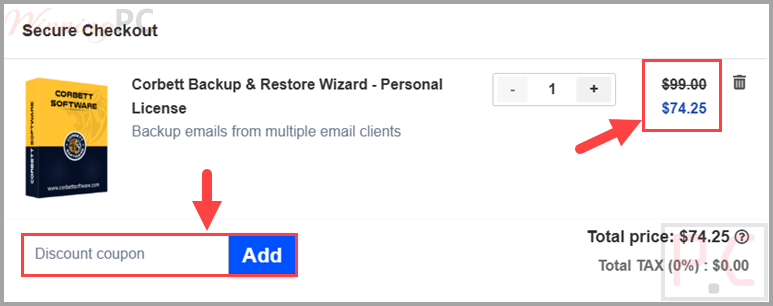
- Pick your license, then paste WINNINGPC25 into the coupon field.
- Confirm the total updated before you pay: $74.25 for Personal, $374.25 for Business, $749.25 for Enterprise.
- Finish the order and check the tier on your receipt matches the one you selected.
Is this Corbett coupon safe to use?
Yes for the coupon itself, and here is exactly what that covers and what it doesn’t.
No crack, no keygen
You install the publisher’s own build (corbett-backup-restore-wizard.exe) and activate it normally. Nothing is patched or repackaged, and WinningPC never touches your card details.
The code runs on Corbett’s own store
WINNINGPC25 is applied at checkout on corbettsoftware.com, not through a key reseller, so you receive a genuine license rather than a resold or grey-market key.
Thirty days to change your mind
Corbett publishes a 30-day money-back policy, and on a purchase starting at $199 that refund window is your real protection.
Treat the vendor’s badges as marketing
Corbett’s homepage shows ISO 27001:2022 and GDPR claims alongside client logos for Amazon, Deloitte and IBM. Those are self-published and we have not independently confirmed any of them, which is one more reason to run the free trial before you pay.
Corbett Backup & Restore Wizard Review & Features
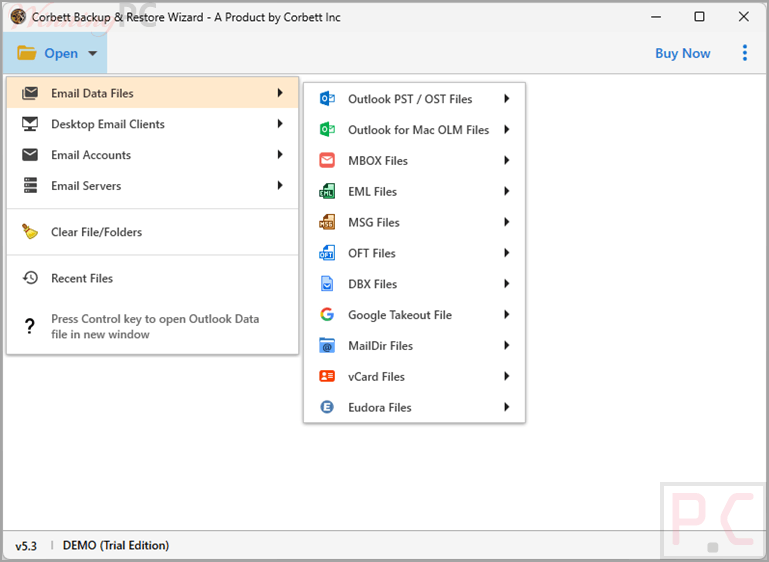
Corbett Backup & Restore Wizard is a comprehensive email backup and migration solution that supports more than 209 email services and IMAP servers. It can export mailboxes to popular formats such as PST, MBOX, EML, MSG, and PDF while preserving folder structure, attachments, and email metadata. Beyond standard backup features, the software includes advanced email preview modes, allowing users to inspect message headers, raw content, properties, and hexadecimal data for detailed analysis. While the feature set is extensive, practical information such as usage limits and edition differences is less clearly explained, making the free trial the best way to evaluate whether it meets your needs.
Screenshots
Key features
- 209+ sources in one tool. Gmail, Yahoo, Office 365 and any IMAP server, so you aren’t buying a separate utility per platform.
- Export to MBOX, PST, PDF, EML or MSG. PST when the destination is Outlook, PDF when a lawyer or auditor needs to read it without an email client.
- Forensic preview panel. Content, Message Header, Hex View, Properties and Raw Message views for checking a message before you hand it over.
- Direct mailbox-to-cloud migration. Moves emails, calendars and contacts from on-premises mailboxes into Office 365 or Gmail, with a preview panel before the move runs.
- Recovery from OST, PST and MBOX files. Pulls deleted or lost messages back out of existing backup files.
What we think
Which Plan Should You Buy?
| Plan | Price | Machines | Updates | Best for |
|---|---|---|---|---|
| Personal License | $74.25 | 5 Machines | Free updates | Students, freelancers, or individuals who need to back up their personal email accounts. |
| Business License | $374.25 | 25 Machines | Free updates | Mobile IT repair technicians, computer service shops, small businesses. |
| Enterprise License | $749.25 | 100 Machines | Free updates | IT administrators for large corporations, government agencies, or digital forensics investigators. |
Corbett Backup & Restore vs Other Alternatives
| Tool | Best current price | License term | Coverage | Best for |
|---|---|---|---|---|
| Corbett Backup & Restore Wizard | $74.25 Personal with code | Lifetime, one-time payment | 209+ services; backup, migration, recovery, forensic preview. | Teams needing all four jobs in one tool. |
| RecoveryTools Email Backup Wizard | $74.25 Lite with a 25% code | One-year, with upgrades and support included | 200+ services, 35+ output formats, batch and proxy modes | Buyers who want support bundled and don’t mind renewing |
| Google Takeout | Free | n/a | Gmail only, exports to MBOX | A one-off personal Gmail archive |
| Thunderbird + ImportExportTools NG | Free, open source | n/a | Any IMAP account, exports EML, MBOX, PDF, HTML | Patient users backing up one or two mailboxes |
Frequently Asked Questions
Does WINNINGPC25 work on every Corbett license?
Yes, all three. Personal drops to $74.25, Business to $374.25 and Enterprise to $749.25. The code applies on Corbett Software’s own checkout, so you’ll see the new total before you pay.
Is this a one-time payment or a subscription?
One-time. Corbett lists its licensing as lifetime validity with no recurring fees or renewals, so there is nothing to cancel later. Confirm it on the order page before you pay, since the full license terms aren’t published publicly.
Can I try it before paying?
Yes. Corbett offers a free trial build (corbett-backup-restore-wizard.exe) and the sensible order is trial first, buy second. The 30-day refund is a backstop, not a substitute for testing it on your own mailboxes.
How many computers does each license cover?
Corbett does not say publicly. The tier names imply rising seat counts, but no device number appears on any readable page, so contact support before buying for a team or a fleet.
Does it run on Mac?
No, not from what the publisher provides. The download is a Windows .exe and no Mac build is listed. Exact supported Windows versions aren’t published either, which is worth confirming if you’re on an older machine.
What formats can it export to?
MBOX, PST, PDF, EML and MSG, with attachments, metadata and the original folder structure preserved. On the input side it reads Gmail, Yahoo, Office 365 and 209+ other services and IMAP servers, plus OST, PST and MBOX files for recovery jobs.
System Requirements & Details
| Feature | Specifications |
|---|---|
| Operating System | Windows 11, 10, 8, 7 (32/64 bit) |
| Processor | Intel® Pentium 1 GHz processor (2.4 GHz is recommended) |
| RAM & Storage | Minimum 4 GB RAM/ 150 MB of free hard disk space |
| Supported input sources | Gmail, Yahoo, Office 365 and 209+ other email services and IMAP servers; on-premises mailboxes; OST, PST and MBOX files. |
| Supported output formats | MBOX, PST, PDF, EML, MSG; direct migration into Office 365 and Gmail |
| Preserved on export | From, To, CC, Date, Subject, attachments, metadata, folder hierarchy |