
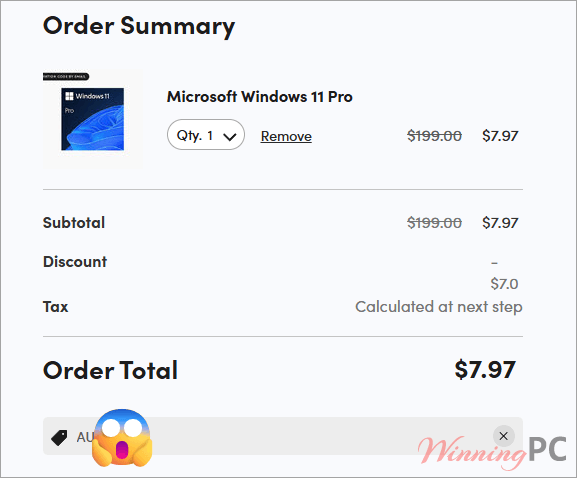
Windows 11 prices with coupon code applied

| Term | Detail |
|---|---|
| Seller | StackSocial (third-party marketplace, not the Microsoft Store) |
| Length of access | Lifetime |
| Installation | 1 PC per license, non-transferable |
| Updates | Included |
| Delivery | Instant redemption code by email after purchase |
| Redemption deadline | Redeem within 30 days of purchase |
| Returns | Unredeemed licenses return for store credit within 30 days. Final once redeemed |
How to use the Windows 11 coupon code
- Check whether you already get it free. Install Microsoft’s PC Health Check app, then open Settings and look under Windows Update. If the Windows 11 upgrade is offered there, take it and stop reading. It costs nothing.
- Pick the right edition: If your PC currently runs any Pro edition of Windows, the Home listing will not work on it. Go straight to the Pro listing.
- Open the Windows 11 listing on StackSocial and add your edition to the cart.
- Paste the code at checkout. Enter Tak**20 in the promo code field and confirm the total drops to $7.97 before you pay.
- Check your email for the redemption code. StackSocial sends it immediately, along with redemption instructions. You have 30 days to use it.
- Activate Windows: Go to Settings, System, Activation, then Change product key and enter the key you were given.
Is this Windows 11 deal safe and legit?
Partly, and the honest version has caveats the sales page does not spell out.
- It is a real storefront: StackSocial is run by StackCommerce, and its Microsoft deals are syndicated by mainstream outlets. You are not buying from an anonymous key shop with an email address for support.
- “Microsoft partner” is a weaker claim than it sounds: Microsoft’s partner directory lists thousands of companies doing training, consulting, integration and reselling. A listing confirms a business relationship exists. It does not certify how any specific product was sourced or priced.
- Microsoft will not vouch for the key: Microsoft’s own support guidance says it cannot confirm the source or validity of licenses bought from third-party sites, and points buyers to the Microsoft Store or authorized retailers instead.
- There is no money-back guarantee: Unredeemed licenses come back as store credit within 30 days. Once you redeem the code, the sale is final.
How well does Windows 11 hold up in daily use?
Windows 11 has settled down a lot since the rocky launch years. The 25H2 release is stable, Snap layouts genuinely cut down the window juggling on a wide monitor, and Copilot sits one keystroke away without asking for a subscription to do the basics. Where the OS draws a hard line is hardware. TPM 2.0 and Secure Boot are not negotiable, and PC Health Check will tell you no long before you reach a checkout page. The Pro extras matter to a narrower group than the marketing suggests: BitLocker drive encryption, Client Hyper-V, Windows Sandbox and Remote Desktop hosting are the real dividing line, and most home users never touch any of them.
Key features
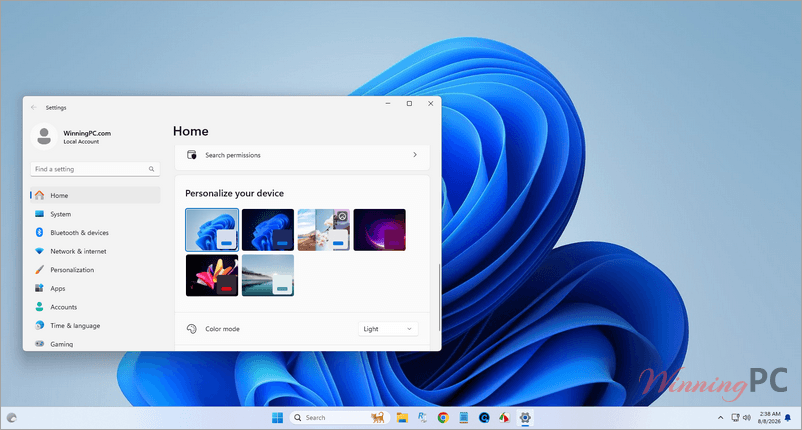
- Copilot built in: Voice input and Copilot Vision, which reads your screen and points at the next step rather than clicking for you. Free on Windows, with Microsoft 365 Copilot only needed for higher usage limits and Office AI.
- Snap layouts and multiple desktop: including redocking that restores your window arrangement when you plug a laptop back into a monitor. Three-column layouts need a screen at least 1920 pixels wide.
- Windows Backup saves files, settings and apps to the cloud so a new PC can restore them. A free Microsoft account includes 5 GB of OneDrive storage.
- Gaming stack: DirectX 12 Ultimate, Auto HDR on an HDR monitor, and DirectStorage on an NVMe SSD with a Shader Model 6.0 GPU.
- Pro only: BitLocker and BitLocker to Go, Client Hyper-V, and Entra ID join for managed devices.
What we liked, what we didn’t
Which Plan Should You Buy?
The two listings are priced the same while Pro is a strict superset of Home. Unless the Home listing is cheaper on the day you look, there is no reason to pick it.
Cheaper and free ways to get Windows 11
| Option | Price | License source | Best for |
|---|---|---|---|
| Free upgrade via Windows Update | $0 | Microsoft, direct | Any eligible Windows 10 PC. Check this before anything else |
| StackSocial with code | $7.97 | Not disclosed | A PC that needs its own license and still clears the hardware bar |
| Authorized partner reseller | Roughly $25 to $40 | Partner channel, stated on invoice | Buyers who want a paper trail and clearer transfer rights |
| Microsoft Store direct | $139 Home / $199.99 Pro | Microsoft retail | Buyers who want zero ambiguity and full Microsoft support |
Questions people ask about the Windows 11 coupon
Is Windows 11 still a free upgrade from Windows 10?
Yes. Microsoft still offers it at no cost through Windows Update, the Installation Assistant and the Media Creation Tool, with no announced end date. Your PC needs to meet the minimum requirements and run Windows 10 version 2004 or later, and you get the matching edition: Home upgrades to Home, Pro to Pro. Run PC Health Check before you spend anything.
Does “lifetime license” mean it never expires?
It means the life of the device, not your lifetime. The license stays with that one PC, is non-transferable, and includes updates. Replace the machine and you start again.
Can I move the license to a new computer?
No. StackSocial states one PC per license and non-transferable, so a new machine means a new license.
What if my key returns an “already used” error?
Contact StackSocial support and keep your purchase email. Used-key errors do get reported around cheap Windows licenses, and it is one reason the undisclosed license type matters. Unredeemed licenses can still be returned for store credit within 30 days, but that window closes once a key is redeemed.
Can I get my money back?
Only before redemption, and only as store credit. Unredeemed licenses go back within 30 days of purchase for StackSocial credit. After you redeem, all sales are final. There is no cash refund and no 30-day money-back guarantee on this listing.
Will this work if my PC fails the TPM 2.0 check?
No. Windows 11 requires TPM 2.0, UEFI with Secure Boot, a 64-bit dual-core processor, 4 GB of RAM and 64 GB of storage. StackSocial’s listing also says the license will not install on a PC that cannot use the free Windows Update upgrade path, and a machine failing the TPM check falls into exactly that group.
What you need to run it
| Feature | Specifications |
|---|---|
| Operating System | Windows 10 version 2004 or later to upgrade |
| Processor | 1 GHz or faster, 2 or more cores, compatible 64-bit CPU or SoC |
| RAM & Storage | 4 GB/ 64 GB or larger |
| System firmware | UEFI, Secure Boot capable |
| TPM | Trusted Platform Module version 2.0 |
| Graphics | DirectX 12 or later with WDDM 2.0 driver |
| Display | 720p or better, larger than 9 inches diagonally, 8 bits per colour channel |
| Other requirements | Internet connection and a Microsoft account during initial setup. Access is desktop only |