
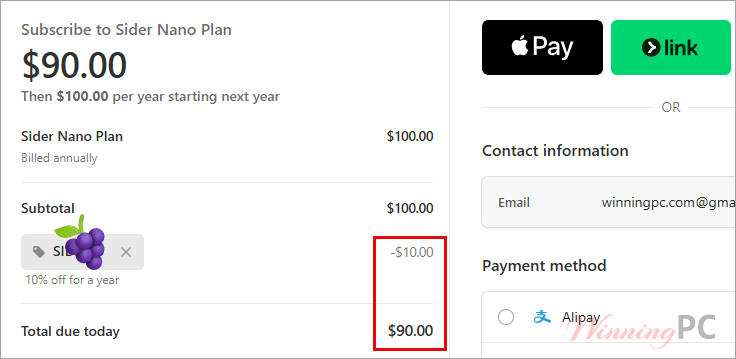
Sider AI prices with the 25% stacked discount

Sider Nano Plan - Yearly
10,000 credits a month, temporary cloud computer. For simple occasional tasks
Sider Lite Plan - Yearly
25,000 credits a month plus a dedicated 2 vCPU cloud computer. For most everyday tasks
Sider Pro Plan - Yearly
50,000 credits a month and a 4 GB RAM cloud computer. For a higher working quota
Sider Max Plan - Yearly
100,000 credits a month and an 8 GB RAM cloud computer. For heavy daily agent use
Sider AI Sitewide 10% Off
Choose a higher plan for more credits and a stronger cloud computer.
How to get the full 25% off at Sider’s checkout
- Copy the coupon code from the offer box above.
- Open the Sider AI pricing page and make sure the Individual tab is selected.
- Switch the billing toggle to Yearly. This is where 17 of the 25 points come from. Skip it and the code only gives you 10%.
- Pick your plan and hit Subscribe Now. On the payment screen, paste GRABON into the discount field and apply it.
- Confirm the total matches the table above and complete your order.
How well does Sider AI actually work?
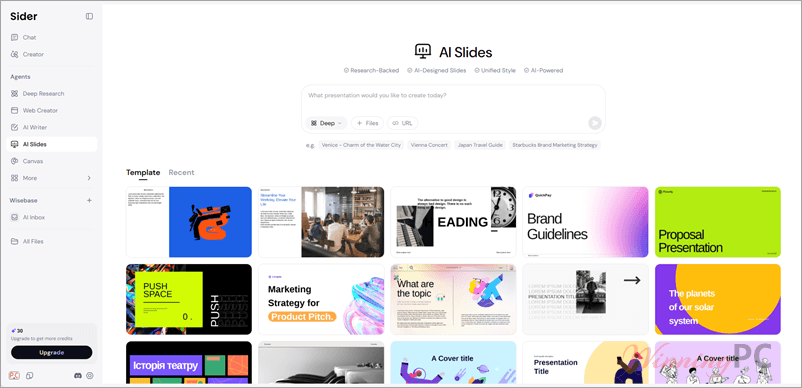
The pitch that holds up is context. Because the sidebar sits on the page you are already reading, you skip the copy-paste loop that makes a separate AI tab tedious, and that saved friction is the whole product. Hand, the browser agent, goes a step further by working inside your logged-in sessions, which is how it can triage a Gmail inbox or compare prices across shops you are signed into. That is genuinely useful and genuinely worth thinking about before you enable it, since the agent has the same access you do.
Where it gets murky is the credit system. Sider switched to a single unified credit pool in June 2026 and now deducts by actual usage rather than a published per-action table, so there is no way to translate “25,000 credits” into a number of chats before you subscribe. You find out by watching the Credits log in your account. For a product sold on credit tiers, that is a real gap.
What you get
- One panel, every frontier model: GPT-6, Claude Fable 5.1, Gemini, DeepSeek and Grok, with the option to fire the same question at several at once and compare the answers side by side.
- Deep Research: Sider AI scans 100+ sources, writes a cited report, and saves every source into Wisebase so you can click a citation and read it next to the claim.
- Scholar Deep Research: Searches 350M+ papers from Nature, Science, IEEE and Springer, reading full text rather than abstracts.
- Hand, the browser agent: Runs multi-step tasks across live sites: form filling, price comparison, inbox triage.
- A dedicated cloud computer on Lite and above: Keeps Hand running 24/7 without your own machine being awake. Sider values it at $10 to $20 a month depending on tier.
- Code: Restyles or rewires any website from a plain-language instruction and remembers the change on your next visit.
What we think
Which Sider AI plan should you buy?
| Plan | Effective cost/month (yearly + code) | Credits/month | Cloud computer | Best for |
|---|---|---|---|---|
| Nano | $7.50 | 10,000 | Temporary, on demand | Occasional summaries and translation |
| Lite | $18.75 | 25,000 | Dedicated: 2 vCPU, 2 GB RAM, 40 GB SSD | Daily use, first tier with 24/7 agent |
| Pro | $37.50 | 50,000 | Dedicated: 2 vCPU, 4 GB RAM, 40 GB SSD | Heavy research and Deep Research runs |
| Max | $75.00 | 100,000 | Dedicated: 4 vCPU, 8 GB RAM, 40 GB SSD | All-day agent work, image and video generation |
Run the per-credit maths and the tiers collapse into one price. Nano is $90 for 120,000 credits a year, Max is $900 for 1,200,000. Both are $0.75 per 1,000 credits, and so are Lite and Pro. There is no volume discount here at all, which means the usual advice to “buy one tier up for headroom” does not apply. Buy the smallest plan that covers your credits and top up if you are wrong.
The one exception is the jump from Nano to Lite. Nano only gets a temporary cloud computer, while Lite adds a dedicated one that Sider itself prices at $10 a month. At the same rate per credit, that machine comes free with the tier. If you plan to use Hand for anything unattended, Lite is the real entry point.
Frequently Asked Questions
Is Sider AI really 25% off, or is that just the coupon?
It is both discounts together. Code from WinningPC is worth 10%; Sider’s own yearly billing toggle is worth 17%. Apply the code on a yearly plan and the combined price is exactly 25% below what the same plan costs paid monthly for a year. On a monthly subscription the code still works, but you only get the 10%.
What’s the cheapest Sider AI plan with the discount?
Nano at $90 for a full year, down from the $120 you would pay across 12 monthly charges.
Is one subscription valid on all my devices?
Yes. One Sider account covers the Chrome and Edge extensions plus the Windows, macOS, iOS and Android apps.
What is the cloud computer, and do I need it?
It is a remote machine Sider runs for you so the Hand agent can keep working when your own device is off. Nano gets temporary access on demand; Lite and above get a dedicated one, from 2 GB RAM up to 8 GB. If you only use the chat sidebar, it is not a reason to upgrade.
Does Sider let me use the output commercially?
Yes. The terms grant you full rights to use, modify, distribute and commercialise the content you generate, with no attribution required, and “Commercial Use Allowed” is listed as a premium feature on the pricing page.
What you need to run it
| Browsers | Chrome (Web Store), Edge (Add-ons) |
| Desktop | Windows, macOS (Mac App Store) |
| Mobile | iOS (App Store), Android |
| Account | One Sider account works across every platform |
| Supported upload formats | PDF, DOC, PPT and web links (Interactive Reading); PDFs, documents and presentations into Wisebase |
| File size limit (free plan) | 10 MB per file |
| CPU / RAM / disk | Not specified by the publisher |