
DeepCleanAudio Giveaway
DeepCleanAudio - AI Noise Reduction
- Product
- DeepCleanAudio
- Website
- steelsoft.site
- License
- Lifetime
- Platform
- Windows 10 / 11 (64-bit)
- Updates
- Free future upgrades
- Updated
- September 28, 2026
Get your unique code by email
License key delivered free to your inbox within minutes.
Protected by Cloudflare Turnstile · Email quality checked by Reoon
All codes have been claimed or the giveaway has closed.
How to Get the DeepCleanAudio License Key for Free
- Fill in the giveaway form on this page with a working email address.
- Check your inbox for the license code from WinningPC. If it has not arrived within a few minutes, check your spam folder.
- Download DeepCleanAudio from SteelSoft’s official site and run the installer.
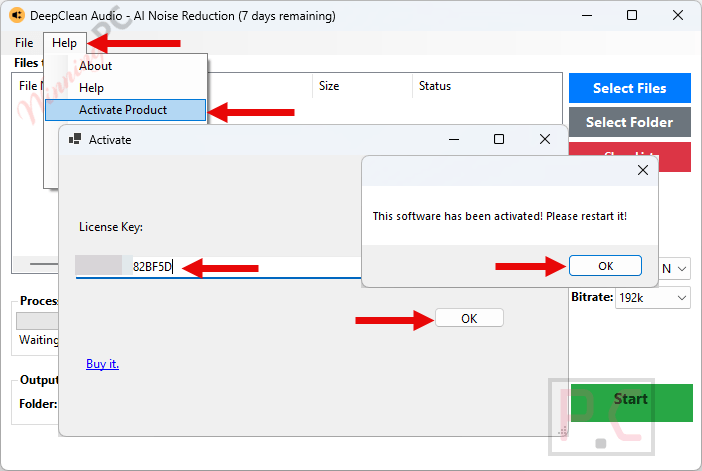
- Open DeepCleanAudio, paste your license code into the activation box, and confirm. Activation is fully offline; no internet connection is needed at this step.
Top Audio Editor Software Coupon & Discount Code

KingShiper Audio Editor - Lifetime/ 2 PCs
One license for 2 PCs | 30-day money back guarantee

HitPaw VoicePea - Perpetual/1 PC (Standard)
Perpetual License | 24/7 tech support

Zortam Mp3 Media Studio Pro (32/64 bit)
1 PC License | Lifetime Free Version Updates

Soundop Audio Editor - Perpetual License
Perpetual License + Lifetime Updates

EaseUS MakeMyAudio (Yearly)
One license for 1 computer | 1-year free upgrades
Is this DeepCleanAudio giveaway safe and legit?
Yes, this is a legitimate giveaway. WinningPC distributes genuine license keys sourced directly from SteelSoft, not cracked builds or grey-market codes.
No crack or keygen
You receive an official SteelSoft license key that activates the publisher’s own installer. Nothing is patched or modified.
Official authorized source
The giveaway runs through WinningPC in direct partnership with SteelSoft; the key is a real commercial license from the developer.
100% offline processing
Once installed, DeepCleanAudio never uploads your files to any server. Your audio and video stay entirely on your machine throughout every session.
No payment required
The giveaway key is completely free. If you later want the paid version, purchases go through SteelSoft’s official site.
Hands-on with DeepCleanAudio
DeepCleanAudio runs two AI models. VoiceFixer handles vocal reconstruction and DeepFilter targets background noise removal, and the combination matters in practice. Basic frequency-based denoisers tend to over-smooth, leaving speech that sounds muffled or processed. The dual-model approach is specifically designed to rebuild vocal detail rather than smothering it, which is where most simpler tools fall short.
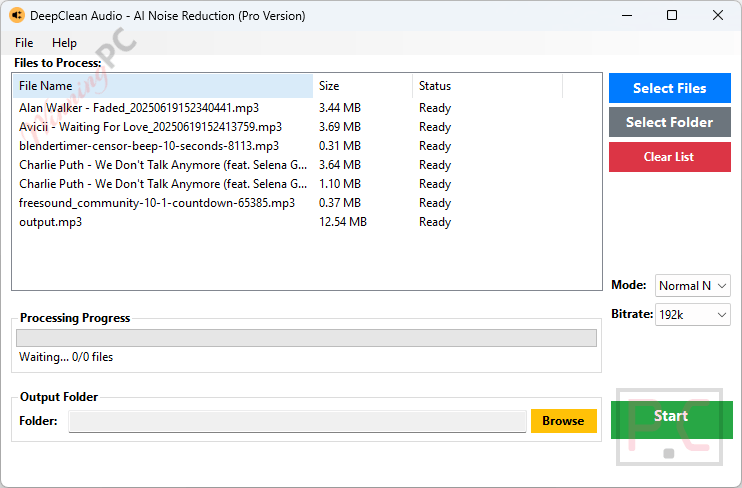
The video passthrough feature is worth calling out separately: it replaces the audio track without touching the video stream, so you take no quality hit on the original footage every time you clean a clip. Batch processing rounds this out for anyone working through dozens of files regularly. The two honest caveats are the non-commercial restriction on the giveaway key and the complete absence of free technical support; if something breaks at activation, you are troubleshooting on your own.
Key features
- AI voice reconstruction (VoiceFixer + DeepFilter): rebuilds muffled vocal detail and strips complex background noise in a single pass, designed to avoid the metallic artifacts simpler denoisers leave behind.
- Zero video quality loss passthrough: swaps the audio track in video files without re-encoding the video stream, preserving original bitrates.
- High-speed batch processing: import entire directories of audio or video files at once for consistent results across large archives.
- 100% offline and private: no cloud uploads, no file-size caps, no duration limits, no monthly fees.
- Windows 10/11 (64-bit) native: installs and runs locally, no account or internet required after setup.
What we think
Frequently Asked Questions
Is the DeepCleanAudio giveaway really free?
Yes, completely free. Fill in the form on this page with your email and WinningPC sends the license key to your inbox. No payment information is needed at any point.
Can I use the giveaway license for commercial work?
No. The giveaway license covers non-commercial use only. If you monetize your content – client video editing, a paid YouTube channel, freelance audio work – you need the $79 Lifetime license from SteelSoft’s site.
Do I need the internet to run DeepCleanAudio?
Not after installation. Activation is fully offline: you paste the license key directly into the app. All processing runs locally after that, with no cloud uploads and no internet connection required.
System Requirements & Details
| Field | Value |
|---|---|
| Operating system | Windows 10 / 11 (64-bit) |
| Internet required | No – activation and all processing are fully offline |