
 Laura Marano
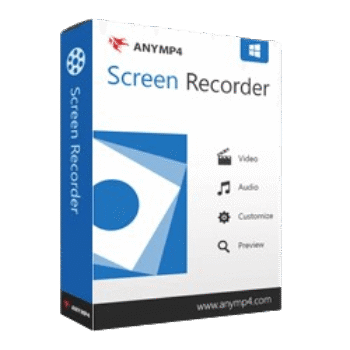
AnyMP4 Screen Recorder captures video, audio, gameplay, webcam footage, phone screens, windows, and screenshots. It supports 4K UHD recording, real-time editing, phone casting and mirroring, and flexible capture controls for desktop apps, browsers, and online meetings.
AnyMP4 Screen Recorder for Windows
3 plans · best save 50%
AnyMP4 Screen Recorder for Mac
3 plans · best save 50%
📄 Licensing & Support Details
- 30-Day Money Back Guarantee
- License Instant Delivery by Email
- 100% Clean & Secure Purchase
- Free Customer Support
- Free Upgrade (Applies to each package)
- Try 7 Days For Free.
📝 How to apply
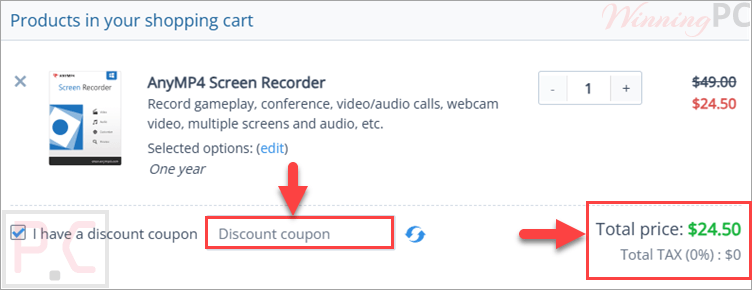
Click ‘Copy Code’ in the box above. We’ll automatically copy it and send you straight to checkout so you can claim your discount.
AnyMP4 Screen Recorder License Key Free Download
- Product name: AnyMP4 Screen Recorder
- Website: https://www.anymp4.com
- License type: 1 year
- Platform: Windows
- Giveaway link: giveaway link-1 giveaway link 2
- Download: screen-recorder.exe
Open the AnyMP4 Screen Recorder giveaway page and fill in your information to get a license for free:

Check your mailbox for your registration code.

Install the software on your computer, and activate it to the full version:


AnyMP4 Screen Recorder: In-Depth Review & Features

Key Features
- Capture the full screen, a fixed region, a custom area, or a selected window.
- Record online meetings from platforms like Google Meet, GoToMeeting, WebEx, Zoom, and Teams.
- Create course recordings, tutorials, training videos, product demos, brand videos, and social media vlogs.
- Record gameplay in HD with support for 4K, H.265, 60 FPS, and GPU acceleration.
- Add webcam footage for picture-in-picture videos, tutorials, and video calls.
- Record iPhone or mobile screens on a computer using PIN, QR code, USB, or Wi-Fi mirroring.
- Capture system audio, microphone voice, audio calls, conferences, and virtual sound card audio.
- Add real-time text, arrows, lines, callouts, colors, notes, stickers, spotlight effects, and cursor highlights.
- Record a specific window in the background while excluding or locking selected windows.
- Take screenshots in PNG, JPG, BMP, and other formats with scrolling capture and pin-to-screen options.
- Schedule recordings to start automatically at a selected time.
- Trim, merge, convert, compress, and edit metadata after recording.
- Add a logo watermark to protect recorded content.
- Save recordings as GIF animations.
- Use recording presets and hotkeys for faster capture control.
- Record without a time limit as long as the computer has enough storage.
- Record video and audio separately when needed.
Pros & Cons
More AnyMP4 Screen Recorder screenshots:


Frequently Asked Questions
Are there any working AnyMP4 Screen Recorder promo codes?
Yes. WinningPC is a good place to check for active AnyMP4 Screen Recorder coupons, along with the official AnyMP4 website. The current deal listed here gives you 50% OFF.
What is the lowest price for AnyMP4 Screen Recorder right now?
The best discount available on WinningPC is 50% OFF. That lowers the 1-Year plan to $24.50 and the Lifetime plan to $31.22.
What video formats are supported by this software?
You can save your video recordings in popular formats, including MP4, MOV, AVI, WMV, MKV, and FLV.
Can I record just a specific portion of my screen?
Yes, you can choose to record the entire screen, pick a specific application window, or drag your mouse to define a custom fixed region.
Does this program work on a Mac computer?
Yes, it is designed to work on both Windows (11/10/8/7) and macOS 10.13 and above.
How long can my screen recordings be?
There is no built-in time limit. You can record continuously as long as your computer has enough storage space available.
Can I record my gameplay smoothly?
Yes, it is optimized for HD game recording with up to 60 FPS, hardware GPU acceleration, and Picture-in-Picture support.
Is it possible to edit my video immediately after stopping the recording?
Yes, the software includes post-recording features to trim, merge, compress, convert, and edit file metadata.
System Requirements & Details
| Language Support | English, Français, Italian, Portuguese, Russian, Spanish, Swedish, and more… |
| Operating System | Windows OS: Windows 11, Windows 10, Windows 8.1, Windows 8, Windows 7 Mac OS: macOS 10.13 or above (macOS Sequoia included) |
| Processor | 1GHz Intel/AMD CPU or above; 1GHz Intel processor and Apple M-series chips |
| RAM & Storage | 1G RAM or more |
| Supported Input | 4K UHD, HD/SD Video (MP4, TS, MKV, AVI, etc.), Audio (AAC, MP3, FLAC, etc.) |
| Supported Output | Video (MOV, F4V, TS, AVI, GIF, WMV, MP4), Audio (MP3, AAC, M4A, WMA), Image (PNG, JPG, BMP, GIF, TIFF) |


Gehst du hier für den vollen Installateur:
https://download.anymp4.com/update/screen-recorder-x86.exe (v1.5.62.0 30MB)
https://download.anymp4.com/update/screen-recorder-x64.exe (v1.5.72.0 122MB)
many thanks my man
Wohh just what I was searching for, thanks for posting.
The Giveaway has ended
Thank you. I have got 1 year license.