
On this page
Vovsoft Giveaway
Vovsoft Print Multiple Web Pages
A batch print utility for HTML files and websites.
- Product
- Print Multiple Web Pages
- Product website
- vovsoft.com
- License
- Lifetime
- Platform
- Windows 11, 10, 8/8.1, 7, Vista, XP (32-bit & 64-bit)
- Usage
- Non-commercial only
- Updates
- No future upgrades
- Support
- No support
- Updated
- 2026-11-16
Continue on vovsoft.com
The publisher handles registration and license delivery on its official website.
This giveaway ended on .
Opens a partner page in a new tab.
50% Off Vovsoft Print Multiple Web Pages
Vovsoft Print Multiple Web Pages Discount Code Nov 2026


Vovsoft Universal License
115+ programs | Lifetime license | All future updates
Is this Vovsoft giveaway safe and legit?
Yes. The key comes from Vovsoft itself and activates the publisher’s own installer.
No crack or keygen
You install the official Vovsoft build and unlock it with a genuine registration code. Nothing is patched or repackaged.
Official source
The giveaway runs with Vovsoft directly, and paid licenses are sold through PayPro Global, Vovsoft’s payment partner, not a grey-market reseller.
Secure checkout
If you buy, payment happens on PayPro Global’s encrypted store. Your card details never touch WinningPC.
Know the refund rule before you pay
Vovsoft doesn’t offer a money-back guarantee. Because a free trial is available, refunds are only granted case by case (accidental orders, for example), and PayPro Global has the final say. Try the free key first.
How to Get the Vovsoft Print Multiple Web Pages License Key for Free
Download the software from the link above and install it on your Windows PC.
Launch the program and go to Help / Edit License.
Paste your registration code and confirm.
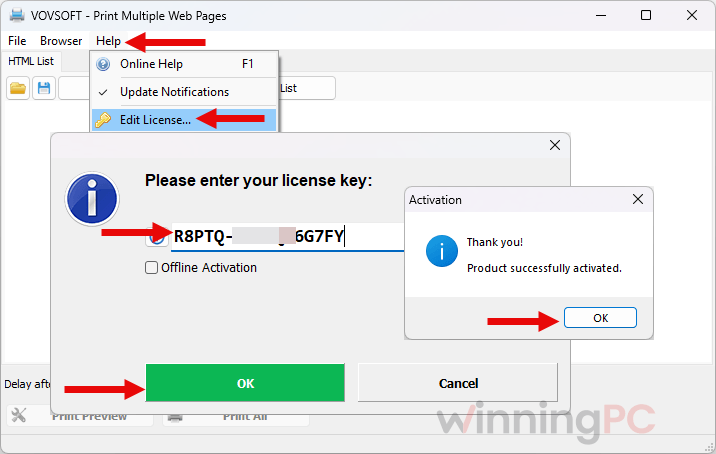
The full version unlocks for lifetime personal use.
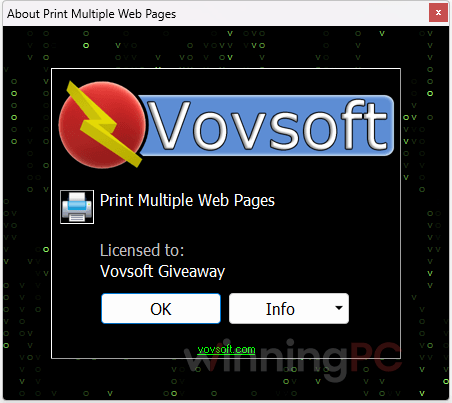
How well does Vovsoft Print Multiple Web Pages actually work?
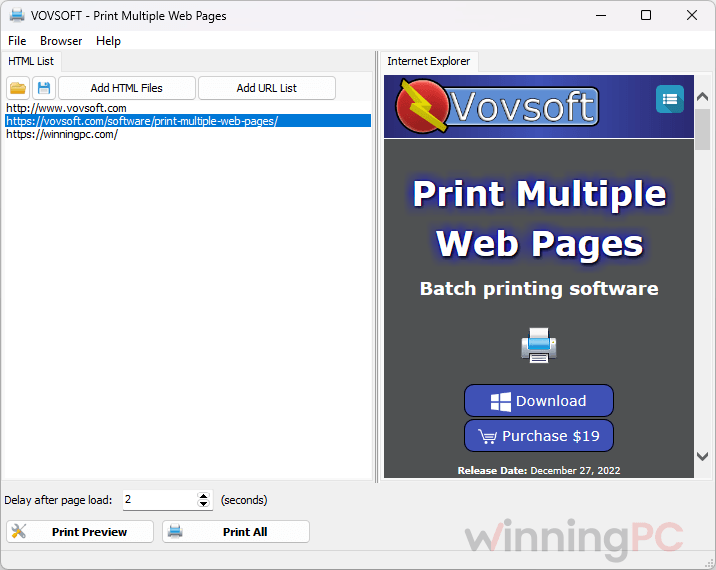
The appeal Vovsoft Print Multiple Web Pages here is how little there is to learn. You build a list, glance at the preview pane to catch a page that loaded wrong, and hand the lot to Windows. That preview step matters more than it sounds, because it’s your one chance to spot a cookie banner or a login wall before it eats a stack of paper. The catch sits under the hood: the app renders pages with the old Internet Explorer engine, so sites built purely for modern browsers can come out with shifted layouts or missing sections. Local HTML files and simpler pages are where it’s most dependable.
Key features
- Add local HTML documents and online URLs to one list, then preview each before printing.
- Send the entire list to the print queue with a single “Print All” click.
- Switch the rendering browser version from the “Browser” menu when a page displays oddly.
- Set a “Delay after page load” so script-heavy pages finish loading before they print.
- Paste any block of text and let “Auto-detect URLs in text” pull out every link for you.
What we think
Frequently Asked Questions
Can Vovsoft Print Multiple Web Pages save web pages as PDF?
Yes, indirectly. Set “Microsoft Print to PDF” as your default Windows printer and the app will output PDFs. The downside is a Save As prompt for each page. Vovsoft suggests a third-party PDF printer configured to auto-save, so every page lands as its own PDF in a folder you choose.
How do I choose which printer it uses?
You change the Windows default printer. The app has no printer selector of its own, so set your preferred printer as default in Windows printer settings before clicking Print All.
Does it work on Windows 11?
Yes. It supports Windows 11, 10, 8/8.1, 7, Vista and XP, in both 32-bit and 64-bit.
Why do some pages print with missing content?
Usually the page hadn’t finished loading. Increase the “Delay after page load” setting so scripts have time to run. If the layout is still broken, the site probably needs a modern browser engine, which this app doesn’t use.
What happens after November 22, 2026?
The giveaway closes and no new keys are handed out. A key you’ve already activated stays valid for life, but it won’t receive updates or support, so keep your installer somewhere safe.
System Requirements & Details
| Field | Value |
|---|---|
| Operating system | Windows 11, 10, 8/8.1, 7, Vista, XP (32-bit & 64-bit) |
| Processor / RAM / disk | Not specified (installer 2.21 MB, portable 2.06 MB) |
| Supported input formats | HTML documents (local files) and web page URLs |
| Supported output formats | Printed pages via your default Windows printer, including virtual PDF printers |
| Language | English |
| Other requirements | Internet connection for online pages; uses the Internet Explorer engine built into Windows |





The FAQ for this:
“What happens after November 22, 2026?
The giveaway closes and no new keys are handed out. A key you’ve already activated stays valid for life, but it won’t receive updates or support, so keep your installer somewhere safe.”
Is inaccurate/incomplete at some point after the giveaway ends previously issued keys are not allowed to make a fresh activation so there is little to no point keeping the installer for later re-installs after a windows re-install or on a new machine. not that it matters as unregistered has same functionality but with a nag screen to register.
The main problem with this is it uses windows Internet Explorer core to preview and print (render) web pages and IE |(all versions) is depreciated and not capable of rendering faithfully most modern websites as it’s development was ceased a long time ago and all but the most simplest websites use technologies that we never part of IE browsers vocabulary in both basic HTML language and scripting language. End result is most modern sites simply do not look like the do in normal modern browsers and many are simply broken.
“Hilfe die Programme von VovSoft verlieren ihren lebenslangen Lizenzen!”
Auch dieses Programm, das ich am 20-08-2024 installiert und mit der obigen lebenslangen Lizenz erfolgreich aktiviert habe, wurde ohne jeglichen Vorwarnung und ohne Grund deaktiviert!