
 WinningPC

Kutools for Excel is an add-in designed to enhance productivity and simplify complex tasks in Microsoft Excel. With over 300 advanced features, this powerful tool helps users automate repetitive operations, manage data efficiently, and perform intricate calculations with ease. It supports all versions of Excel, including Office 365, and is compatible with Windows XP through Windows 11. Kutools for Excel is perfect for both beginners and advanced users, offering intuitive tools for data manipulation, worksheet management, and formula editing, ensuring a seamless and efficient workflow.
Kutools for Excel Coupon Code Oct 2026

Kutools for Excel
Lifetime license, use forever | Free upgrade and support for 2 years

You may also like

ExtendOffice Office Tab
Lifetime license, use forever | Free upgrade and support for 2 years
ExtendOffice Office Tab Pro
Lifetime license, use forever | Free upgrade and support for 2 years
Key Features & Screenshots
- With 300 advanced functions that support maximum for Excel, this Excel add-in makes users satisfied because the limitations in Exel are easily overcome; after installing on the left of the Excel spreadsheet window will Excel Explorer appears to list for the viewer the open Excel file, the structure of the sheets and the columns in the file, so that you can switch to use other files and other sheets quickly.
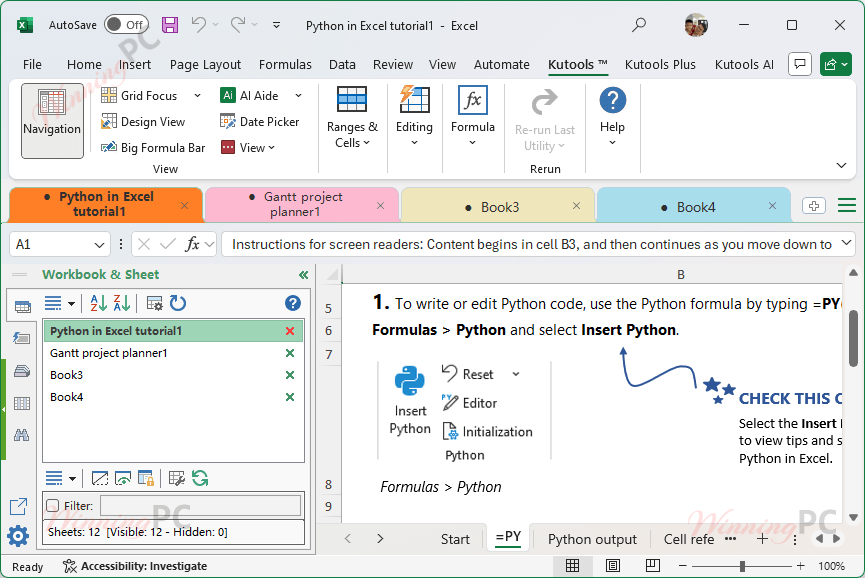
- The automated capabilities of Kutools for Excel allow automatic identification of the first row of data in each column to name each column and distinguish them, with the columns tag that allows you to view all column names in the worksheet.
- Kutools for Excel allows users to enlarge the screen in a certain location or area to choose to use more easily, if you are an impaired person, this feature of the program supports you as much as possible, By just pointing at a certain area all information, the items in the area will be enlarged for easy user selection.
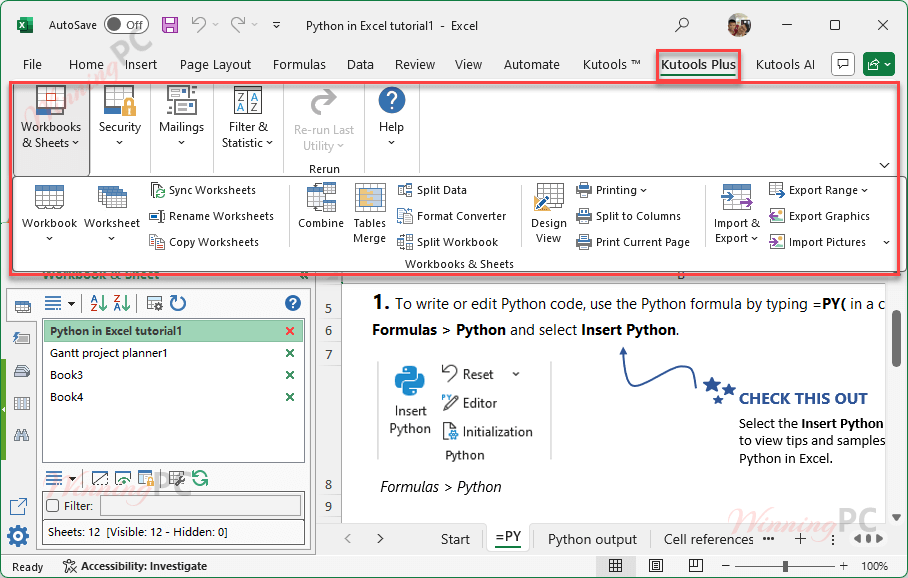
- The ability to split or split excel 2007 files, sheets are appreciated in the program of Kutools for Excel, besides, after joining or splitting the file, you can still keep your original excel 2007 file.
- In addition, Kutools for Excel has the following typical features:
– Easily find and replace in multiple spreadsheets and spreadsheets
– Convert spreadsheet and spreadsheet settings
– Add other tools to Select, Insert, Text, Format, Delete, Link, Comment, Sheet, Workbook
– Add more functions to count by Advanced sort, super filter, pagination, and color
– Convert text into dates, units, and currencies, compare and copy multiple ranges
– Merge cells, rows, and columns without losing data

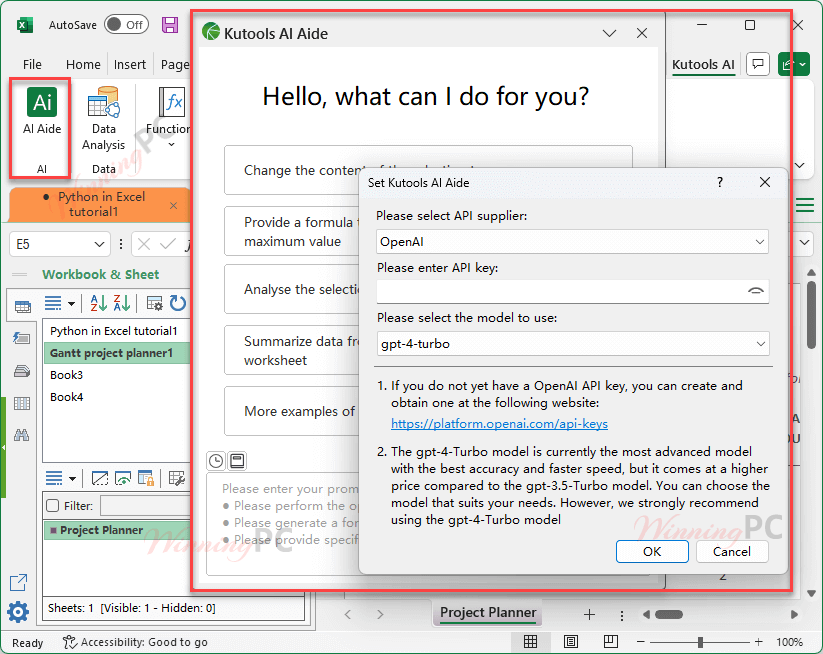
Kutools AI Aide
This advanced AI-powered feature transforms the way you work in Excel by bringing intelligent support and automation to your fingertips. By integrating these AI tools with traditional data processing in Microsoft Excel, Kutools AI Aide delivers a game-changing experience; seamlessly blending the analytical power of ChatGPT with Excel’s flexibility to boost productivity and insight like never before.
- Fixed some minor bugs and enhanced the software stability.
- AI Generated Formulas
- AI Formula Explanation
- AI Data Analysis
- AI Text Translation
- AI Custom Functions
- Added support for Google Gemini API
- Optimized interface, formulas, etc., for direct insertion into worksheets
- Improved some processing logic for increased accuracy
- Password Manager: When opening a workbook encrypted with a password, Kutools’ Password Manager will appear in the Password dialog box even if the “Automatically Fill Password” option is not enabled.
- Compare Worksheets: Optimized interface, improved processing logic.
- Optimized startup speed, and improved stability and compatibility.
Pricing Plans & Conclusion
We can download and use the Kutools tool for free for about 2 months. We do not need to provide credit card details until we are ready to purchase the software. Currently, the Kutools for Excel tool is available for a one-time purchase of $49.00. Just pay once and you will be able to use all the features of Kutools for Excel comfortably.
In short, Kutools For Excel helps you shorten many complex Excel tasks with just one mouse click. You can manipulate Excel more conveniently and easier to use. In addition, Kutools also provides many practical functions that Excel can not perform or quite difficult to perform. This greatly increases efficiency when using Excel and reduces the probability of errors.
Frequently asked questions
How do I install Kutools for Excel?
Download the setup file from the ExtendOffice website, run the installer, and follow the on-screen instructions. Once installed, the Kutools tab will appear in your Excel interface.
Is Kutools for Excel compatible with my version of Excel?
Kutools for Excel supports Microsoft Excel 2007, 2010, 2013, 2016, 2019, 2021, 2024 and Office 365.
Can I try Kutools for Excel before purchasing?
Yes, Kutools for Excel offers a 30-day free trial with access to all features, allowing you to evaluate its full capabilities.
What is the AI Aide feature in Kutools for Excel?
The AI Aide feature leverages artificial intelligence to assist with generating custom formulas, automating tasks, providing data analysis insights, and more, enhancing your productivity.
How do I merge cells without losing data using Kutools for Excel?
Use the “Merge Cells Without Losing Data” feature to combine multiple cells, rows, or columns while preserving the content, ensuring data integrity and formatting remain unchanged.
How do I handle and remove duplicates with Kutools for Excel?
Kutools offers advanced tools to identify, highlight, and remove duplicate values across your datasets, ensuring your data remains clean and accurate.
Does Kutools for Excel support batch operations?
Yes, Kutools supports batch operations for a wide range of tasks, including editing, formatting, and managing large volumes of data across multiple worksheets and workbooks.
How can I use the WinningPC coupon code for Kutools for Excel?
Enter the coupon code WINNING***5 during checkout on the ExtendOffice store to receive a 25% discount on your purchase.
Technical Details
| Language Support | English, Français, German, Italian, Spanish, Swedish, and more… |
| Money Back Guarantee | 60-Day |
| Operating System | Windows |
| Shipping | Instantly receive the license code |
| Subscription | Lifetime |
| Support Services | Forums, Tickets |





One more thing is that when you are evaluating a good on the internet electronics shop, look for web stores that are frequently updated, retaining up-to-date with the latest products, the most beneficial deals, in addition to helpful information on services and products. This will make sure that you are getting through a shop that really stays ahead of the competition and provides you things to make intelligent, well-informed electronics buys. Thanks for the critical tips I’ve learned from your blog.