
MobiKin Eraser for iOS Giveaway
MobiKin Eraser for iOS
Permanently erase all data on iOS devices, covering photos, contacts, messages, call logs, and private information.
- Product
- MobiKin Eraser for iOS
- Website
- mobikin.com
- License
- 1-Year
- Platform
- Windows 11/10/8/7
- Installer
- mobikin-eraser-for-ios.exe
- Support
- No technical support
- Updates
- No free upgrades
- Usage
- Non-commercial use only
- Updated
- 2026-09-07
Get your unique code by email
License key delivered free to your inbox within minutes.
Protected by Cloudflare Turnstile · Email quality checked by Reoon
This giveaway has ended, but you can still get a limited-time discount from the official offer page.
MobiKin Eraser for iOS Plans & Coupon Codes
MobiKin Eraser for iOS
6 plans · best save 72%
1 Year, 3 PCs License ★ Best Deal
1-Year Updates | 30-Day Money-Back Guarantee
1 Year, 30 Devices, 1 PC License
1-Year Updates | 30-Day Money-Back Guarantee
Lifetime, 1 PC License
Lifetime Updates | 30-Day Money-Back Guarantee
Lifetime, 3 PCs License
Lifetime Updates | 30-Day Money-Back Guarantee
Lifetime, 30 Devices, 1 PC License
Lifetime Updates | 30-Day Money-Back Guarantee
MobiKin Eraser for iOS (Mac)
6 plans · best save 72%1 Year, 30 Devices, 1 PC License
Free upgrade, yearly subscription
Lifetime, 1 PC License
Lifetime Updates | 30-Day Money-Back Guarantee
Lifetime, 3 PCs License
Lifetime Updates | 30-Day Money-Back Guarantee
Lifetime, 30 Devices, 1 PC License
Lifetime Updates | 30-Day Money-Back Guarantee
You may also like

MobiKin iOS Toolkit - Lifetime (Windows)
One-time payment, lifetime, free upgrades included
MobiKin iOS Toolkit - Lifetime (Mac)
One-time payment, lifetime, free upgrades included
Is this MobiKin Eraser for iOS giveaway safe and legit?
Yes. This is a publisher-authorized promotion, not a crack, patch, or grey-market key. Here’s why you can trust it:
No crack or keygen involved
You receive a genuine license key from MobiKin and activate the official build downloaded directly from their site. Nothing is patched or repackaged.
Official publisher giveaway
The free key comes straight from MobiKin, the software’s developer. WinningPC only runs promotions authorized by the publisher.
Secure HTTPS checkout for paid plans
If you choose the coupon route instead, payment is handled on MobiKin’s own encrypted store. Your card details never touch WinningPC.
30-day money-back on paid purchases
The giveaway key is free, so there’s no financial risk either way. Paid licenses include a 30-day refund window directly from MobiKin.
How to get the MobiKin Eraser for iOS License Code for Free?
- Find the registration form on this page and enter your email address. MobiKin will send your free 1-Year license code to your inbox within a few minutes.
- Download MobiKin Eraser for iOS from the official MobiKin website and install it on your PC.
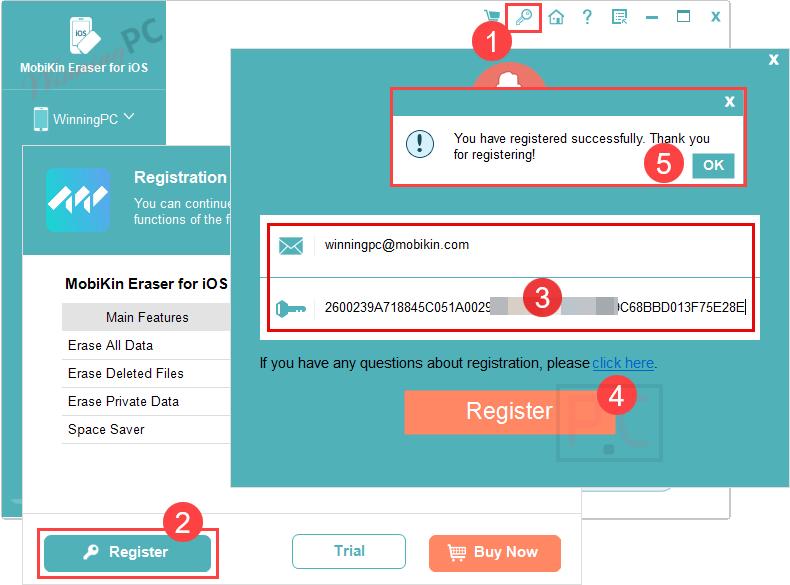
- Open the application, then click the key icon in the main menu to open the registration window.
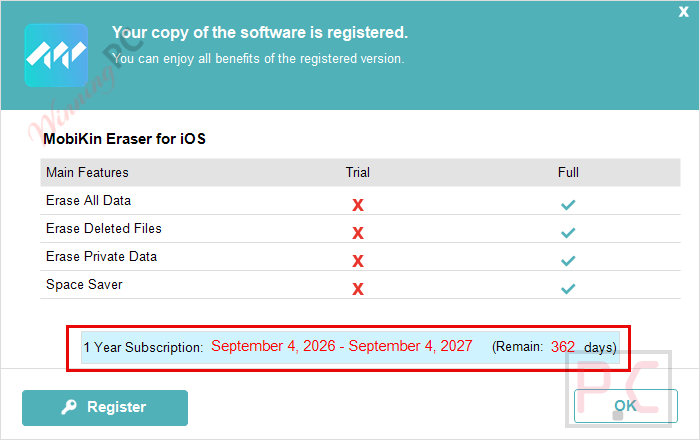
- Paste the license code from your email into the field and confirm. Your copy is now activated for one year.
- Connect your iPhone or iPad via USB cable, choose your preferred erasure level (Low for speed, High for maximum security), and click Start. The process takes anywhere from a few minutes to an hour depending on the level selected and how much data is on the device.
Hands-on with MobiKin Eraser for iOS
The most useful thing about MobiKin Eraser for iOS is the choice between three erasure levels, and the way those levels actually map to different real-world situations. The Low setting finishes in roughly half the time of the other modes and handles most casual sell-before-handoff scenarios just fine. Medium goes further, wiping existing data and already-deleted files in a thorough pass; for most home users, that’s the one to reach for. The High level runs two full overwrite passes, which is more than any commercial recovery service is going to undo. One practical detail worth knowing: you need the latest version of iTunes installed on your Windows PC before connecting a device, which is an extra step if you’ve never used it.

Key features
- Three erasure levels (Low / Medium / High): choose between speed and thoroughness; High mode overwrites everything twice using military-grade methods.
- Erases already-deleted data: clears files you’ve removed from the device that recovery software could still retrieve from unallocated storage.
- 10+ social app data removal: permanently wipes conversations and cached data from WhatsApp, LINE, WeChat, Snapchat, Facebook, Skype, and more.
- Wide iOS and device support: covers iOS 5 through iOS 27 beta, iPhone 4 through the full iPhone 17 series, and every current iPad and iPod touch model.
- Junk file cleanup mode: MobiKin Eraser for iOS removes temporary files and system debris alongside the erasure to recover storage space and speed up device performance.
Pros & Cons
more MobiKin Eraser for iOS Screenshot screenshots


Common questions about MobiKin Eraser for iOS
Does the giveaway key include future software updates?
No. The free 1-Year license gives you the current version only, with no upgrades included. If MobiKin releases a major update after your key is issued, you’d need a paid license to access it. For most people erasing a phone before selling it, the current version handles the job perfectly well.
Can I use this giveaway key at work or for client devices?
No. The giveaway license is strictly non-commercial. If you’re wiping phones as part of a paid service, a repair shop, or any business operation, you’ll need a commercial paid license.
Does MobiKin Eraser for iOS work with iPhone 17 and iOS 27?
Yes. The current version explicitly supports the iPhone 17, iPhone 17 Pro, iPhone Air, and iPhone 17 Pro Max, as well as iOS 27 beta and iOS 26. Coverage stretches all the way back to the iPhone 4 and iOS 5.
What happens when my 1-Year giveaway license expires?
After one year, the software stops functioning on your device. You can renew with a paid license starting from $14.97 (1 Year, 1 PC with code WP**HALF). Any data already erased during the license period is permanently gone and unaffected.
Is a factory reset not enough – why use a dedicated eraser?
A factory reset marks storage as available but doesn’t overwrite the data itself, which means recovery tools can still retrieve deleted files. MobiKin overwrites the storage directly, making data unrecoverable by any commercial means. If you’re selling to a stranger or handling sensitive personal or professional data, the dedicated eraser is the safer choice.
How many iPhones can I erase with one license?
The MobiKin Eraser for iOS giveaway is a 1 PC license, meaning the software runs on one computer. From that one computer, you can erase as many iOS devices as you like during the license year, one device at a time.
System Requirements & Details
Windows version
| Operating system | Windows 11 / 10 / 8 / 7 |
| Processor | 750MHz Intel or AMD or faster |
| RAM | 512MB or above |
| Hard disk space | 1GB or more |
| Additional requirement | Latest version of iTunes must be installed |
macOS version
| Operating system | macOS 10.10 (Yosemite) or later |
| Processor | Intel Core 1GHz or above |
| Hard disk space | 1GB or more |
Supported iOS versions
iOS 5, iOS 6, iOS 7, iOS 8, iOS 9, iOS 10, iOS 11, iOS 12, iOS 13, iOS 14, iOS 15, iOS 16, iOS 17, iOS 18, iOS 26, iOS 27 Beta
Supported Apple devices (selected)
- iPhone: iPhone 4 through iPhone 17 series (including iPhone 17 Pro Max, iPhone Air, iPhone 16e, iPhone SE models)
- iPad: All iPad Pro, iPad Air, iPad mini, and standard iPad models through 2025 (iPad 11th Gen, iPad Pro 13″/11″ 2025, iPad Air 13″/11″ 2025)
- iPod touch: iPod touch 3 through iPod touch 7
Note: This product does not have dedicated input/output format fields – it is a data-erasure tool, not a file converter. Format rows not applicable.