Laura Marano
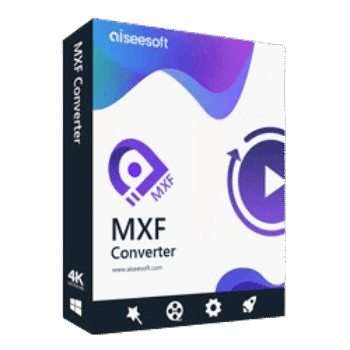
Aiseesoft MXF Converter converts professional camcorder recordings into popular video, audio, and editing-friendly formats. This MXF converter tool also includes built-in editing tools, batch conversion support, and 2D-to-3D video conversion.
Aiseesoft MXF Converter for Windows
2 plans · best save 50%
Aiseesoft MXF Converter for Mac
2 plans · best save 50%
📄 Licensing & Support Details
- License Type: 1 Year, Lifetime license.
- 30-Day Money-Back Guarantee
- Free Upgrades
- 24/7 Customer Support
- 100% Secure.
📝 How to apply
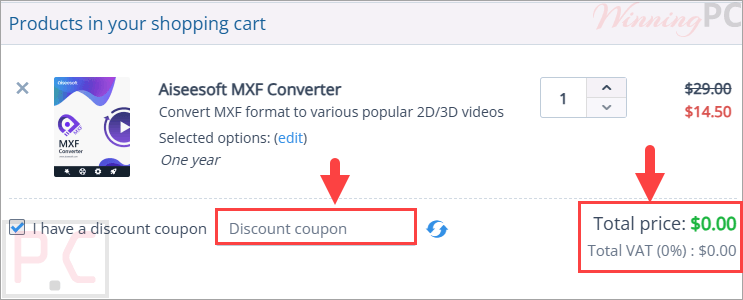
Click ‘Copy Code’ within the above coupon box; the code is then copied while you are routed to the checkout area to input it for a lower price.
Aiseesoft MXF Converter: In-Depth Review & Features

Key Features:
- Convert MXF and P2 MXF files to SD, HD, and common video formats.
- Export videos to MOV, MP4, AVI, MKV, WMV, FLV, WebM, MPG, and more.
- Convert MXF recordings for Adobe Premiere Pro, Final Cut Pro, Sony Vegas Pro, iMovie, and Magix Video Pro.
- Preserve original video quality during conversion.
- Support H.264/MPEG-4 AVC and various HD video profiles.
- Convert MXF files into formats compatible with iPhone, iPad, Android devices, game consoles, and media players.
- Crop video frames to remove unwanted edges.
- Add text or image watermarks.
- Merge multiple MXF clips into a single file.
- Adjust brightness, contrast, saturation, hue, and volume.
- Convert 2D MXF videos into 3D formats.
- Preview videos before conversion.
- Capture screenshots with the built-in snapshot tool.
- Process multiple MXF files simultaneously.
- Customize encoder, bitrate, frame rate, and resolution settings.
- Accelerated conversion using AMD APP and NVIDIA CUDA technologies.
Pros & Cons:
More screenshots:


Frequently Asked Questions
Where can I find discounts or promo codes for Aiseesoft MXF Converter?
The easiest place to check for an active Aiseesoft coupon code is WinningPC. You can also monitor Aiseesoft’s official promotions, but WinningPC regularly tracks available coupon offers and pricing updates.
What’s the biggest discount currently available?
At the moment, WinningPC offers a 50% OFF discount on both license options. The 1-Year License is reduced to $14.50, while the Lifetime License is available for $24.97.
What is Aiseesoft MXF Converter used for?
It is used to convert MXF and P2 MXF video files into more widely supported video and audio formats for playback, sharing, and editing.
Can it convert MXF files for Adobe Premiere Pro?
Yes. It can convert MXF recordings into formats compatible with Adobe Premiere Pro and other popular editing applications.
Does it support batch conversion?
Yes. You can convert multiple MXF files at the same time.
Can I edit videos before conversion?
Yes. The software includes tools for cropping, watermarking, merging videos, and adjusting visual settings.
Does it support 3D video creation?
Yes. It can convert standard 2D MXF videos into several 3D output formats.
Which devices are supported?
The software supports output profiles for iPhone, iPad, Android devices, Apple TV, PlayStation, PSP, Wii, Xbox, and other media devices.
Can I customize output quality settings?
Yes. You can adjust the video encoder, bitrate, frame rate, resolution, and other output parameters.
Does it support HD video conversion?
Yes. It supports various HD output formats including HD MP4, HD MOV, HD MKV, HD WMV, and HD TS.
System Requirements & Details
| Operating System | Windows 11, 10, 8.1, 8, 7, Vista, XP (SP2 or later) Mac OS X 10.7 or higher |
| Processor | 1GHz Intel/AMD CPU or above |
| RAM | 1GB RAM or more |
| Supported Input | MXF, TS, MTS, M2TS, TP, TRP |
| Supported Output | MPG, MPEG-1, MPEG-2, MPEG-4, H.264, AVI, FLV, MP4, M4V, MKV, MOV, 3GP, 3G2, SWF, WMV, ASF, TS, DV, VOB, WebM, AAC, AC3, FLAC, MP3, WAV, WMA, and more. |
| Supported Devices | iPhone, iPad, iPod, Apple TV, Samsung Galaxy, Google, Motorola, LG, Sony, HTC, PS4, PS3, PSP, Wii, NDS, Xbox |
| Supported Editing Software | iMovie, Final Cut Pro, Final Cut Express, Sony Vegas, Adobe Premiere, Avid Media Composer |