
On this page
Ashampoo Backup PRO 26 Giveaway
Ashampoo Backup PRO 26
The ultimate fix for malware infections, hard disk defects and Windows crashes
- Product
- Ashampoo Backup PRO 26
- Product website
- ashampoo.com
- License
- Lifetime
- Platform
- Windows 11, Windows 10 (x64)
- Usage
- Non-commercial only
- Updates
- No future upgrades
- Support
- No support
- Updated
- 2026-10-06
Continue on ashampoo.com
The publisher handles registration and license delivery on its official website.
The free license is no longer available.
Top Windows Backup & Restore Coupon Codes

EaseUS Todo Backup Home (Lifetime Upgrades)
Lifetime free upgrade | Premium technical support

AOMEI Backupper Pro (Lifetime Upgrades / 1 PC)
One-time fee, lifetime use and upgrades | Free technical support


Is this Ashampoo giveaway safe and legit?
Yes. This is a promotion run by Ashampoo itself, and you end up with a genuine license for the official build.
No crack or keygen
You install Ashampoo’s own installer and activate it with a real key. Nothing is patched or repackaged.
Official source
The key comes from Ashampoo’s giveaway page, not a reseller or a grey-market key site.
Nothing to pay
The only thing you hand over is an email address. No card details are involved at any point.
How to get the Ashampoo Backup PRO license key for free?
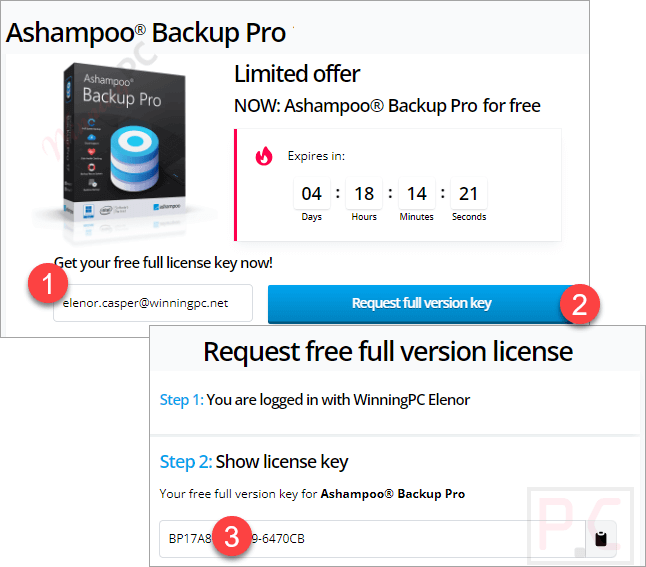
- Open the official Ashampoo giveaway page linked below and enter your email address.
- Copy the Ashampoo Backup Pro 26 license code you receive after submitting your email. If it doesn’t show up right away, check your inbox and spam folder.
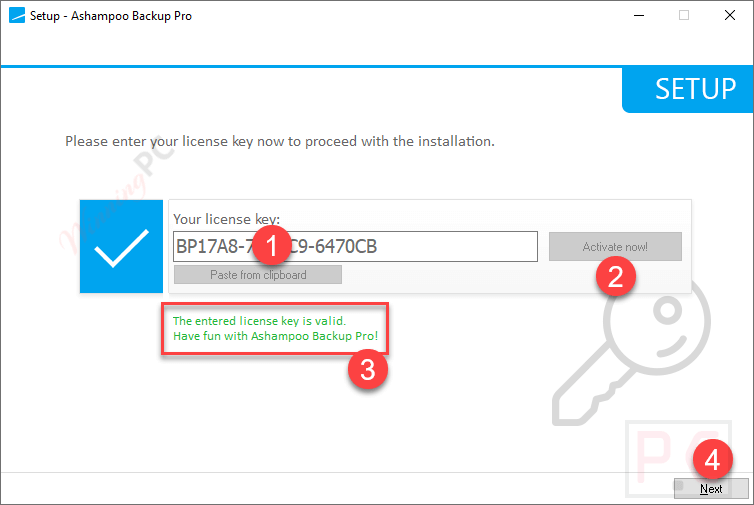
- Download the Ashampoo Backup Pro 26 installer and run it with an administrator account, since the program needs full admin rights.
- Paste your license key when the installer asks for it. Stay online for this step: activation requires an internet connection.
- Open the program and try Easy Backup first. Pick what to back up, pick where to store it, and your first backup is running.
Ashampoo Backup PRO Review & Features
Ashampoo Backup PRO 26 stands out for how little attention it asks for. Real-time backup watches the folders you choose and updates your archive whenever files change, and plug-and-play plans fire automatically the moment you connect a specific external drive. That’s the difference between a backup you have and a backup you meant to make. The rescue system matters even more: it boots from USB or DVD, can read BitLocker-encrypted drives, and restores a full system image so you skip the Windows reinstall entirely.
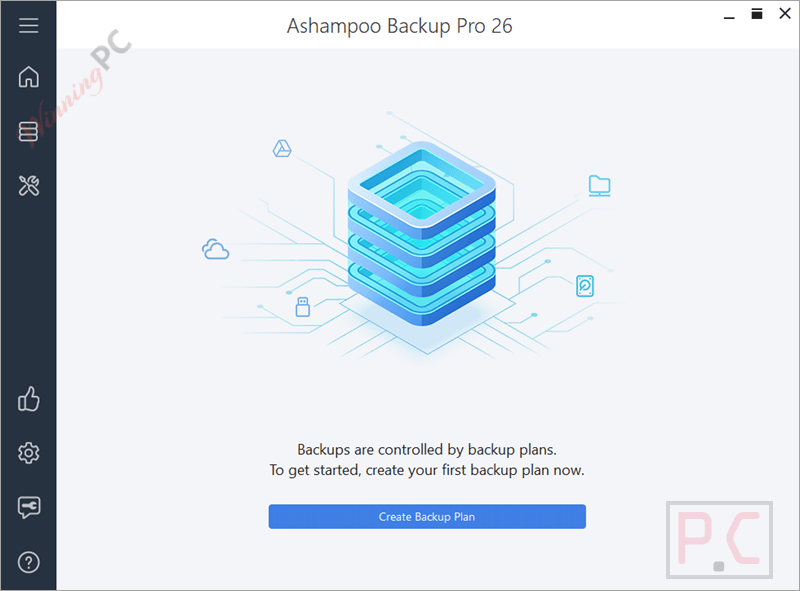
Ashampoo claims its “infinite reverse incremental” images take up to 50% less space than rival tools, which we’d treat as a vendor figure rather than a promise. The limits are real, though. There’s no support for ARM-based PCs, partitions of 8 TB or larger are off the table, and the license phones home at regular intervals, which is worth knowing for software you’ll lean on during your worst PC day.
Key features
- Real-time backups for the folders you pick, so your newest files are already covered when something crashes.
- Bootable rescue system (USB or DVD) with extended driver support, to restore a dead Windows install from a backup image.
- Plug & play plans that start on their own as soon as a set drive is connected, no clicks needed.
- Wide storage choice: local disks, USB sticks, NAS, Dropbox, OneDrive, Google Drive, OneDrive Business/Office 365, Owncloud and more.
- Backup Viewer to browse an archive and pull out single files without restoring the whole thing.
pros & cons
more Ashampoo Backup PRO screenshots!
Frequently Asked Questions
Can I upgrade the giveaway license to the newest version for free?
No. The giveaway terms exclude free updates, so your key stays on Ashampoo Backup Pro 26. Moving to a newer release means buying it from Ashampoo.
Does it work on Windows laptops with ARM (Snapdragon) chips?
No. Ashampoo states that systems with ARM processors aren’t supported, so it only runs on 64-bit x86 Windows 11 and 10.
Can I back up a drive larger than 8 TB?
No. Partitions or storage devices of 8 TB or more aren’t supported. For a big data drive, you’d need to split it into smaller partitions or use a different tool.
Can I restore one file without restoring the whole backup?
Yes. You can recover individual files and folders selectively, and the Backup Viewer lets you look inside an archive before you restore anything.
Are my backups encrypted?
Yes. Backups are compressed automatically and you can protect them with AES encryption, which is worth switching on if your backups go to the cloud.
What if my backup drive isn’t plugged in when a backup is due?
The backup is postponed and runs once the drive is available again. You’ll also get a notification about the missed attempt, so nothing fails silently.
System Requirements & Details
| Field | Value |
|---|---|
| Operating system | Windows 11, Windows 10 (x64) |
| Processor | ARM processors not supported |
| Disk space | 500 MB free for installation |
| Supported backup destinations | Internal/external hard drives, USB sticks, network drives (NAS), Dropbox, OneDrive, Google Drive, OneDrive Business / Office 365, Owncloud, Telekom MagentaCLOUD, Strato, 1&1 and other cloud services |
| Partition size limit | Partitions or storage devices of 8 TB or larger are not supported |
| Other requirements | Internet connection to activate; license verified at regular intervals; full administrative rights |





If you are using this app and are having problems creating a USB Rescue System boot disk, you’ll get a popup, in the app, saying you are eligible for a free update. This update fixes the problem of creating a USB boot disk and if you still have problems with it, try using the Extended third party driver set, in the Driver Import Settings, which worked for me. Now that I have fully working, it’s a great app.
Ashampoo tried to make this version a sub but failed to attract any offers. Now that they are giving it away, go for it.
For me, the best image backup software is Macrium Reflect. I am using the workstation version which is truly amazing. I bought the paid version some time back from Softpedia.
I believe the paid version with a perpetual license is still on a sale at Softpedia.
Sorry, my bad! It should be Iperius Backup Premium.
Anyway, I have tried them all. The backups are all reliable.
Hi Peter,
Thanks so much for sharing 🙂
On the other hand, if you have a virtual machine set up on your computer, go for it.
Besides Ashampoo Backup Pro 25, wait for the giveaway version of O&O Diskimage Pro 18.
I also recommend Veeam Backup & Replication Community Edition and Imperius Backup Pro (Free if you know how to get it).
In the end, I realized that it was rather bloated and slowed down my pc a little. Besides, it is strictly GUI which I dislike.
If you do not intend to install a VM, do not require a virus and malware check, do not intend to back up to a network attached storage or your cloud account but just an external disk, then this version is not for you.
Ashampoo Backup Pro 17 will be a better choice.
As for me, I ditched it a long time ago. I have different backup software on my 5 laptops now.
Windows 7 Pro – Image for Dos
Windows 8.1 – R-Drive Image
Windows 10 Pro – Macrium Reflect
Windows 10 Pro (Japanese version) – Image for Windows
Windows 10 Pro – O&O Diskimage 17 Pro