Chris Bruner
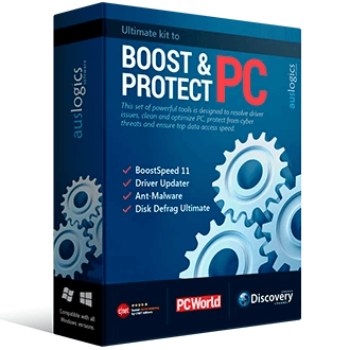
Auslogics Essential Tools is a powerful suite of four PC tune-up programs designed to clean, speed up, and protect your computer. The bundle includes BoostSpeed for all-in-one maintenance, Anti-Malware for top-tier threat detection, Driver Updater for hardware optimization, and Disk Defrag Ultimate for pro-grade drive defragmentation.

Auslogics Essential Tools
1-year subscription | Includes Auslogics BoostSpeed, Auslogics Driver Updater, Auslogics Anti-Malware, Auslogics Disk Defrag Ultimate.
📄 Licensing & Support Details
- License: 1-year subscription.
- Support: Fast professional support via email and in-app question tool.
- Refund Policy: 30-day money-back guarantee.
📝 How to apply
- Simply select the “Copy Code” button in the coupon box above.
- The discount code will be saved automatically, and you’ll be redirected to complete your purchase with the reduced price.

In-Depth Review & Features

Key Features
- Identifies and removes junk files, temporary files, and old logs to safely clean up your PC.
- Completely uninstalls unneeded apps, programs, and their leftover traces.
- Disables unneeded startup programs to help Windows boot faster.
- Eliminates traces of your online activity to safeguard sensitive personal information.
- Tweaks network settings to ensure top internet connection speed.
- Tracks CPU, GPU, and disk temperatures in real time to prevent hardware overheating.
- Removes invalid or corrupt keys from the Windows registry to stop system glitches.
- Detects and deletes malware, spyware, and viruses missed by primary antiviruses.
- Diagnoses and resolves driver issues using a database of over 60 million verified drivers.
- Optimizes SSD drives to extend their service life and applies smart defragmentation for traditional HDDs.
- Automates computer maintenance by detecting and eliminating issues on a convenient schedule.
Pros & Cons
More Auslogics Essential Tools screenshots:
Auslogics Disk Defrag Ultimate

Auslogics BoostSpeed

Auslogics Driver Updater

Auslogics Anti-Malware

Frequently Asked Questions
Where can I find working code for Auslogics Essential Tools?
You can easily locate the latest verified discount codes and active promotions for this bundle directly on WinningPC, which regularly updates offers alongside official channels.
What is the lowest price available right now for this PC tune-up suite?
Currently, the best savings you can secure is a massive 63% OFF discount, dropping the regular price of $199.95 down to just $74.98, exclusively available through WinningPC.
Will the cleanup tools delete my personal files?
No, the software is designed to target only temporary files, cache, old installers, and system junk without affecting your valuable personal documents or photos.
Does the Anti-Malware tool conflict with my existing antivirus?
No, Auslogics Anti-Malware is built to work alongside your primary antivirus, providing an extra layer of security by catching threats that other programs might miss.
How does the Driver Updater know which updates are safe to install?
The application uses intelligent algorithms to precisely match your hardware with official, manufacturer-recommended updates, and it can even suggest stable versions if the newest release is known to be buggy.
Is it safe to defragment my SSD with this bundle?
Yes, Disk Defrag Ultimate automatically detects if your drive is an SSD and applies a special optimization algorithm instead of standard defragmentation, which reduces write operations and extends the drive’s lifespan.
What happens if I accidentally delete a file I need during cleanup?
The software gives you full control, allowing you to quarantine suspicious files so you can easily restore them later if needed.
System Requirements & Details
| Feature | Specifications |
|---|---|
| Language Support | English, Français, German, Italian, Spanish, Swedish, and more… |
| Operating System | Windows 7, 8, 8.1, 10, 11 |
| Processor | 32-bit and 64-bit support listed for Windows 7, 8, 8.1, and 10 on Auslogics’ official support page; Windows 11 also supported |
| Supported Input | Junk files, registry entries, startup programs, malware items, drivers, HDD/SSD drives, fragmented files |
| Supported Output | Cleaned PC, updated drivers, malware scan results, optimized drives, maintenance reports, performance charts |