On this page
Get Bookmark Manager free on Google Play →
Check the price reads $0.00 before you tap Install. It goes through as a purchase, so it stays in your Google account library for good. How app price drops work
Bookmark Manager price and requirements
| App | Bookmark Manager – URL manager |
| Developer | Yogesh Dama |
| Store | Google Play |
| Regular price | $0.99 (US Play Store) |
| Price now | $0.00 |
| Offer ends | August 8, 2026 |
| In-app purchases | None |
| Contains ads | No |
| Requires | Android 5.0 or later |
| Download size | About 3 MB |
| Rating | 4.1 stars from 878 reviews |
| Installs | 50,000+ |
| Last updated | November 7, 2025 |
| Price checked | Oct 2026 by Chris |
The free version has ads. This one doesn’t
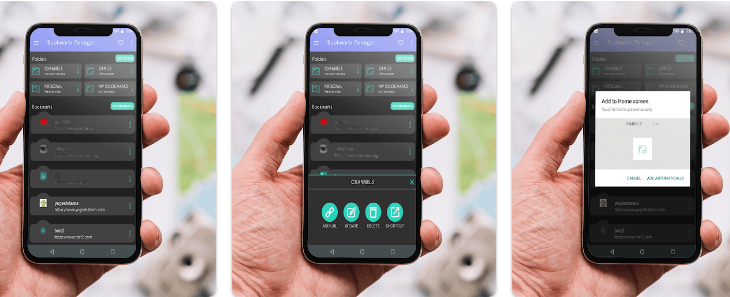
No ads, no in-app purchases, no subscription. The same developer publishes a separate free Bookmark Manager that carries both, so what $0.00 buys you here is the app without the advertising. The Data safety declaration reports nothing collected and nothing shared, and there’s no account to create, so your bookmarks stay on the device.
Folder shortcuts are the reason to install this
Share-menu capture is quick and folders work the way you’d expect, but the feature people actually keep it for is pinning a folder to the home screen, which no browser does. The gaps are real though: no search, titles don’t fill in from the page, and import only reads files this app exported, so a Chrome bookmarks HTML file won’t load. Several 2025 reviews also report export failing, and there’s been no update since November 2025.
What it does
- Save links from Chrome, Firefox or any app through the Android share menu
- Sort them into folders, and sort the folders too
- Pin a folder to your home screen as a shortcut
- Dark and light themes
- Works offline; internet access is only used to fetch favicons


![Passport Photo: ID Photo Print App for Free [Android]](https://winningpc.com/wp-content/uploads/2024/08/passport-photo-id-photo-print-767x770.png "passport photo id photo print")