Cathryn Lee

Epubor eBook Converter converts non-protected eBooks into formats like EPUB, Mobi, AZW3, TXT, and PDF so you can read them on Kindle, Kobo, Nook, Sony eReader, iPad, iPhone, and Android devices.

Epubor eBook Converter for Win/Mac (1 Year)
20% off coupon code: regular price $19.99, discounted price $15.99
Epubor eBook Converter for Win/Mac (Lifetime)
20% off coupon code: regular price $39.98, discounted price $31.98
Epubor eBook Converter for Win/Mac (Family License)
20% off coupon code: regular price $79.96, discounted price $63.96
📄 Licensing & Support Details
- Free version upgrades during the license period
- 30-day 100% money-back guarantee
- Safe checkout protection
- 6 × 12 free after-sale service
📝 How to apply
To get this deal, click the ‘Copy Code’ button in the box above. You’ll automatically copy the code and be taken straight to checkout so you can lock in your discount.
Epubor eBook Converter: Review & Features
Key Features
- Converts eBooks for reading on Kindle, Kobo, Nook, Sony eReader, iPad, iPhone, Android phones, and more.
- Supports input formats including KFX, EPUB, PDF, AZW, AZW1, AZW3, AZW4, Mobi, PRC, TPZ, Topaz, TXT, and HTML.
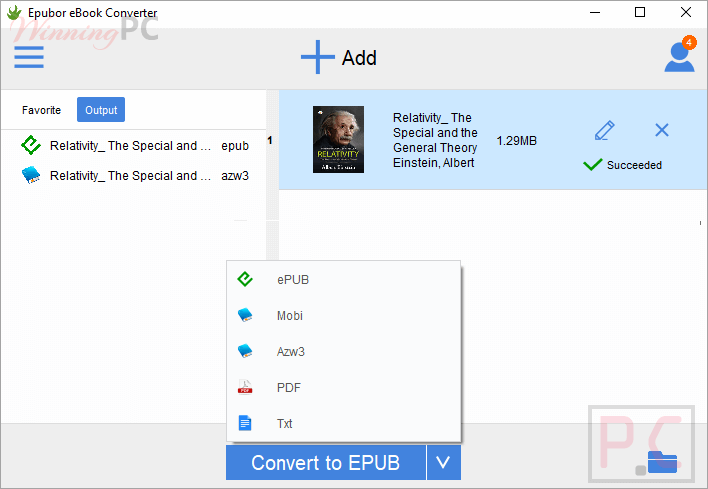
- Exports to EPUB, Mobi, AZW3, TXT, and PDF.
- Uses eCore technology for up to 60X faster conversion speed.
- Batch conversion lets you convert multiple books to one format at once.
- Allows metadata editing, including author, title, categories, keywords, pages, publisher, and publishing date.
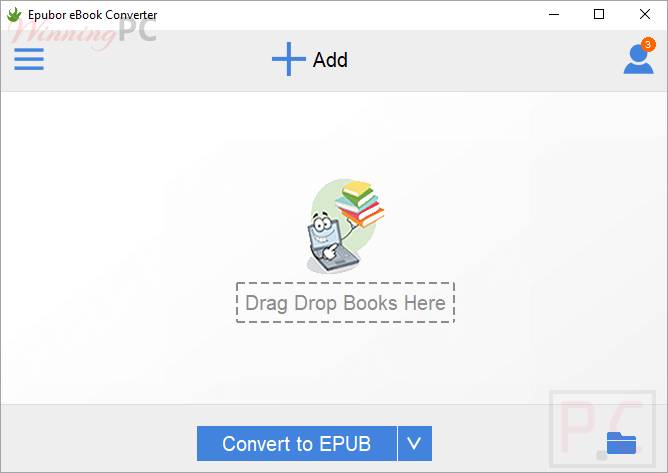
- Simple interface with “Add” button and favorite folder import option.
- Converts books in just 2 clicks.
Pros & Cons
Epubor eBook Converter screenshots
Frequently Asked Questions
What is the best discount currently available for Epubor eBook Converter?
The best current discount is 20% OFF, available directly on WinningPC.
Does it support encrypted eBooks?
No. It only handles non-protected files. For encrypted eBooks, Epubor Ultimate is required.
What output formats are supported?
It supports EPUB, Mobi, AZW3, TXT, and PDF as output formats.
Is there a refund policy?
Yes. You can request a refund by email, and the product includes a 30-day 100% money-back guarantee.
Can I use it on a new computer?
Yes. De-register the software from your old computer first, then install it on the new one.
Is the software safe?
Yes. The provided data states that it is 100% safe with no virus or malware.
Can I edit book details before converting?
Yes. You can edit metadata such as title, author, publisher, categories, keywords, and publishing date.
System Requirements & Details
| Feature | Specifications |
|---|---|
| Language Support | English, Français, Italian, Spanish, Swedish, and more… |
| Operating System | Windows 10/11 Mac OS X 10.14 and later |
| Processor | Not specified |
| RAM & Storage | Not specified |
| Supported Input | KFX, EPUB, PDF, AZW, AZW1, AZW3, AZW4, Mobi, PRC, TPZ, Topaz, TXT, HTML |
| Supported Output | EPUB, Mobi, AZW3, TXT, PDF |