
On this page
Franzis ANALOG Projects Giveaway
Franzis ANALOG Projects 4
Transforms your images into analog memories in no time.
- Product
- Franzis ANALOG Projects 4
- Product website
- projects-software.com
- License
- Lifetime
- Platform
- Windows 11 / 10 / 8.1 (64-bit)
- Usage
- Non-commercial only
- Updates
- No future upgrades
- Support
- No support
- Updated
- 2026-09-26
Continue on reg.franzis.de
The publisher handles registration and license delivery on its official website.
The free license is no longer available.
Top Photo Editor Coupon Codes in Oct 2026

Aiarty Image Enhancer (+ 2 Bonus Gifts) - Lifetime/ 3 PCs
Lifetime Free Upgrade Windows Gifts: Image Matting + VideoProc


PhotoWorks Ultimate - Lifetime license
FREE updates and technical support

Is this Franzis giveaway safe and legit?
Yes. This is a publisher-run promotion from Franzis Verlag GmbH, a German software company with an established catalog of photo editing tools.
No crack or keygen
You receive an official registration code from Franzis themselves, delivered to your registered email. The installer is Franzis’s own published build – nothing is patched or tampered with.
Official publisher source
The license is issued through Franzis’s own account system at projects-software.com, not a grey-market key reseller or third-party giveaway broker.
Account registration is straightforward
You create a Franzis account on their official website and receive the key directly. No payment details are requested for the free key.
No financial risk
There is nothing to buy and no credit card required to claim the giveaway license. The only thing you hand over is your email address.
How to Get the Franzis ANALOG Projects 4 License Key for Free
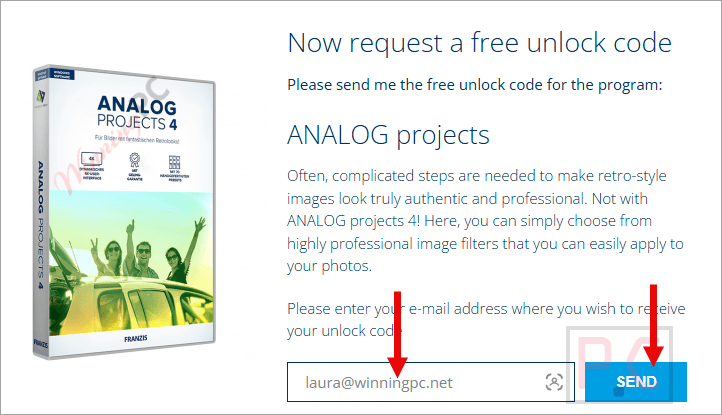
- Click the giveaway link below to open Franzis’s official ANALOG Projects 4 giveaway page.
- Enter your email address to create a free Franzis account, or log in to your existing one.
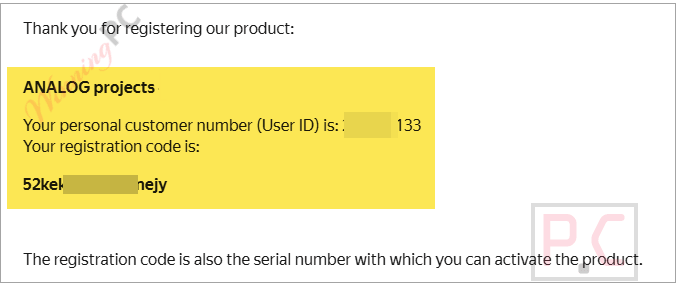
- Franzis will email your personal user ID and registration code to that address – check your inbox (and spam folder if it doesn’t arrive within a few minutes).
- Download the Franzis ANALOG Projects 4 installer from the same page.
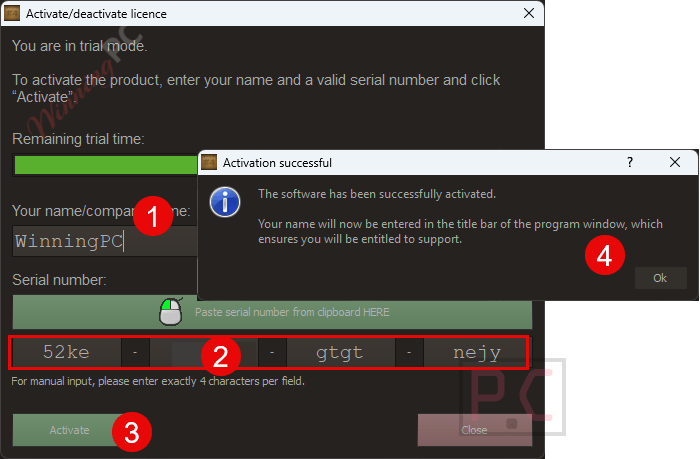
- Launch the installer, enter your name (or company name) and your registration code when prompted.
- Click Activate – the software unlocks immediately for lifetime use on your Windows PC.
Franzis ANALOG Projects Review & Features
Franzis ANALOG Projects 4 gives digital photos an analog film look using 140 presets, including 40 new film emulations based on specific film stock characteristics. It also includes an expert mode with 117 image filters across seven categories for creating custom looks. Focus peaking helps identify in-focus areas, while grain controls and sensor error correction provide additional editing options. The Standard edition works as a standalone application and does not include Photoshop or Lightroom plug-ins, the multi-layer Color module, or LUT management.
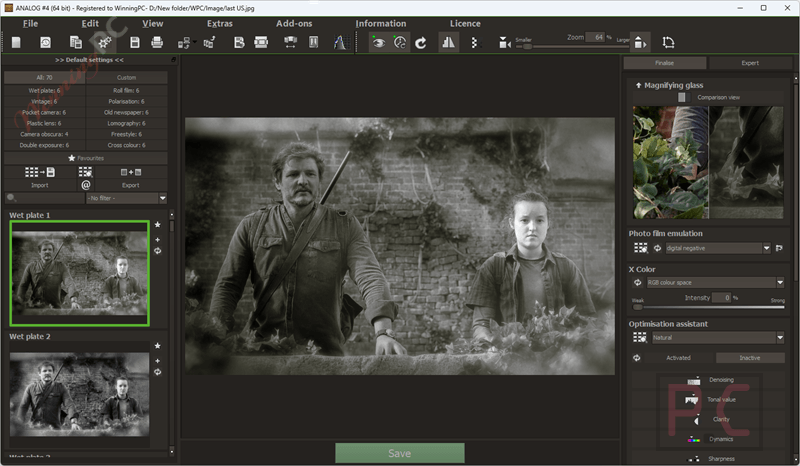
Key features
- 140 hand-optimized analog presets across 12 categories, including new preset categories for Second Exposure and Cross Color.
- Expert mode with 117 image filters in 7 categories for building custom analog looks.
- 40 new photo film emulations designed to mimic specific analog film stocks.
- RAW development module with extended sensor error correction (range expanded to 500 in v4).
- Focus-peaking module, Grain module, and Selective drawing module – all new in version 4.
What we think
Frequently Asked Questions
Is Franzis ANALOG Projects 4 really free?
Yes – Franzis is running an official publisher giveaway offering a Lifetime Standard license at no cost. You register an account on their site, receive a key by email, and activate the installer. The offer is time-limited, so claim it while the giveaway is still running.
Does it work on Windows 11?
Yes. Franzis ANALOG Projects 4 officially supports Windows 11, 10, and 8.1 (64-bit). Minimum hardware: Intel i3 (or comparable AMD), 4 GB RAM, DirectX-compatible GPU, 1600×900 screen. For smooth performance on large files, Franzis recommends an i7 and 8 GB RAM.
Is there a Mac version?
No. ANALOG Projects 4 is Windows-only. Mac photographers should look at DxO FilmPack or a Lightroom-compatible preset pack instead.
System Requirements & Details
| Operating system | Windows 11 / 10 / 8.1 (64-bit only) |
| Processor (minimum) | Intel Core i3 or comparable AMD processor |
| Processor (recommended) | Intel Core i7 or comparable AMD processor |
| RAM (minimum) | 4 GB |
| RAM (recommended) | 8 GB |
| GPU | DirectX-compatible graphics card |
| Screen resolution (minimum) | 1600 × 900 |
| Screen resolution (recommended) | 1920 × 1080 |
| Other | Single-user license; internet connection required for account registration and activation |


![[Contest] Rain Cleaner Pro Giveaway: Win 1 of 50 Free 1-Year Licenses](https://winningpc.com/wp-content/uploads/2026/10/rain-cleaner-pro-icon.png "rain cleaner pro icon")

