
 WinningPC

Coolmuster Mobile Transfer helps you to transfer data from the old phone to the new one, even if they are running different OSes, such as the most popular iOS and Android. It supports almost all Android and iOS devices and meets all your needs. The program has an easy-to-understand interface to help you freely move various data, such as photos, videos, contacts, SMS, and more between two mobile phones or tablets.
- Product name: Coolmuster Mobile Transfer
- Publisher: Coolmuster
- Website: https://www.coolmuster.com
- License type: lifetime
- Price:
$25.95$0.0 - Platform: Windows 11/10/8/7
- License code & download – last updated: Apr 23, 2026
Click here...
Unlocking content...
📝 Note: Please follow the Activation Guide to successfully claim your license.
This Coolmuster Mobile Transfer giveaway license includes 1-year software updates and excludes technical support. For unrestricted lifetime access and priority assistance, utilize the promotional deal below.

Coolmuster Mobile Transfer - 1 Year License (1 PC)
50% coupon code: regular price $25.95, discounted price $12.97
Coolmuster Mobile Transfer - Lifetime License (1 PC)
50% coupon code: regular price $35.95, discounted price $17.97
Coolmuster Mobile Transfer for Mac - 1 Year License (1 PC)
50% coupon code: regular price $25.95, discounted price $12.97
Coolmuster Mobile Transfer for Mac - Lifetime License (1 PC)
50% coupon code: regular price $35.95, discounted price $17.97
You may also like

All Products Bundle, Lifetime (Windows)
One-time payment, permanent lifetime license | Free lifetime software upgrades
All Products Bundle, Lifetime (Mac)
One-time payment, permanent lifetime license | Free lifetime software upgrades
Follow the steps below to activate your Coolmuster Mobile Transfer license and configure the English interface. For technical assistance, leave a comment at the bottom of this page.
Fill out the form and get the Coolmuster Mobile Transfer license key on the giveaway page to get the 1-year license key


Download and install the software on your computer. Open the software and use your email address and the above Coolmuster Mobile Transfer license code to activate it:

Enjoy it for 1-year free!
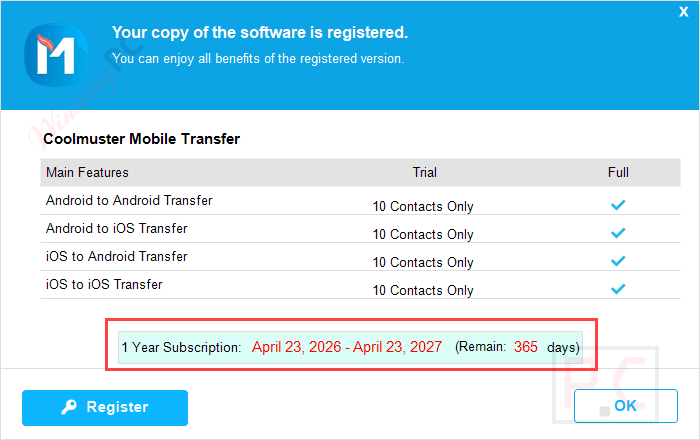
Main Screenshot:
After the installation is complete, launch the software to begin transferring content from your phone to your computer.

Make both devices recognized by this mobile transfer tool by connecting them to your computer with the aid of USB cables. Now, please choose the content that you want to copy.

Transferring data

Transfer is completed!

Main Features
- With this phone transfer software, you can move content between two smartphones or tablets.
- With Coolmuster Mobile Transfer, transferring data between two phones is no longer a time-consuming task. It will help you migrate your files from one phone to another without hassle within only three steps, no matter how huge the data amount is.
- Basically, it is possible to transfer what you care about. It supports most common data types, including Text Messages, Call Logs, Contacts, Calendars, Safari Bookmarks, Photos, Videos, Music, Documents, Apps, eBooks, etc.
- It sports a clean and intuitive layout that provides you with a secure data transfer solution with great speeds. It doesn’t come with malware, ads, or user tracking, so your data will be safe throughout the entire transfer process.
- It works well on all Windows systems, including Windows 11/10/8/7/XP/Vista/2003/2000/NT.
Technical Details
| Language Support | English, Français, Italian, Spanish, Swedish, and more… |
| Money Back Guarantee | 90-Day |
| Operating System | Windows |
| Shipping | Send registration code via Email, download URL is included (Free) |
| Subscription | 1-Year, Lifetime |
| Support Services |





Please be aware that in order to use this tool on any Android device you HAVE TO enable USB Debugging before use and that some Android APPs will detect the enabling of USB Debugging as a hack attempt on their DRM protected content and will in result deny you the privilege of viewing their copyright content just in case you are trying to use USB debugging to hack their system as it is primarily used for gaining access to content not usually available on an android system, much like how this program uses it to gain access to data not available in other legitimate ways.
Also if you have a previous giveaway license you want to extend just use a different email address when requesting license with gmail.com addresses you can create alternate email addresses by inserting a “.” in the username portion and gmail will treat it as if the “.” isn’t there but you don’t need to use a working email address as the license is displayed on the page after completing any sharing tasks if applicable…
You can remove the old short license, you’ll just need to delete or rename the usr.bin in the respective
C:\Users\[WINDOWSUSERNAME]\AppData\Roaming\Coolmuster\ sub-folder for THIS program to remove the previous license and then you will be able to apply the new license you obtained today.
TK
This Giveaway has been expired.
transfer all data from my old phone to a new one easily, thanks.