Laura Marano

Ironsoftware IronPrint is an advanced C# printing library designed to give .NET developers total control over cross-platform document printing.
Status: ✅ Active & Verified
Last Checked: October 2026
Offer: 15% Off

IronPrint Lite License
5% off coupon code: regular price $799, discounted price $759.05
IronPrint Plus License
5% off coupon code: regular price $1,199, discounted price $1,139.05
IronPrint Professional License
10% off coupon code: regular price $2,399, discounted price $2,159.10
IronPrint Unlimited License
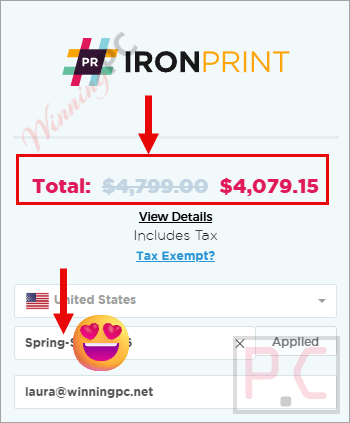
15% off coupon code: regular price $4,799, discounted price $4,079.15
📄 Licensing & Support Details
- Perpetual license (no recurring fees)
- 1-year Premium Support & Updates
- 30-day money-back guarantee
- Email support
📝 How to apply
- Selecting the “Coupon Code” button above will take you to the IronPrint checkout site.
- Pick a lifetime license plan that fits your requirements, such as Lite, Plus, Pro, or Unlimited, and then click the pink “Buy License” button.
- When you enter the code in the designated field, the discount will be applied, and the total price will be reduced.
What is IronPrint?
IronPrint is a premium C# printing library built for .NET developers. It allows you to easily integrate document, PDF, HTML, and image printing capabilities into your applications. Designed for C#, F#, and VB.NET, it works across multiple .NET versions (up to .NET 10) and runs cleanly without requiring Microsoft Office Interop. Whether you are building WebApps, Mobile applications (MAUI), Desktop programs (WPF, Avalonia), or Console apps, IronPrint manages the complex printing workflows for you.
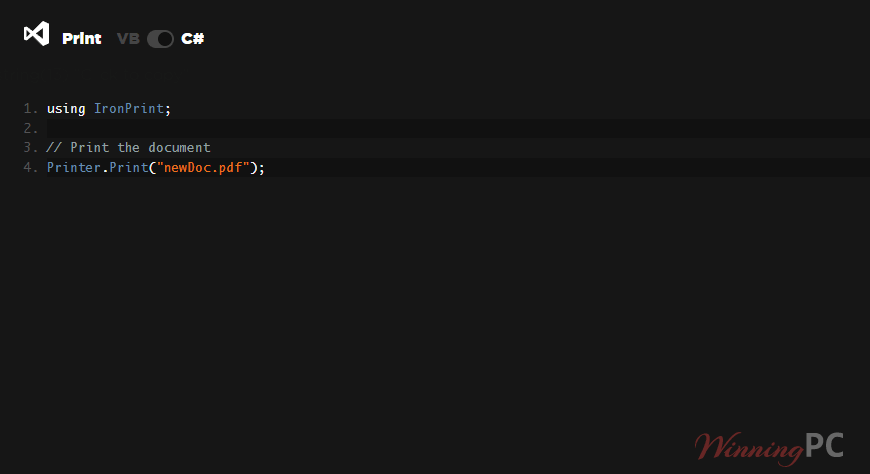
In-Depth Review & Features
1. Comprehensive Document Printing
IronPrint isn’t just for plain text. I found it incredibly versatile for rendering and printing a variety of standard formats:
- Supported Formats: You can natively print PDFs, HTML files, images, and standard documents.
- PDF Flattening: If you are working with interactive PDF forms, IronPrint allows you to easily flatten the PDF before printing. This is a necessary feature to ensure that all filled-in form values are actually retained and visible on the printed paper.
2. Complete Control Over the Printing Process
Automation is where this library truly shines, though it gives you options depending on your user’s needs:
- Silent Printing: This is my favorite feature for automated workflows (like generating invoices on a server). You can print documents directly without any dialog box pop-ups or required user interaction. (Note: This feature is strictly available for Windows environments).
- Print with Dialog: If your application requires user input, you can easily trigger the native OS dialog box, allowing the user to select their own appropriate print options.
3. Granular Custom Print Settings
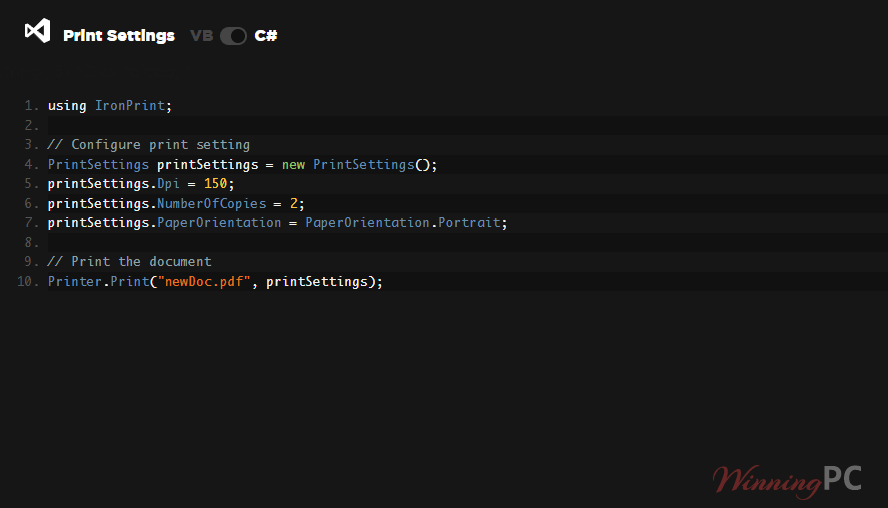
Every print job can be customized with just a few simple lines of code. IronPrint gives you deep programmatic access to:
- Paper Size & Orientation: Effortlessly set the specific paper dimensions and specify whether the document should print in portrait or landscape.
- Margin Control: Customize and set exact page margins, which are calculated precisely in millimeters.
- Print Quality & Copies: Adjust the print resolution (DPI) to best fit the output needs, and define the exact number of copies for the print run.
- Grayscale Toggle: Control whether the document is printed in full color or forced into grayscale to save ink.
- Printer Routing: Programmatically specify the exact name of the printer for the job, allowing you to control exactly where the physical document ends up.
4. Printer Discovery and Information
To successfully route print jobs, you need to know what hardware is available.
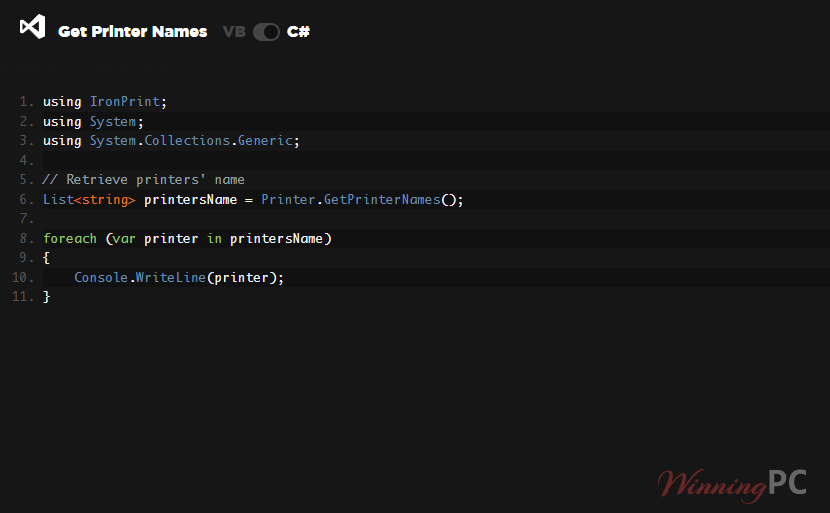
- Retrieve Printer Names: IronPrint allows you to easily fetch all local printer names available to the system, putting that data right at your fingertips. (Note: This capability is currently limited to Windows, iOS, and Android platforms.)
Pros & Cons
More screenshots
Frequently Asked Questions
What exactly does IronPrint do?
IronPrint is a library that assists .NET developers in easily integrating and automating printing capabilities (like printing PDFs, images, and HTML) into their C#, F#, and VB.NET applications.
Where can I find the best coupon code for IronPrint?
WinningPC is currently the best place to find the verified coupon code for this product, offering the highest discount rate on the market.
Do I need Microsoft Office installed to use IronPrint?
No. IronPrint is designed to work independently and provides cross-platform document printing without the need for Office Interop.
What versions of .NET does IronPrint support?
It supports a wide range of versions, including the latest .NET 10, 9, 8, 7, 6, 5, and Core 3.1+, as well as .NET Framework 4.6.2 and above.
Does the “Silent Printing” feature work on all platforms?
No. According to the official specifications, Silent Printing (printing without a user dialog box) is currently available for Windows environments only.
Can I use IronPrint to retrieve a list of available printers?
Yes, you can easily retrieve local printer names. However, this specific feature is only available on Windows, iOS, and Android. It is not currently supported on Mac.
Can I adjust the margins for my print jobs?
Yes. IronPrint allows you to fully customize and set your print margins, which are calculated and set in millimeters.
Will form fields in my PDFs print correctly?
Yes, IronPrint includes a feature that allows you to flatten PDFs prior to printing, ensuring that all inputted form values are retained on the physical document.
What Integrated Development Environments (IDEs) are officially supported?
IronPrint is fully compatible with Microsoft Visual Studio, as well as JetBrains ReSharper and Rider.
Technical Specifications
| Supported Languages | C#, VB.NET, F# |
| Supported .NET Versions | .NET Core (10, 9, 8, 7, 6, 5, and 3.1+) .NET Framework (4.6.2+) |
| Operating Systems & Processors | Windows (x64, x86) | Windows 7+, Server 2016+ Mac (x64, ARM) | macOS 10.15+ Apple iOS (12+) Android API 21+ (v5 “Lollipop”) |
| Supported Project Types | Web (Blazor & WebForms), Mobile (MAUI), Desktop (WPF, MAUI & Windows Avalonia), Console (App & Library) |
| Supported IDEs | Microsoft Visual Studio, Jetbrains ReSharper & Rider |
| Printable Formats | PDF, HTML, Images, and Documents |