Kernel Google Chat Export Tool Coupons: 30% Discount (Jun 2026)

Kernel Google Chat Export Tool is a utility designed to export Google Chat conversations, including messages and attachments, into formats like PDF and HTML.

  • Status: ✅ Active & Verified
  • Last checked: June 2026
  • Offer: 30% Off
  • Code: VW***30

Kernel Google Chat Export Tool - 25 Users License

Kernel Google Chat Export Tool - 25 Users License

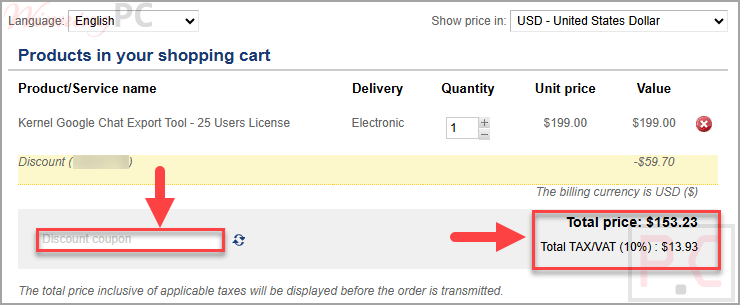
30% off coupon code: regular price $199.0, discounted price $139.3

−30%

Kernel Google Chat Export Tool - 50 Users License

Kernel Google Chat Export Tool - 50 Users License

30% off: regular price $399.0, discounted price $279.3

−30%
Kernel Google Chat Export Tool - 100 Users License

Kernel Google Chat Export Tool - 100 Users License

30% off: regular price $699.0, discounted price $489.3

−30%
Kernel Google Chat Export Tool - 250 Users License

Kernel Google Chat Export Tool - 250 Users License

30% off: regular price $1,299.0, discounted price $909.3

−30%
Kernel Google Chat Export Tool - 500 Users License

Kernel Google Chat Export Tool - 500 Users License

30% off: regular price $2,299.0, discounted price $1,609.3

−30%
  • 30-day money-back guarantee
  • 24×7 free support
  • Delivery key via email in 15 minutes.
  • Secure checkout

Click ‘Copy Code’ to save your discount and proceed to the checkout page. Please review your order details and final total before completing your purchase.

kernel google chat export tool coupon code
Kernel Google Chat Export Tool Coupons: 30% Discount (Jun 2026) 1

Kernel Google Chat Export Tool helps users export Google Chat data from Google Workspace accounts to local or NAS storage. It supports exporting conversations, attachments, and metadata while preserving the original structure and formatting.

Kernel Google Chat Export Tool Coupons
Kernel Google Chat Export Tool Coupons: 30% Discount (Jun 2026) 2
  • Export chats to PDF and HTML: save conversations in widely used file formats.
  • Supports multiple chat types: export direct messages, group chats, and Spaces.
  • Attachment handling: saves all shared files into separate folders within the backup directory.
  • Advanced search: find specific Google Workspace users quickly using name or Gmail ID.
  • Selective export filters: filter data by date, chat type, and attachments.
  • Multiple instances support: run several export processes simultaneously without overlap.
  • Local and NAS storage support: choose where to store exported data.
  • Preserve structure and formatting: maintains chat content, permissions, and layout.
  • Export reports to CSV: generate reports after completion for record-keeping.
  • Real-time progress tracking: monitor export status with live summaries.

Pros & Cons

PROS
  • Exports Google Chat to PDF and HTML.
  • Supports direct messages, group chats, and Spaces.
  • Saves attachments in separate folders for easier organization.
  • Includes search and filter options for selective export.
  • Can export to local or NAS drives.
  • Provides real-time progress, backup logs, and CSV reports.
  • Preserves content and formatting during export.
CONS
  • Free demo is limited to 3 chats of 1 Google Workspace user.

More screenshots

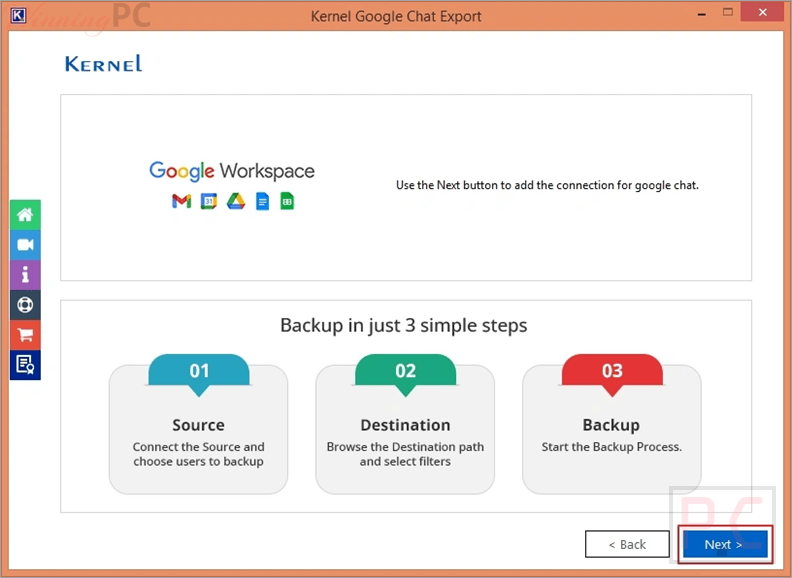
kernel google chat export tool enter google workspace credentials
Kernel Google Chat Export Tool Coupons: 30% Discount (Jun 2026) 3
kernel google chat export tool select google chat users
Kernel Google Chat Export Tool Coupons: 30% Discount (Jun 2026) 4
kernel google chat export tool select output file type
Kernel Google Chat Export Tool Coupons: 30% Discount (Jun 2026) 5

What data is included in the export?

It includes messages, mentions, attachments, metadata, and more.

Can I export only specific chat types like Spaces?

Yes, you can use chat type filters to export only Spaces or other selected chat types.

Is there a free version available?

Yes, a demo version allows saving 3 chats of 1 user for testing purposes.

Can I export chats for multiple users at once?

Yes, the tool supports bulk export for multiple Google Workspace users.

Where are attachments saved after export?

Attachments are stored in separate folders within the user’s chat backup directory.

Can I export Google Chat to HTML format?

Yes, HTML is supported as an output format during the export process.

Can I save Google Chat as a PDF using this tool?

Yes, the tool allows exporting chats directly into PDF format along with full conversation data.

Where can I find the latest Kernel Google Chat Export Tool coupon code?

You can use the current code VW***30 to get 30% off on supported licenses on WinningPC.

FeatureSpecifications
Operating SystemWindows 365, 11, 10, 8.1, 8, 7, Vista, XP, 2000, 98, NT, 95
Windows Server Support2022, 2019, 2016, 2012, 2008 R2, 2008, 2003 R2, 2003
ProcessorIntel® Pentium compatible (x86, x64) or equivalent
MemoryMinimum 128 MB
Disk Space500 MB
8.5Expert Score
Very Good

Kernel Google Chat Export Tool focuses on exporting and organizing Google Chat data with support for multiple formats and user accounts.
(Review by Laura Marano – tech writer and software reviewer at WinningPC)

Overall
8.6
Functionality
8.5
Ease-of-use
8
Customer Support
9

5/5 - (268 votes)

Affiliate Disclosure: Some links on WinningPC are affiliate links. If you purchase through them, we may earn a small commission at no extra cost to you. This helps support our site and keeps our content free.

Laura Marano
Laura Marano

Laura Marano is the Content Manager at WinningPC with over 7 years of experience in software testing, content strategy, and digital marketing. She specializes in hands-on reviews of tools ranging from data recovery software to productivity solutions, ensuring every article is based on real user experience. Laura is passionate about helping readers choose the right software while saving money through verified coupon codes and exclusive giveaways. She collaborates directly with software developers to bring authentic deals to users. When not testing new tools, Laura shares her insights on LinkedIn, contributing to discussions about tech, and content strategy.

We will be happy to hear your thoughts

Leave a reply

Your total score

WinningPC
Logo
Register New Account