WinningPC
Kernel Microsoft Teams Migration is a versatile tool designed to facilitate the migration of Microsoft Teams data between Office 365 tenants. Tailored for IT administrators and enterprise users, it enables the transfer of entire Teams, including channels, posts, chats, files, conversation history, tabs, calls, activities, meetings, notes, wikis, members, planners, permissions, and Teams Chat from one Microsoft 365 tenant to another. Whether you’re migrating individual Teams or conducting bulk transfers, this tool ensures that no critical information is left behind, preserving accuracy, data integrity, and continuity of organizational workflows.
Kernel Microsoft Teams Migration also supports incremental migration, allowing the transfer of newly arrived or updated data after the initial migration. This prevents duplicate items and ensures the most current information is available at the destination. Additionally, the software offers advanced filtering options, enabling selective migration of specific teams, channels, posts, or files, providing flexibility and control over the process. It retains the original folder hierarchy, metadata, team ownership, members, roles, and settings, ensuring collaborative structures and permissions remain intact. This significantly reduces the need for post-migration reconfiguration while maintaining security and compliance.
Kernel Microsoft Teams Migration Coupon Code Oct 2026

Kernel Teams Migration - 10 Teams
42% off coupon code: regular price $599, discounted price $349.30
Kernel Teams Migration - 25 Teams
44% off coupon code: regular price $999, discounted price $559.3
Kernel Teams Chat ( 1: 1 ) Migration - 10 users
44% off coupon code: regular price $499, discounted price $279.3
Kernel Teams Chat ( 1: 1 ) Migration - 25 users
46% off coupon code: regular price $899, discounted price $489.30
Kernel Teams or 1 : 1 Chat Backup - 10 Users
44% off coupon code: regular price $499, discounted price $279.30
Kernel Teams or 1 : 1 Chat Backup - 25 Users
46% off coupon code: regular price $899, discounted price $489.3
Key Features and Screenshots

- Comprehensive Data Migration: Kernel Microsoft Teams Migration is designed to migrate all Teams components: public and private teams, channels, files, conversation history, tabs, calls, activities, meetings, notes, planners, members, permissions, and Teams Chat.
- Preservation of Metadata, Hierarchy, and Permissions: The software retains the original folder hierarchy, metadata, team ownership, members, owners, and settings. This guarantees that collaborative structures and permissions remain intact post-migration, reducing post-migration reconfiguration and maintaining security and compliance.
- Bulk Migration Capabilities: This migration tool supports the migration of single as well as bulk Teams and Channels with metadata, saving significant time and effort. This feature is particularly useful for large organizations undergoing mergers, acquisitions, or tenant consolidations.
- Incremental Migration: Kernel Microsoft Teams Migration supports incremental migration, allowing you to migrate newly arrived or updated data after the initial migration. This ensures that no duplicate items are transferred, maintaining data integrity.
- Selective Migration Options: It also offers selective migration channels and Teams objects with advanced filters, allowing you to include or exclude specific teams, channels, posts, or files as needed, providing flexibility in the migration process.
- Cross-Tenant Migration: The tool excels in cross-tenant migration, no matter which Office 365 plan you’re using (Microsoft 365 Business & Enterprise versions), efficiently transferring data between different Office 365 tenants. This is important for organisations that need to migrate data due to tenant changes or consolidations.
- Detailed Reporting: Kernel Microsoft Teams Migration will send a comprehensive report containing all details of the Microsoft Teams migration to another tenant, including any omitted or failed parts and more. Detailed migration status reports are generated in CSV format, allowing administrators to monitor progress, identify errors, and ensure accountability throughout the migration process.
- Secure Data Transfer: The migration process is designed to be secure and reliable, ensuring that all data is transferred securely without any risk of data loss or breaches.




Frequently asked questions
Who can benefit from using Kernel Microsoft Teams Migration?
Organizations undergoing mergers, acquisitions, or restructuring, as well as IT administrators managing tenant consolidations, can benefit from this tool to efficiently migrate Teams data without data loss.
What types of Teams data can be migrated?
The tool supports migration of various Teams components, including:
– Public and private teams
– Standard, shared, and private channels
– Chats (1:1 and group)
– Files, tabs, and apps
– Meetings, notes, and planners
– Members, owners, and permissions
Does Kernel Microsoft Teams Migration maintain the original structure and metadata?
Yes, it preserves the original hierarchy, metadata, timestamps, and message statuses during migration, ensuring consistency in the destination tenant.
Can I perform selective migrations?
Absolutely. Kernel Microsoft Teams Migration offers advanced filtering options, allowing users to migrate specific teams, channels, or date ranges as per their requirements.
How do I perform a migration using Kernel Microsoft Teams Migration?
The process involves:
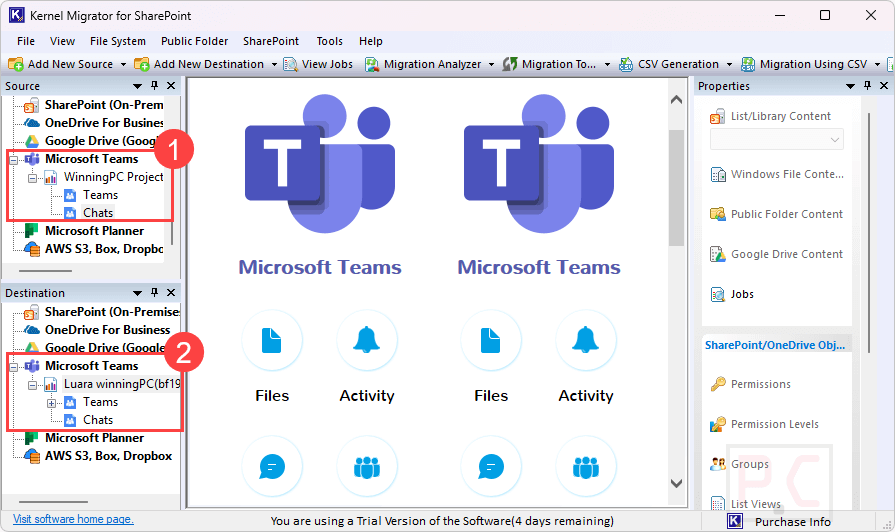
– Adding source and destination Teams accounts
– Mapping teams and channels between tenants
– Selecting specific data or performing a full migration
– Initiating the migration and monitoring progress
Are there any discounts available?
Yes, you can use the coupon code VW***30 provided by WinningPC to receive a 46% discount on your purchase.
Technical Details
| Language Support | English, Français, Italian, Spanish, Swedish, and more… |
| Money Back Guarantee | 30-Day |
| Operating System | Windows 365 (Cloud PC), 11, 10, 8, 7 Server Pack 1, Windows Server 2022, 2019, 2016, 2012 R2, 2012, 2008 R2, 2008, 2003 |
| Shipping | Register code will be sent to your email in minutes |
| Subscription | Lifetime |
| Support Services | Email, Tickets, Forums, Phone |