
On this page
MultCloud Premium Giveaway
MultCloud Premium
Transfer and manage your multiple cloud files with one app
- Product
- MultCloud Premium
- Product website
- multcloud.com
- License
- 3 Months (200GB data traffic)
- Platform
- Online Tools
Mobile Apps - Support
- Free support
- Usage
- Non-commercial only
- Updated
- 2026-10-10
Continue on prf.hn
Share to reveal your license code and the official claim page.
This giveaway ended on .
For new users only!
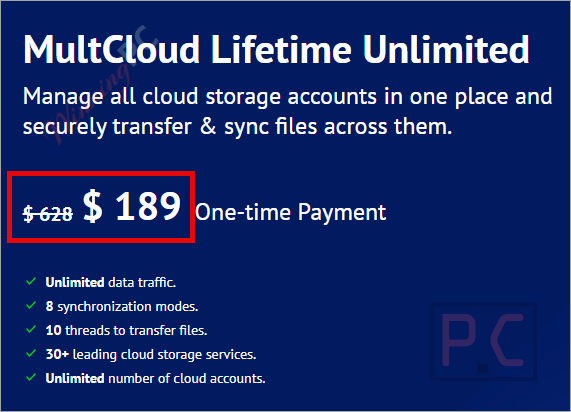
Enjoy 70% Off MultCloud Lifetime Unlimited
MultCloud Premium Coupon Code Oct 2026

AOMEI 2026 Halloween promotion: Up to 80% OFF
Join AOMEI's Halloween Sale 2026 and save up to 80% on popular software and the new Family Bundle. Protect, manage, and recover your valuable data for less. The event ends on Nov 15th, 2026!

MultCloud Biggest Discount Ever: Save Up to 70%!
Save up to 70% during MultCloud’s Biggest Discount Ever promotion. Securely transfer, sync, and back up files between cloud drives with one simple, all-in-one solution.
MultCloud Lifetime Unlimited
Onetime payment, lifetime use | Unlimited data traffic for a lifetime
📄 Licensing & Support Details
- License Type: Free version (5GB data traffic/month) and Premium plans (Monthly, Yearly, Lifetime).
- Support: Provided via email support team.
- Money-Back Guarantee: Not specified in the provided data.
📝 How to apply
- To grab this deal, click the “Copy” button in the box above.
- The promo applies automatically, taking you directly to checkout to lock in your software at a discounted price.
Is this MultCloud offer safe to use?
Yes – this is an official giveaway from MultCloud’s own platform, and the security setup is solid.
No crack or keygen
MultCloud is a web-based service. There is nothing to patch or repackage; you register an account and enter an official activation code. That is the whole process.
256-bit AES encryption
All data transmitted between MultCloud’s servers and your cloud providers (Google Drive, OneDrive, Dropbox, etc.) travels over a 256-bit SSL channel. This is the same encryption standard banks use.
OAuth authorization only
MultCloud connects to your cloud accounts via OAuth, so it never sees or stores your account passwords. You grant specific permissions and can revoke them from your cloud provider’s settings at any time.
No permanent file storage
Files are temporarily cached during an active transfer and deleted from MultCloud’s servers the moment the task finishes. Your data does not sit on MultCloud’s infrastructure after the operation completes.
How to Get the MultCloud Giveaway Premium License for Free?
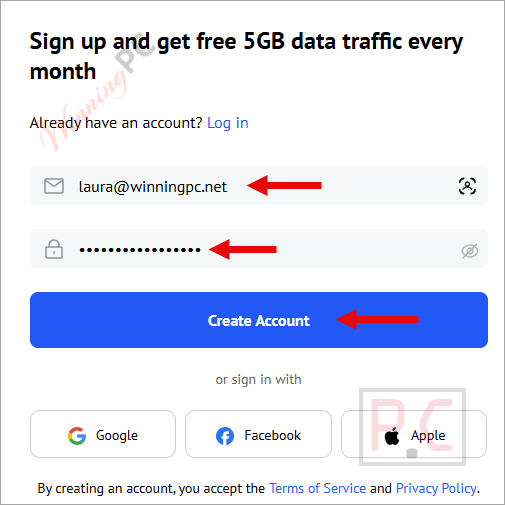
- Open the MultCloud Premium redeem page, enter your email address and password to create your free account.
- Please check your email to confirm your registration.
- Log in with your account.
- Enter the license code above to get 200GB of data traffic for 3 months and access to all the advanced features for a year.


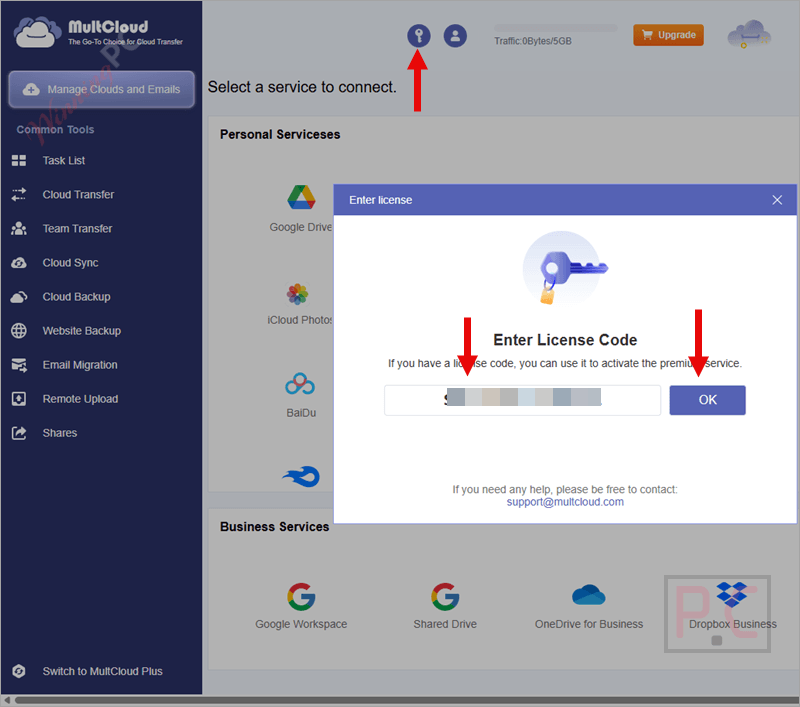
Login to your MultCloud account, and click the user icon on the right side you can see account settings and other options (change language, create a sub-account,…)
On the left side are common tools (task list manager, cloud transfer/sync/backup,…)

To use this service to manage your cloud accounts, you have to add these cloud storage services to MultCloud first.
Just click the “Add Cloud” button, then choose a cloud service to connect. Following the instructions of MultCloud Premium for each cloud service, you must agree to its authorization or enter the username/password to finish this step:

Now all your cloud services are showing on the left side (under the “My Cloud Drives” section).
Left-click to manage a cloud, such as browse data, copy, cut, delete, rename, copy, etc.
Right-click to rename the cloud or remove it from MultCloud:

Select a task – Cloud Sync for example just select source and target cloud then press “Sync now” to start this task.

You also have other options for this task: sync mode (normal sync, one-way sync, two-way sync, simple sync, email notification, filter,..)

All tasks appear on the “Task List” section: you can manage cloud transfer, cloud sync, and shared file saving tasks here.

How well does MultCloud actually work?
MultCloud transfers files between cloud storage services using its servers, so transfers continue after you close the browser without using your local bandwidth. It supports more than 30 cloud services and offers eight sync modes, including real-time, one-way, two-way, and scheduled sync. It can also back up Gmail emails and attachments as PDFs to cloud storage. MultCloud is useful for large cloud migrations and regular cross-cloud backups. Transfer traffic is limited by the available data allowance, including the 200GB allowance provided with the free giveaway.
Key features
- 1-Cloud File Transfer: Migrate files directly from one cloud service to another (e.g., from Dropbox to Google Drive) without using your local bandwidth. Transfer tasks run in the background even if your browser is closed.
- Cloud Sync: Keep folders matched between two different cloud drives in real-time. It supports both one-way and two-way synchronization, alongside timed sync intervals.
- Cloud Backup: Back up data from one drive to another and quickly recover lost files by restoring them from your saved backup versions.
- Email Migration: Back up your Gmail conversations and attachments in bulk, saving them directly to your computer or cloud drive as PDF files.
- Cloud Explorer: Manage your files across multiple clouds with a single login. You can upload, download, copy, cut, preview, rename, and share files just like you would in Windows Explorer.
- Extensive Integration: Supports over 30 online storage services, including Google Workspace, SharePoint, MEGA, pCloud, Amazon S3, and standard FTP/WebDAV.
- Security Guarantee: Uses 256-bit AES encryption for data transmission and OAuth authorization to connect your accounts, ensuring your passwords are never saved on their servers.
pros & cons
Common Questions About MultCloud Premium
Where can I track down active promo codes and deals for MultCloud?
To find the most reliable discounts for this cloud management tool, check out WinningPC. We regularly update our platform with the latest verified offers and coupons alongside official promotions.
What is the absolute highest discount currently available for MultCloud?
Right now, you can lock in a massive 75% OFF the Lifetime Unlimited plan through the exclusive deals featured on WinningPC.
Is MultCloud a cloud storage service itself?
No, it acts as a management channel. It does not provide its own storage space. Instead, it lets you move files between your existing cloud drives based on the free space available on your destination cloud.
Do I need to keep my browser open during a cloud transfer?
No, you do not need to keep your browser working. Once you schedule or start a cloud transfer task, it processes on the servers.
Can I access MultCloud through an Android or iOS app?
At present, there is no separate mobile application available. It is accessed entirely through your web browser.
Will transferring files delete my original data?
By default, the transfer task simply copies the data from the source to the target drive. However, if you check the option to “Delete all source files after transfer is complete,” it will remove the original files.
How does MultCloud keep my passwords safe?
The platform uses the OAuth authorization protocol, which allows it to build a connection to your cloud services with your permission, without ever requiring or seeing your actual usernames and passwords.
Is it possible to migrate my emails using this service?
Yes, you can directly back up and save your Gmail emails, including attachments, as PDFs to your computer or directly to a cloud drive in bulk.
System Requirements & Details
| Operating system | Web-based – any modern browser (Chrome, Firefox, Edge, Safari) |
| Desktop client | None required |
| Internet connection | Required for all operations |
| Supported cloud services | Google Drive, Google Workspace, OneDrive, OneDrive for Business, SharePoint, Dropbox, Dropbox Business, MEGA, Google Photos, iCloud Photos, FTP, Box, and 30+ others |
| Supported input formats | Not applicable – MultCloud transfers files as-is between cloud drives; format support depends on the file type stored in your cloud |
| Supported output formats | Not applicable (see above). Email migration outputs Gmail messages and attachments as PDF files |
| Account requirement | A MultCloud account (free to create) |

![[Contest] Rain Cleaner Pro Giveaway: Win 1 of 50 Free 1-Year Licenses](https://winningpc.com/wp-content/uploads/2026/10/rain-cleaner-pro-icon.png "rain cleaner pro icon")


WHEN WILL THE GIVEAWAY BE RENEWED
I don’t know, I will notify you when it starts running.
is not umlimited traffic , only give you 200 G
Thanks for your report, you’re right!
The new giveaway gives 200GB/month only.