WinningPC
Personally, Notta AI Notetaker really takes the stress out of keeping track of conversations, whether I’m in a meeting, a class, or just on a call. It converts spoken words into text instantly, and it works in 58 languages, which is super helpful if you’re working with people from different places. What I love is that it doesn’t just give you a transcript; it also pulls out the key points, decisions, and action items. I can use it on the web, my iPhone, Android, or even as a browser extension, so it’s always there when I need it.
Notta AI Notetaker also connects smoothly with tools I already use, like Zoom, Google Meet, Teams, Notion, and Slack. Saving notes is simple too; I can export them as TXT, Word, PDF, or SRT. Plus, the built-in noise reduction really helps keep transcriptions accurate. Whether you’re in sales, consulting, journalism, studying, or working remotely, it just makes note-taking easier and more collaborative.
Notta AI Notetaker Plans & Coupon Codes (100% Working)
Notta AI PRO - Monthly
40% discount coupon code: regular price $13.49, discounted price $8.09
Notta AI PRO - Annually
64% discount code: regular price $161.88, discounted price $58.79
Notta AI Business - Monthly
40% discount code: regular price $27.99, discounted price $16.79
Notta AI Business - Annually
64% discount coupon: regular price $335.88, discounted price $119.99
Notta Education Discount
If you are a student or teacher, you can purchase the Annual Pro Plan, Annual Business Plan and Monthly Business Plan at a 50% discount.
Key Features and Screenshots
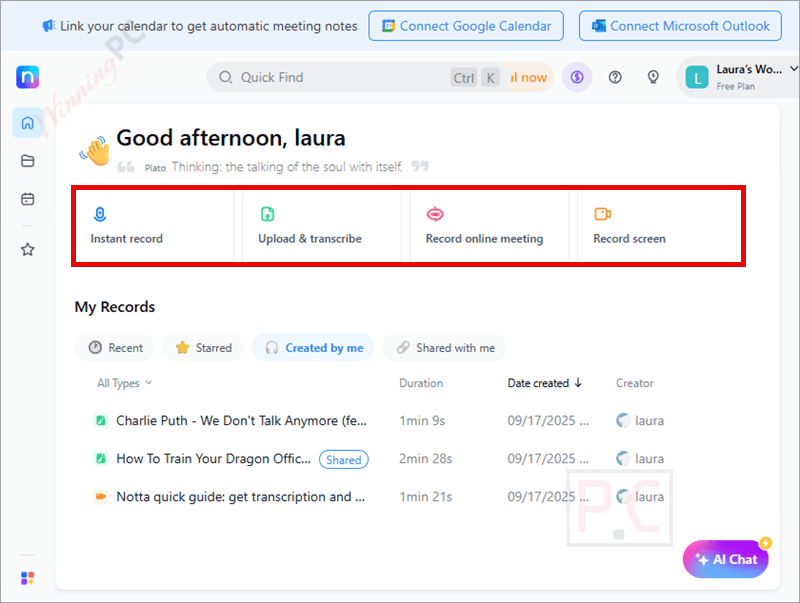
- Real-time transcription: Turn your live meetings, calls, or recordings into accurate text instantly. No waiting around; you can follow the conversation while the transcript builds itself.
- Smart summaries with one click: Skip the long pages of notes. This tool condenses your meetings into digestible summaries, pointing out decisions, action items, and highlights you can act on right away.
- Multi-language support: With 58 languages available, Notta works just as smoothly for international teams, lectures, or cross-border projects.
- Seamless collaboration: Share notes, summaries, or clips directly with colleagues via Slack, email, or project tools. Everyone stays updated without extra effort.
- Highlight and clip important moments: Instead of sending full transcripts, you can cut out the key parts and share only what matters most.
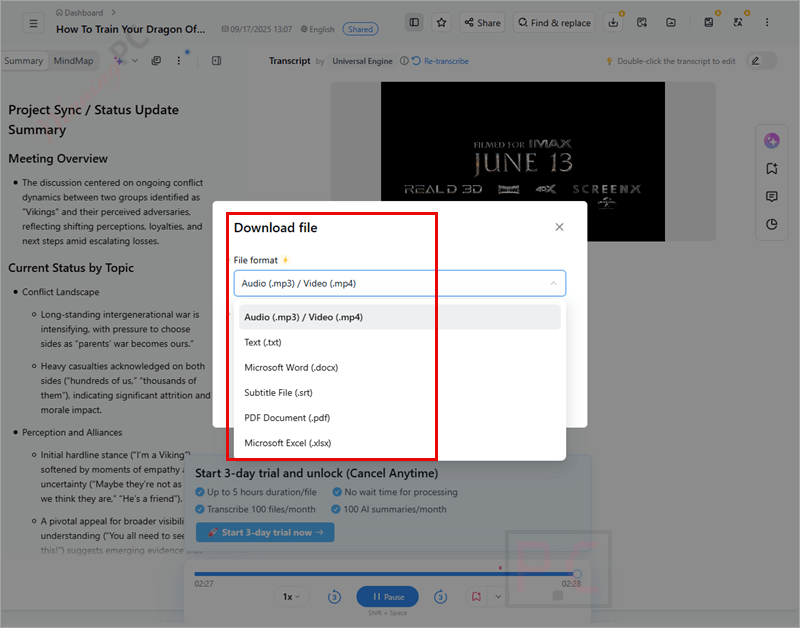
- Flexible exporting: Save your work as TXT, Word, PDF, or SRT files, or push it straight into tools like Notion for future use.
- Integrations that fit your workflow: Connect with Zoom, Google Calendar, Outlook, Salesforce, Slack, and many others through Zapier. Notta slips right into the tools you already rely on.
- Enterprise-level security: Built with SOC 2, GDPR, HIPAA, and ISO 27001 compliance, so your conversations and customer data remain fully protected.
- Time savings: Transcribes an hour-long recording in roughly five minutes, cutting your note-prep workload by half.
Notta AI Notetaker Pros and Cons
How to Use (Step-by-Step Guide)
Step 1. Sign up or log in
Go to Notta’s website or open the mobile app (iOS/Android). Create a free account or log in with Google, Apple, or email.
Step 2. Choose your recording method
You can:
- Start a live recording during a meeting or lecture.
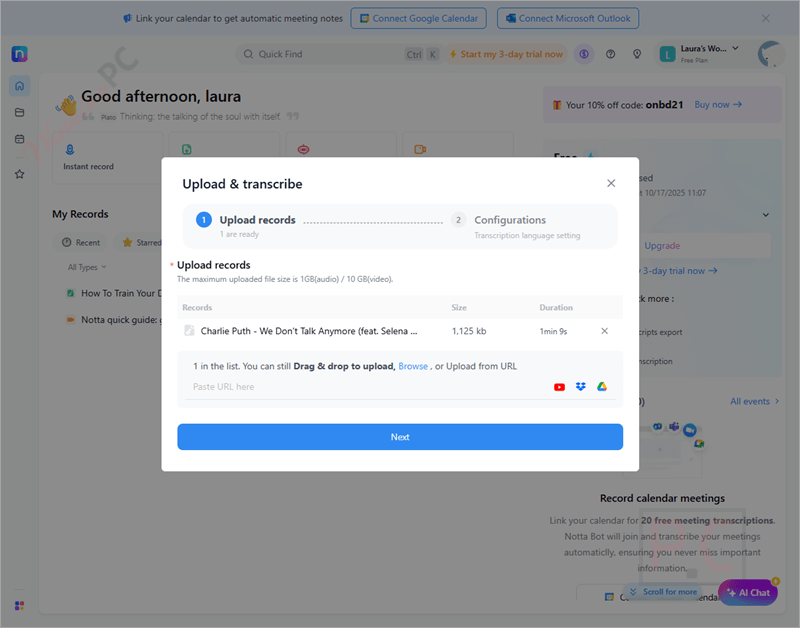
- Upload an audio or video file you already have.
- Connect Notta with apps like Zoom or Google Meet for automatic transcriptions.
Step 3. Start recording/transcribing
Hit the “Record” button or upload your file. Notta begins real-time transcription and displays text on screen while capturing audio.
Step 4. Edit and organize
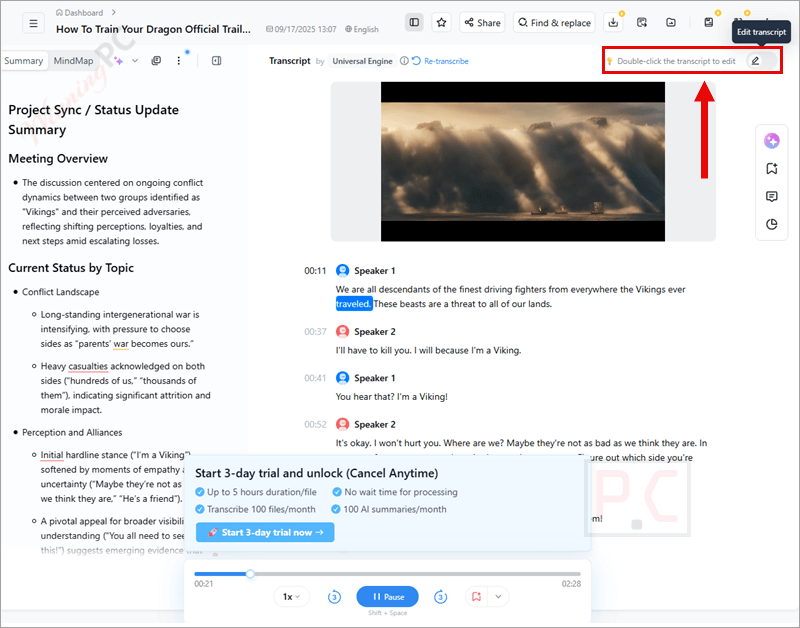
Once your transcript is ready, you can edit text, highlight key points, or mark important sections directly in Notta’s editor.
Step 5. Generate a summary
Click on the AI summary tool to get instant meeting highlights: like action items, decisions, or key takeaways.
Step 6. Share with others
Send notes via email or Slack, export them as TXT, Word, PDF, or SRT files, or sync with Notion, Salesforce, and other tools.
Step 7. Review anytime
Access all your transcripts and summaries in your Notta dashboard, organized and searchable for easy reference later.
Frequently Asked Questions
How accurate is the transcription?
In clear audio settings, the accuracy is very high. Like any AI tool, accuracy may drop in noisy environments or with overlapping voices.
Can Notta create meeting summaries automatically?
Yes. With a single click, Notta AI Notetaker generates concise summaries that highlight decisions, action items, and discussion points.
What export options are available?
You can export notes and transcripts as TXT, Word, PDF, or SRT files, or send them directly to tools like Notion, Slack, or Salesforce.
Does Notta integrate with popular apps?
Definitely, Notta AI Notetaker connects with Zoom, Google Calendar, Outlook, Slack, Notion, Salesforce, Zapier, and more.
Can Notta identify different speakers?
Yes, Notta has speaker identification to make transcripts easier to follow.
Is there a discount available?
Yes! WinningPC provides an exclusive coupon code no**0 that gives you up to 64% off your Notta.ai subscription.
Why Choose WinningPC
At WinningPC, we are committed to providing 100% valid and verified coupon codes, so you can always shop with confidence.
- If you encounter an invalid code or a better offer, please let us know.
- Our team updates all discount information regularly to ensure accuracy.
- Official Authorization: We only share authentic discounts from trusted software developers.
- No Fake Discounts: Unlike some sites, we never use misleading deals. The final price you see is the true discounted price.
- Secure Purchases: All transactions are processed on the official vendor’s website, ensuring authenticity and data protection.
- Extra Support: If you face order or vendor issues, contact us. We’ll liaise with the vendor to help resolve your problem quickly.
Technical Details
| Language Support | Notta supports 58 languages for transcription |
| Money Back Guarantee | Non-refundable |
| Operating System | iOS (10.0 and later) Android (7.0 and later) Web browsers: the latest Chrome, Edge, and Safari for Mac/PC. Works on smartphones, tablets, and via the web. |
| Shipping | Register code will be sent to your email in minutes |
| Subscription | 1-Month, 1-Year |
| Support Services |