
On this page
ON1 NoNoise AI Giveaway
ON1 NoNoise AI
NoNoise AI holds up well exactly where noise usually wins: high-ISO wildlife, dim interiors, astrophotography.
- Product
- ON1 NoNoise AI 2024.5
- Product website
- on1.com
- License
- Lifetime
- Platform
- Windows & Mac
- Updates
- No future upgrades
- Support
- Free tech support
- Updated
- 2026-07-16
Continue on winningpc.com
Share to reveal the official giveaway page, then register there to receive your license.
This giveaway ended on .
57% Off ON1 NoNoise AI - Lifetime License
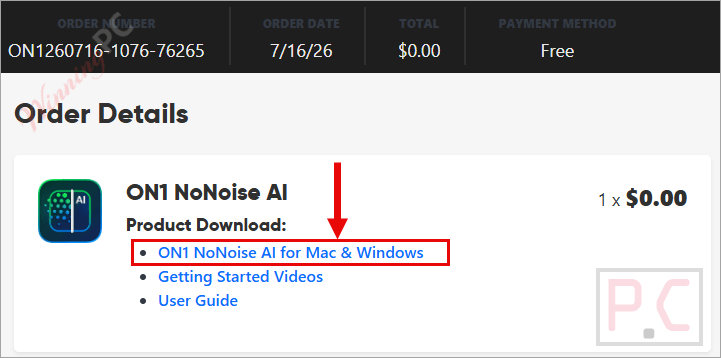
How to claim your free ON1 NoNoise AI license
- Open the official ON1 NoNoise AI giveaway page, then click on the “Claim Your Copy” button.
- Following the instructions to get ON1 NoNoise AI for free.
- You need to sign in to your ON1 account or create an ON1 account to activate the product.
- Download and install ON1 NoNoise AI on Windows or Mac.
- Log in with your account and enjoy the ON1 NoNoise AI 2024 full version for free.

ON1 NoNoise AI Plans & Coupon Codes

In-Depth Review & Features
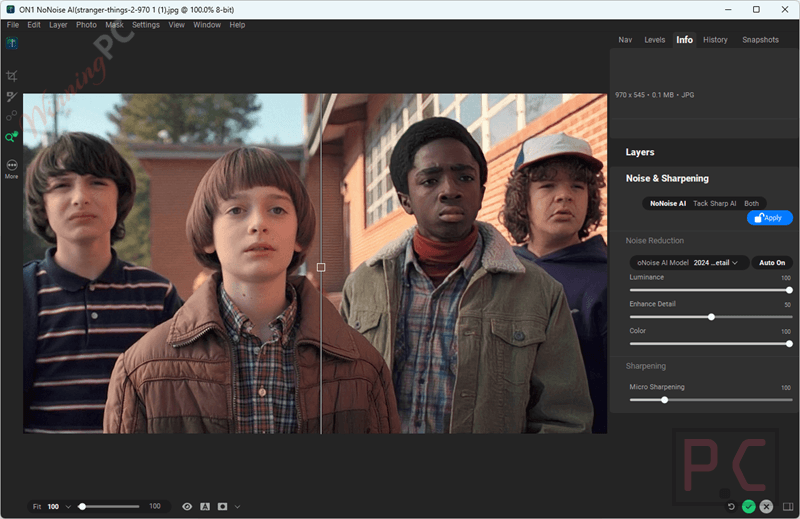
ON1 NoNoise AI holds up well exactly where noise usually wins: high-ISO wildlife, dim interiors, astrophotography. The AI does a solid job telling grain apart from real texture, so images don’t end up with that flat, over-smoothed look cheaper denoise tools produce. The bigger surprise is Tack-Sharp AI, which pulls detail back out of motion blur, useful for a bird’s wing mid-flap or a handheld shot where the shutter speed dropped too low.
Key features
- ON1 NoNoise AI is an intuitive and reliable noise-reduction software that lets you remove noise from photos, preserving the sharpest details in your images. With the help of AI, this tool is able to remove all image noise as well as intelligently recover and enhance the details in pictures.
- This noise-reduction software offers a professional solution that helps users edit their images and save them as DNG raw files while maintaining the full tonal and color range. It also supports popular image file formats, including PNG, JPEG, and more.
- ON1 NoNoise AI developed Tack Sharp AI, a state-of-the-art AI noise-reduction software. With it, you can easily and freely sharpen or deblur details in your images. The motion blur is detected and removed to be saved in your files for later use. Even this tool supports saving out-of-focus shots.
- You can preview the adjustments at super-fast speed, in just a fraction of the time. Also, this tool is designed not only to adjust images but also to maintain sharpness.
- Another noteworthy feature of noise-reduction software is its exclusive progressive sharpening algorithm. With its help, your images will be sharpened, and the size of the details in the photo will also be adjusted according to your wishes.
- It is said that ON1 NoNoise AI is a wonderful software for reducing noise in images. As you know, most raw image noise comes from the demosaicing process, and ON1 NoNoise AI can perform AI-based demosaicing. You will get the perfect images with reduced noise and increased detail and sharpness.
- ON1 NoNoise AI includes layers to combine multiple renditions of a picture or even numerous pictures. It also offers the “Auto” button to analyze the picture and determine the correct amount of noise. This function will work according to your preferences.
- ON1 NoNoise AI can batch-process settings for a group of images in no time at all. You can drag a folder or a file into the software to open it and start modifying the images.
Pros & Cons
More ON1 NoNoise AI screenshots!


Frequently Asked Questions
Do I have to pay anything to claim this ON1 NoNoise AI giveaway?
No. Registering through the official giveaway page gets you a free Lifetime license, no payment required.
What happens if I miss the giveaway?
The free giveaway closes and you’ll need to buy the Full Version instead. WinningPC readers can still use code FW**CC for 10% off ($62.99, regular $69.99).
Does ON1 NoNoise AI upload my photos to the cloud?
No. Processing happens locally, so your photos aren’t uploaded anywhere or used to train external models.
How do I claim my free ON1 NoNoise AI license?
Register with your name and email on ON1’s official giveaway page before July 31, then activate the key you receive by email.
System Requirements & Details
| Language Support | English, Français, Italian, Spanish, Swedish, and more… |
| Money Back Guarantee | 30-Day |
| Operating System | Windows & macOS |
| Shipping | Register code will be sent to your email in minutes |
| Subscription | Lifetime |
| Support Services | Live Chat, Tickets |






it’s an ancient version 2024… not worth handing over email and other personal details to create yet another account just to obtain obsolete software. I also note this is a closed source proprietary licensed product but it incorporates GPLv2 licensed FFMPEG.ORG DLLs illegally distributing them. They had the option to build the DLLs to only include LGPLv3 code and make them legal to distribute in a closed source proprietary licensed product but they CHOSE to steal Intellectual Property and pass it off as their own works, illegally. And despite the installer letting us specify install folder and point ProgramData to a different drive if you choose to install for all users rather than download the AI model files to the chosen drive for installation or ProgramData it installs them in on the SYSTEM drive in the logged in users AppData\Roaming\ subfolder meaning if the program is used by multiple users then MULTIPLE coppies of the model files will be downloaded into each logged in users AppData\Roaming subfolders so none of the model downloads are shared across users! BAD WASTEFUL DESIGN! 1.39GBytes of the system drive per user account on your system using this program!
Uninstalling because it does not do enough to warrant the drive space taken up!
Watch out with this one… there appears to be NO UNINSTALL utility or entry in Programs and Features and and no uninstall executable in the installation folder… you will have to manually uninstall this using administrative tools to remove start menu entries and any shortcuts and program folders and data folders … it is NOT a proper windows program as all proper windows installers generate an compatible uninstaller to undo what the installer did and hopefully clean up data folders too… this does NONE of that!
navigate to the folder where you originally installed the program and double click on the file “Maintenancetool.exe” to perform the basic uninstall and then navigate to the folders in
C:\Users\[WINDOWSLOGIN]\AppData\Roaming\ON1\ON1 NoNoise AI 2024
and delete it… would be around 2GBytes when fully populated.
And C:\ProgramData\ON1 or where ever you assigned during installation and delete the approx 55MBytes there.