
 Laura Marano
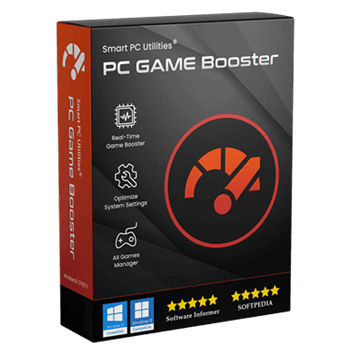
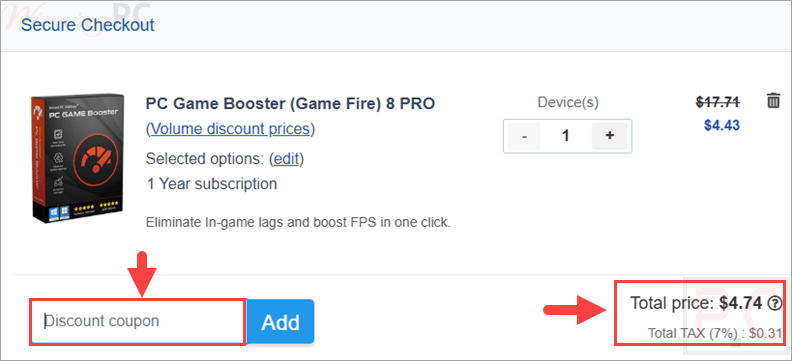
PC Game Booster is free right now through an official giveaway — claim a 1-year license (worth $31.58) at no cost, ✅ verified Oct 2026. Just register on the developer’s giveaway page below to get your key. Prefer the latest version with updates? Use code P4X***G5M for 85% off ($4.74). Works on Windows 11/10/8.1.
PC Game Booster Pro (formerly Game Fire) improves the gaming experience without lag. It can optimize your PC’s performance to eliminate in-game lag, boost FPS, and deliver a great gaming experience.
PC Game Booster Pro
Optimizes your PC for gaming and boosts in-game FPS by improving system performance and reliability.
- Product
- PC Game Booster Pro
- Product website
- smartpcutilities.com
- License
- 1-Year
- Platform
- Windows 11/10/8.1
- Installer
- gamebooster-setup.exe
- Usage
- Non-commercial only
- Updates
- You get free updates for 1-year
- Support
- No free tech support
Continue on smartpcutilities.com
Share to reveal the official giveaway page, then register there to receive your license.
This giveaway ended on .
85% Off PC Game Booster 8 PRO - 1 Year
PC Game Booster Coupon Codes (100% Working)
PC Game Booster Pro
7 plans · best save 85%

📝 How to apply
Click the ‘Copy Code’ button in the coupon box above. The code will be copied, and you will be redirected to the checkout page, where you can apply it to secure your discounted price.
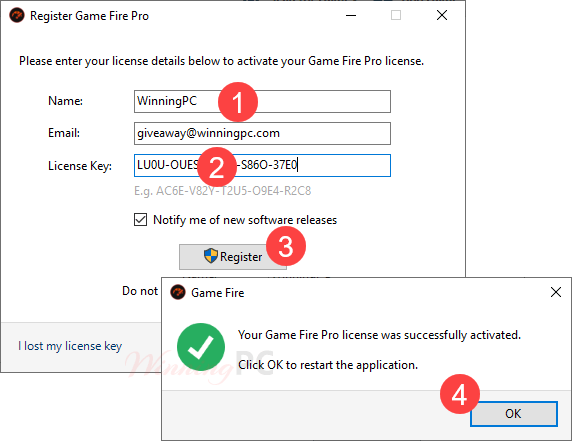
Activation Guide: PC Game Booster PRO License for Free
Go to the giveaway page, and click on the “Get Free License” button to get your license key for PC Game Booster Pro.


The download link for PC Game Booster Pro is provided to you above, just download and install the software on your computer. After installation, run the program and register it with your license key. You can register by going to REGISTER from within the main program window:
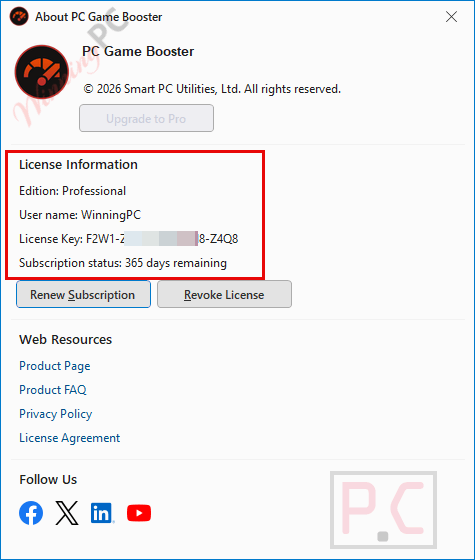
Enjoy it for 1-year with the free update:
PC Game Booster Pro: Review & Features

Key Features:
- Real-time Game Booster: Enhances performance instantly to ensure games utilize all available system resources effectively.
- System Optimizer: Tweaks system and internet settings for a stable, less interrupted experience.
- All Game Manager: Centralized interface to manage all titles, including those from platforms like Steam and Uplay.
- Live Optimization: Allocates higher processing priority to active applications and automatically reclaims memory when it drops too low.
- Customizable Optimization: Provides tools such as a file defragmentation utility, an applications optimizer, and a settings tweaking tool.
- Third-Party App Control: Intelligently identifies and suspends non-critical scheduled tasks and Windows services from third-party software.
- Health Monitoring: Displays real-time hardware data, including CPU and GPU temperatures and clock speeds.
Pros & Cons
More screenshots:


Frequently Asked Questions
Where can I find a coupon code for PC Game Booster?
The latest and best deals can be found on WinningPC, alongside the official software website or the developer’s social media channels.
What is the best discount currently available?
The best current discount is 88% OFF, available directly on WinningPC.
Does PC Game Booster really increase game FPS?
Yes, it delivers measurable improvements in frame rates and stability by tuning up system and network settings, though results depend heavily on your current hardware.
Is it safe to use this software on my computer?
Absolutely. The system optimizations are temporary, and the software does not overclock your hardware, ensuring your CPU and GPU remain safe from damage.
Can it optimize non-gaming applications?
Yes, it can effectively optimize third-party applications by suspending unnecessary background services while you use your priority apps.
Will my system go back to normal after I finish playing?
Yes, once you exit Game Mode, the software automatically restores all suspended background items and services to their normal state so your regular workflow is unaffected.
Can I monitor my computer’s temperature while gaming?
Yes, the software provides real-time updates on system health, displaying CPU and GPU temperatures as well as clock speeds directly on your screen.
System Requirements & Details
| Language Support | Chinese Simplified, English, French, German, Italian, Japanese, Portuguese, Russian, Spanish. |
| Operating System | Windows 11/10/8.1/8/7/Vista Requires .NET Framework 4.8 |
| Shipping | Register code will be sent to your email in minutes |
| Subscription | Lifetime |
| Support Services | Tickets |



Man kann euch nur Gratulieren für die verseuchte Software und verseuchten Seiten zu denen ihr hier Leute ohne Ahnung verführt. Respekt . Die Seite sollte man echt dicht machen!
Win11 22H2
Unable to write the license file to the local disk error code -206 Tried changing permission on installed directory, disabled avast anti virus, flushed dns and ran it as admin.
This same.. After uninstalling this program, I had an explorer error- .exe files could not be run. I had to repair/reinstall windows…
you have to re-associate the .exe i had to do this on another program also as it removed the extension also
Have you reinstalled Game Fire Pro yet? And what was the result?
I had the same problem on my Windows 10 PC and am still fixing it 🙁
Not trying to spam, But this should work. tenforums . com/tutorials/8703-restore-default-file-type-associations-windows-10-a.html
And the giveaway activation never worked after reinstall, I contacted smartpcutilities trough support ticket and haven’t heard back from them lol.
I’m using Malwarebytes….
You can check this thread: https://forums.malwarebytes.com/topic/294440-download-link-blocked-false-positive/
Website Blocked: http://www.smartpcutilities.com
v2.6.23 | Heuristics: suspicious content
Our website is 100% malware-free
https://www.virustotal.com/gui/url/083cb27d2176faf6e9dc55d739cd8915aab639e8a3ec060f243f0412d792a6ed
It could be a false positive. I’m using Kaspersky Premium and nothing happens.
Giveaway has expired – website for license key is no longer available!
Hi,
This is 24hrs giveaway only.