WinningPC

Are you looking for a PDF converter software to convert PDF files to image format on macOS? For this situation, an all-in-one PDF to Image Batch Converter program will come in handy. PDF to Image Batch Converter from PCWinSoft is a powerful PDF converter software that allows you to convert almost any PDF file to all the most common image formats such as PNG, JPG, etc. Besides, it is a batch pdf converter that allows you to convert large batches of PDF files at the same time.
PCWinSoft PDF to Image Batch Converter Free Key
- Product name: PDF to Image Batch Converter
- Website: http://www.pcwinsoft.com/
- License type: lifetime
- Platform: macOS
- Download: PDFImagicConverterInstall.dmg
- Giveaway link: click here
How to get the license key?
Open the PCWinSoft PDF to Image Batch Converter giveaway link and finish the giveaway form.
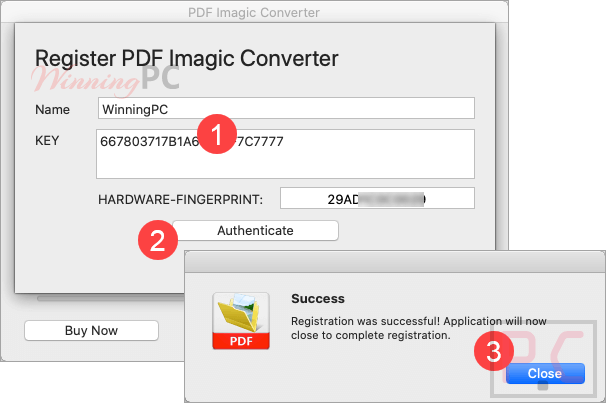
After that, just download and install this software on your Mac, launch it and choose “Register\Send REGISTRATION-KEY….”
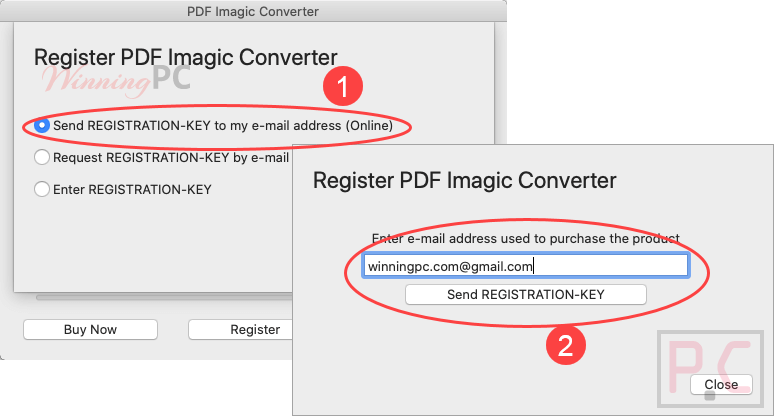
Check your mailbox for the free registration code, back to the software and register it:
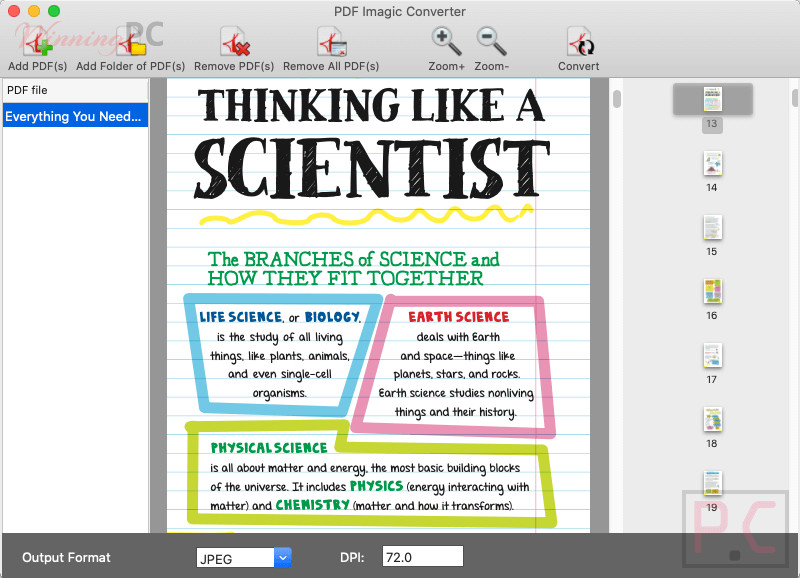
PCWinSoft PDF to Image Batch Converter screenshot:
Main Features
- Various converting output formats, including PNG, JPG, and all most common image formats
- Batch converts many PDF documents at once
- Conversion quality – converting files without losing format
- Set the range of pages from a PDF document you want to convert
- Can set the DPI of the images you want to save.
Technical Details
| Language Support | English, Français, Italian, Spanish, Swedish, and more… |
| Money Back Guarantee | 30-Day |
| Operating System | macOS |
| Shipping | Register code will be sent to your email in minutes |
| Subscription | Lifetime |
| Support Services | Tickets |