

PDFZilla is a simple yet efficient PDF converter solution for converting PDF files with ease. With this tool, you can convert PDF files into other formats such as Word documents (DOC/RTF), Excel spreadsheets (XLS), images (JPG/PNG/BMP/TIF/GIF), plain text files (TXT), HTML files, and more. This tool also allows you to control how your PDF file performs because you can choose a single page or a range of pages inside a PDF file for conversion, allowing you to convert only the pages you want.
You will work with features like an image converter, combining PDF files, PDF cutter, and PDF rotator. Among these main features, you are allowed to combine multiple PDF files into one or rotate PDF pages according to 90 degrees, 180 degrees, and 270 degrees. PDFZilla also integrates professional functions to help you create a PDF file from images like JPG/PNG/TIF/BMP/GIF etc. Another important feature of this software is the ability to cut PDFs. You can delete selected pages, delete odd pages, delete even pages, split to single PDF, and split page range.
PDFZilla Software Coupon Code Oct 2026 (100% Working)

PDF Tools Pack Special Offer
PDF Tools Pack (PDF Eraser Pro + PDF Replacer Pro + PDFZilla + PDF Anti-Copy Pro + Batch Word to PDF Converter Pro + PDF Page Merger Pro). 72% Off coupon code, regular price $179.70, discounted price $49.95
PDFZilla Giveaway License Key Free
- Product name: PDFZilla 3
- Website: https://www.pdfzilla.com/
- License type: lifetime
- Platform: Windows
- Download: pdfzilla_winningpc.exe
- License code – last updated: Aug 05, 2023
Click here...
- License code: MDOSOPM-Z4V20P-32EI1
Important information about registration:
The program can only be activated/registered correctly if you have previously selected a task such as “PDF to … Converter”. After that, you can register the program and only then will the registration with the registration code MDOSOPM-Z4V20P-32EI1 be fully and definitively acknowledged!
- License code: MDOSOPM-Z4V20P-32EI1
How to get the license key?
Use the above giveaway installer to download and install the free version of PDFZilla. Open the program and click on the “Register” button then copy and paste the free license code to activate it


PDFZilla Screenshot!

PDF to Word Converter

Image to PDF Conveter

PDF Merger
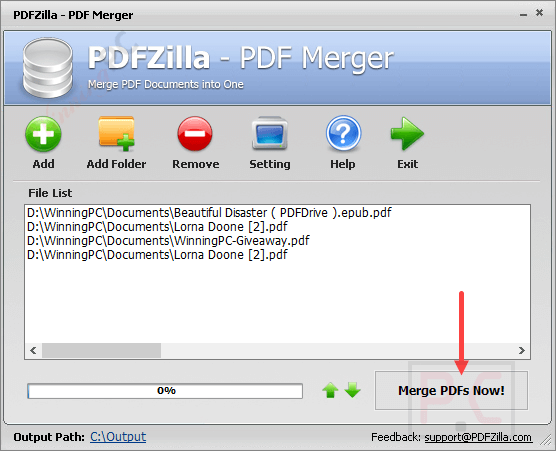
PDF Cutter

PDF Rotator

Main Features
- PDFZilla is a robust and feature-rich PDF format converter tailor-made for Windows operating systems, including Windows 7, 8, 10, and 11. It helps you convert PDF files into a plethora of formats like Excel, PNG, JPG, Word, HTML, RTF, SWF, TXT, and more to help you work with your documents across different applications with ease.
- PDFZilla also is an image converter software that allows you to effortlessly generate PDF files from various image formats such as JPG, PNG, TIF, BMP, and GIF. With its help, you can convert your image files into professional-looking PDF documents with just a few clicks.
- This tool also provides the remarkable batch converter feature to help you convert multiple PDF files with just a single click instead convert tedious file-by-file. Using it, you can simplify your workflow, save time, and boost productivity.
- The intelligent page selection feature is also possible in PDFZilla to help you handpick and convert only the specific pages you require. You just select exactly the essential pages and this tool wiil swiftly extract the precise information you need to help you get results more accurately.
- With PDFZilla, each converted PDF file retains its authenticity, appearing just like its PDF predecessor, but with the added advantage of being fully editable. This means your valuable information remains intact throughout the conversion process.
Technical Details
| Language Support | English, Français, Italian, Spanish, Swedish, and more… |
| Money Back Guarantee | 30-Day |
| Operating System | Windows Vista, Windows 7, Windows 8/8.1, Windows 10/11 |
| Shipping | Register code will be sent to your email in minutes |
| Subscription | Lifetime |
| Support Services |





@WINNINGPC
Does not work !!
Please check the comments for a solution. For example:
Here is the way
1. download software
2. run it
3. select any button pdf to word/image/excel/txt converter (on left side)
4. add any file to convert and click convert
5. a message ” trial version…” click OK to register (it open another website, close this
website)
6. paste code MDOSOPM-Z4V20P-32EI1, click OK
7. sucessfull registered, close software and open again, it’s fully register
https://www.pdfzilla.com/down/pdfzilla_giveaway.exe is not found.
Please use this one: https://www.pdfzilla.com/down/pdfzilla_winningpc.exe
Not Found
The requested URL was not found on this server.
Please use this one: https://www.pdfzilla.com/down/pdfzilla_winningpc.exe
And this is a solution for this issue:
“Solution to above problem FOUND!
Important information about registration:
The program can only be activated/registered correctly if you have previously selected a task such as “PDF to … Converter”. After that you can register the program and only then will the registration with the registration code MDOSOPM-Z4V20P-32EI1 be fully and definitively acknowledged!”
Lösung des obigen Problems GEFUNDEN!
Wichtige Information zur Registration:
Das Programm lässt sich nur dann richtig aktivieren/registrieren, wenn man eine Aufgabe wie zum Beispiel „PDF to … Converter“ vorher ausgewählt hat. Dannach kann man das Programm registrieren und nur dann wird die Registration mir dem Registrations-Kod MDOSOPM-Z4V20P-32EI1 vollständig und endgültig zur Kenntnis genommen!
Thanks very much.
Same problem with registration even though it shows “Register Successfully! Please restart program”.
Tried also registration as Admin, same problem.
Registration did not work even after several attempts, also uninstall & reinstall program did not solve the issue.
Please use a new giveaway installer: https://www.pdfzilla.com/down/pdfzilla_giveaway.exe