Laura Marano

It’s amazing how Privacy Eraser Pro, an all-in-one privacy suite, PC optimization, and cleaning tool, helps me clean up my digital footprints, protect personal information, and make my PC run faster. Its main strength is removing activity traces from Windows, popular web browsers, and hundreds of third-party applications. Privacy Eraser Pro clears browsing histories, cached files, cookies, form data, download lists, saved passwords, and search keywords from browsers like Chrome, Edge, Firefox, Opera, Brave, and more. The startup manager allows me to disable unwanted startup items and speed up boot time, and the built-in uninstaller helps me remove applications I no longer use.
Privacy Eraser Pro Coupon Code (100% Working)

Privacy Eraser Pro - 1 Year License
50% Off coupon code, regular price $39.95, discounted price $19.95
Key Features and Screenshots

- Complete Browser Cleaning: Wipes browsing history, cache, cookies, form data, download lists, session traces and much more from all major browsers, including Chrome, Edge, Firefox, Opera, Safari, Explorer and Brave.
- Windows Activity Erasure: Removes Windows usage logs such as recent documents, run commands, search histories, temp files, clipboard data, crash dumps, and thumbnail caches to keep daily activity private.
- Third-Party App Cleanup: Cleans traces from hundreds of common applications, media players, archiving tools, office suites, messaging apps, and more, thanks to its built-in and customizable cleaning modules.
- Secure File Shredding: Permanently destroys sensitive files and folders using advanced data-wiping algorithms, ensuring they cannot be recovered by undelete or forensic tools.
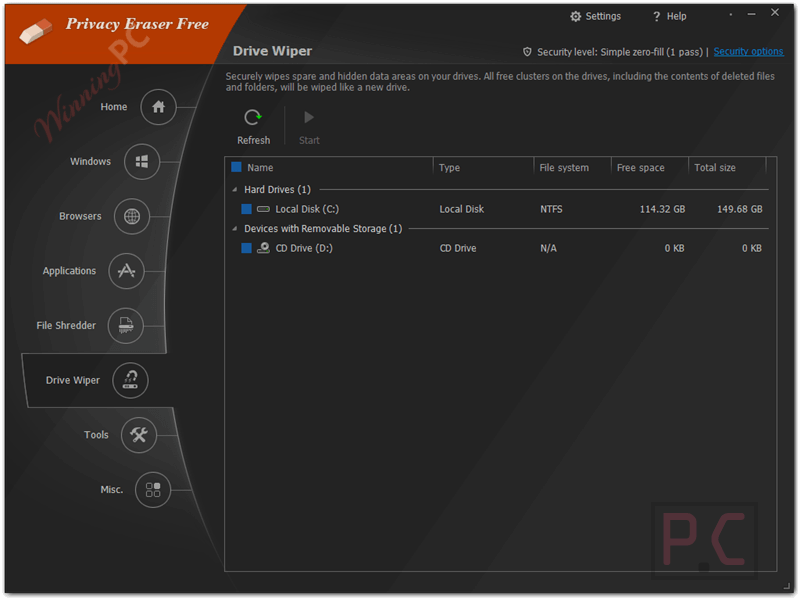
- Drive & Free Space Wiping: Overwrites free disk space to eliminate recoverable fragments and offers full drive wipe options for users preparing to sell or recycle a PC or hard drive.
- Registry Cleaning & Optimization: Scans for invalid, outdated, or leftover registry entries and removes them to help improve system stability and overall responsiveness.
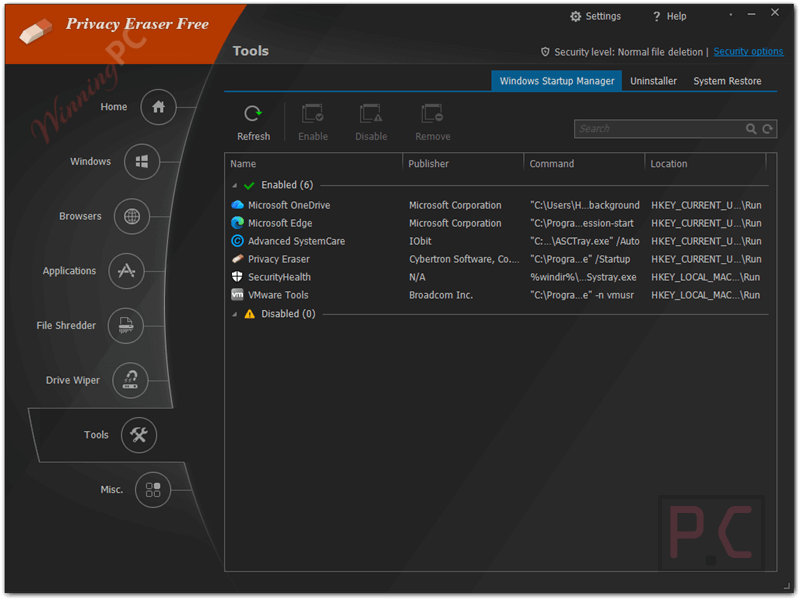
- Startup Manager: Lets you control programs that run at startup, speeding up boot times and reducing background resource usage.
- One-Click Quick Cleaning: Combines all privacy and cleaning tools into a single instant action for fast, hassle-free cleanup.
- Scheduled Automatic Cleaning: Automates privacy protection by running cleanups at startup, shutdown, or on daily and weekly schedules.
How to Use (Step-by-Step Guide)
Step 1. Download & install Privacy Eraser Pro
Step 2. Select Areas You Want to Clean
Select the categories you want to clean: Windows traces, browser data, applications, registry, and advanced items.
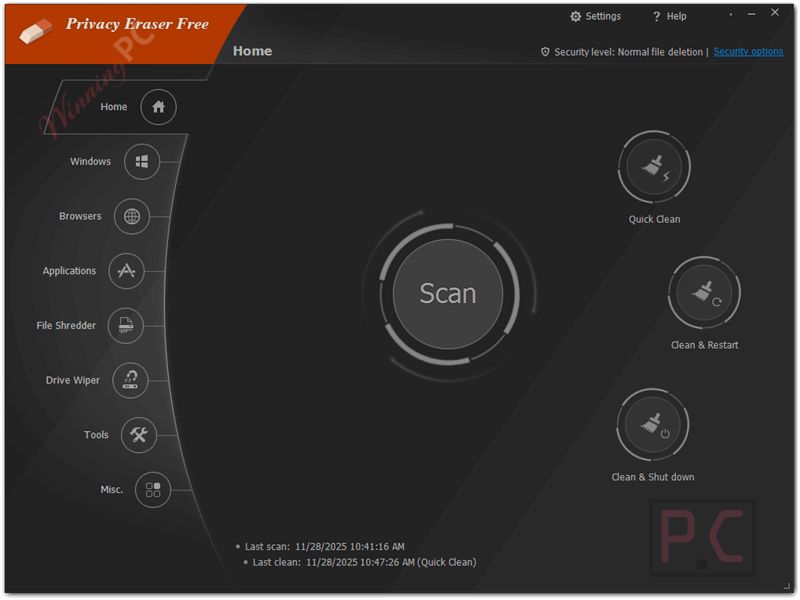
Step 3. Use One-Click Quick Clean
Click Quick Clean -> let the program scan -> click Clean to remove all selected traces.
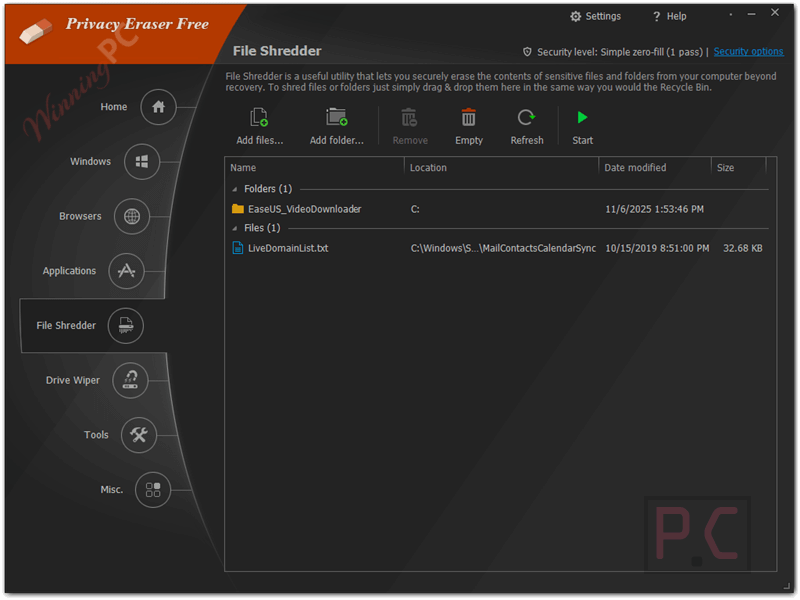
Step 4. Shred Sensitive Files (Optional)
Go to Tools -> File Shredder, add files or folders, and click Shred to erase them permanently.
Step 5. Wipe Free Disk Space (Optional)
Open Driver Wiper, choose your drive, and start wiping to remove recoverable fragments.
Step 6. Clean the Registry
Use Registry Cleaner -> scan -> fix detected issues.
Step 7. Manage Startup Items
Go to Tools -> Windows Startup Manager and disable unnecessary items to speed up boot time.
Step 8. Automate Your Cleaning
Open Schedule, set your preferred time or event, and let the cleaning run automatically.
Frequently Asked Questions
What is the secure file shredding feature?
Secure file shredding permanently destroys selected files using professional wiping algorithms, making them impossible to recover even with advanced recovery software.
Does Privacy Eraser Pro support cleaning third-party apps?
Yes. It includes built-in cleaning modules for hundreds of popular applications and allows custom plug-ins for apps not covered by default.
Can it remove Windows activity logs?
Absolutely. The software deletes recent document lists, run commands, thumbnails, temp files, clipboard data, error logs, search histories, and other system records.
Will it slow down my system?
No. In most cases, it improves performance by clearing junk files and optimising the registry and startup entries.
Is there a startup manager included?
Yes. You can view, enable, or disable programs that run at startup to speed up boot time and reduce background load.
Does the software include a registry cleaner?
It does. The registry cleaner scans for invalid entries, leftover paths, and broken references to help improve system stability.
Is there any discount available for Privacy Eraser Pro?
Yes! Through WinningPC, you can get a coupon that offers 50% off the full version, making it much more affordable to upgrade.
Why Choose WinningPC
- Why Trust? We are committed to providing 100% valid and verified coupon codes, so you can always shop with confidence.
- Found an Invalid Coupon or a Better Deal? If you encounter an invalid code or a better offer, please let us know. Our team updates all discount information regularly to ensure accuracy.
- Official Authorization: We only share authentic discounts from trusted software developers.
- No Fake Discounts: Unlike some sites, we never use misleading deals. The final price you see is the true discounted price.
- Secure Purchases: All transactions are processed on the official vendor’s website, ensuring authenticity and data protection.
- Extra Support: If you face order or vendor issues, contact us. We’ll liaise with the vendor to help resolve your problem quickly.
Technical Details
| Language Support | English, Français, Italian, Spanish, Swedish, and more… |
| Money Back Guarantee | 30-Day |
| Operating System | Windows 11/10/8.x/7/2022/2012 (32/64-bit) |
| Shipping | Register code will be sent to your email in minutes |
| Subscription | 1-Year, Lifetime |
| Support Services | Email, Tickets |