Laura Marano

The Redmine Budgets plugin is designed to help track project budgets, costs, and profitability while keeping work aligned with schedules. It supports both time & material and fixed-fee billing models, with flexible billing rates that can be defined by user, project, issue, or company.
In addition, the plugin allows project and issue costs to be calculated directly on Redmine issue pages, supports multiple hourly rates with effective dates, and enables separate budgeting rules for each project. The PRO version extends these capabilities with flat-rate billing, recurring budgets, additional bill rates, expense integration, and complete cost totals in time reports.
Redmine Budgets Plugin Promo Coupon Codes Oct 2026

You may also like

RedmineUP full stack bundle
RedmineUP complete plugin pack contains all PRO versions of plugins: Agile, Helpdesk, CRM, MailChimp, Invoices, Finance, Products, Checklists, People, Questions, Zenedit, Reporter
Key Features and Screenshots
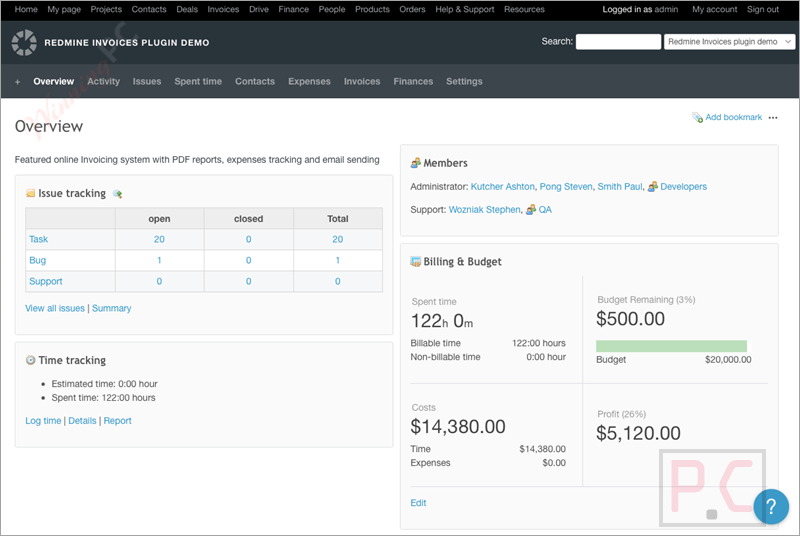
- Flexible billing options: It lets you work with Time & Material or fixed‑fee billing, so each project can use the pricing style that best suits it, with rates set by user, project, issue, or company.
- Invoice and expense tracking: Provides tools to create invoices and record expenses for each project.
- Hourly rate history: Allows each user to have different rates per project, with defined start and end dates.
- Custom bill rates: Allows setting rates by user, project, issue, or company to fit different work setups.
- Budgeting strategies: Allow every project to define its own budgeting method and limits.
- Budget planning: Supports budgeting with either a fixed project amount or time‑based calculations using hourly rates per employee, project, or task.
- User costs and bill rates: Defines hourly costs and bill rates per employee and shows detailed cost breakdowns in time spent reports.
- Project dashboard: Displays current financial status, costs, profitability, time spent, and budget usage, including internal and external costs, in one place.
- Cost reports: Adds a cost column to time logs that calculates costs using the user’s rate on that date and provides totals by groups or selections.
- Flat rate billing type (PRO): Adds the ability to bill work using a single flat fee for the project.
- Recurring budget (PRO): Lets you set up budgets that renew automatically on a schedule.
- Project hour rate (PRO): Sets a specific hourly rate for the entire project.
- Expenses integration (PRO): Connects budgeting with expense data for more accurate cost tracking.
- Total cost in time reports (PRO): Shows full cost totals directly within time‑based reports.
How to Use (Step-by-Step Guide)
Step 1. Install the plugin and enable the Budgets module in your Redmine project.
Step 2. Choose a billing type (time-based or fixed fee) and set the project budget.
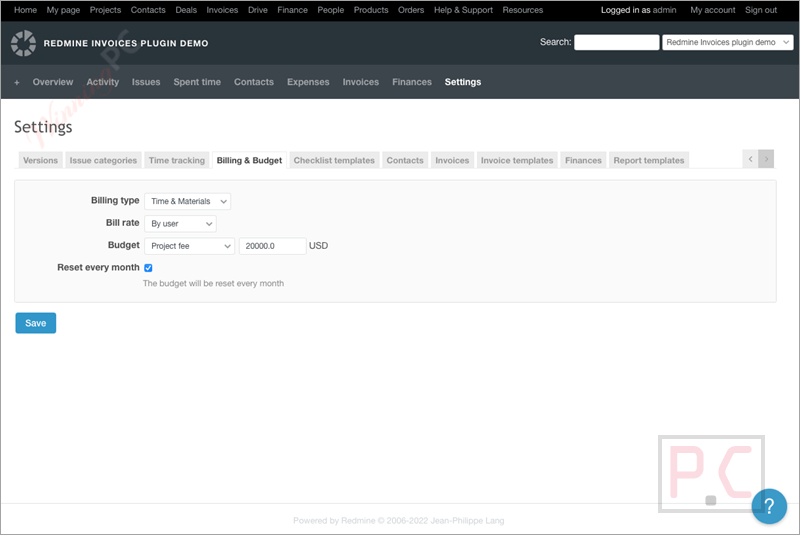
Step 3. Assign user rates with optional start and end dates.
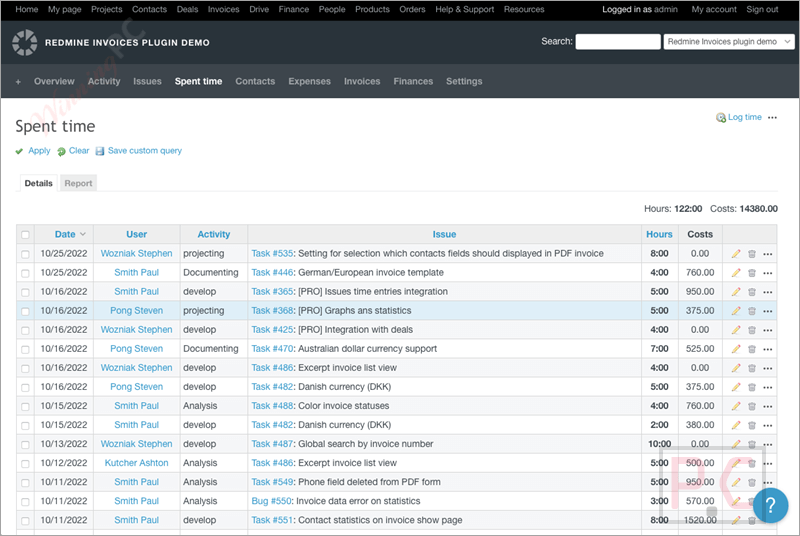
Step 4. Log time on issues as usual; costs are calculated automatically.
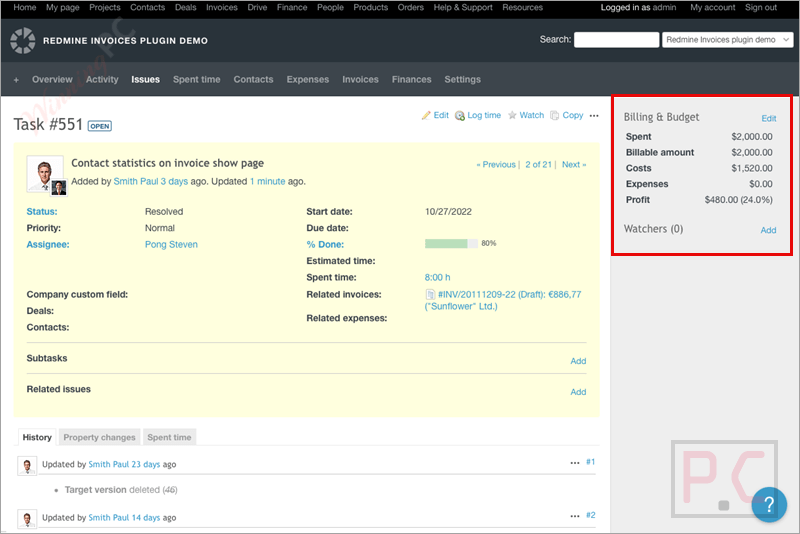
Step 5. Review costs and budgets on issues, the project dashboard, and cost reports.
Frequently Asked Questions
Does the plugin support fixed-fee projects?
Yes, it supports fixed-fee projects as well as time-and-material billing.
Can I set different hourly rates for different users?
Yes, you can assign hourly rates per user, and those rates can vary by project.
Can hourly rates change over time?
Yes, each rate can have a start and end date, so historical cost data stays accurate.
Does each project have its own budget settings?
Yes, budgeting rules and limits can be configured separately for each project.
Is there a dashboard to see project profitability?
Yes, the project dashboard shows costs, time spent, budget usage, and profitability in one place.
How can I get a discount on the Redmine Budgets Plugin?
WinningPC provides a coupon that gives you the best discount on the Redmine Budgets Plugin.
Why Choose WinningPC
- Why Trust? We are committed to providing 100% valid and verified coupon codes, so you can always shop with confidence.
- Found an Invalid Coupon or a Better Deal? If you encounter an invalid code or a better offer, please let us know. Our team updates all discount information regularly to ensure accuracy.
- Official Authorization: We only share authentic discounts from trusted software developers.
- No Fake Discounts: Unlike some sites, we never use misleading deals. The final price you see is the true discounted price.
- Secure Purchases: All transactions are processed on the official vendor’s website, ensuring authenticity and data protection.
- Extra Support: If you face order or vendor issues, contact us. We’ll liaise with the vendor to help resolve your problem quickly.
Technical Details
| Language Support | English, Français, Italian, Spanish, Swedish, and more… |
| Money Back Guarantee | 30-Day |
| Operating System | Linux, OS X, Windows |
| Shipping | Register code will be sent to your email in minutes |
| Subscription | 1-Year |
| Support Services | Email, Forums |