Simple App Locker normally costs $0.99 on the US Play Store; right now it’s $0.00 until 6:59 AM on 25 August. It needs Usage Access to see which app is in the foreground, and Play’s Data safety panel reports nothing collected or shared. Price checked Oct 2026 by Chris.
On this page
Get Simple App Locker free on Google Play →
Check the price reads $0.00 before you tap Install. It goes through as a purchase, so it stays in your Google account library for good. How app giveaways work
Something not working? Leave a comment and we’ll help.
What Simple App Locker costs and what it needs
Price & specs
| App | Simple App Locker |
| Developer | Neelam Govind Bhanushali |
| Store | Google Play |
| Regular price | $0.99 (US Play Store) |
| Price now | $0.00 (100% off) |
| Offer ends | 25 August 2026, 6:59 AM |
| Rating | 3.5 ★ from 284 reviews |
| Installs | 10,000+ |
| Last updated | 19 August 2025 |
| Price checked | Oct 2026 |
Simple App Locker does one job, on the right phone
Review & features
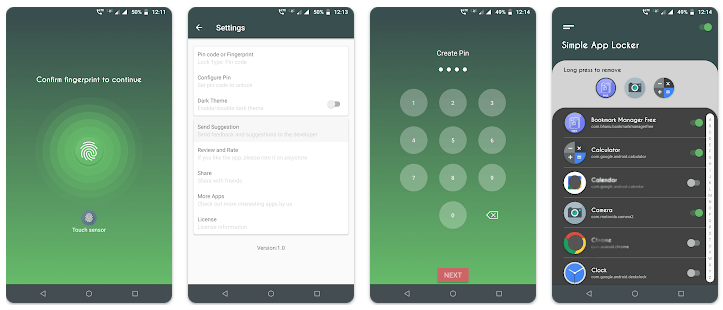
What Simple App Locker gets right is the absence of everything else: your app list, a switch beside each entry, a pin or fingerprint prompt, no upsell on the way in. A June 2026 reviewer named two gaps that show up daily: it takes a pin or a fingerprint only, with no pattern option, and there is no timeout setting to control how often it re-asks, which some users want and others are glad to be without.
Key features
- Lock any installed app behind a 4-digit pin or your fingerprint
- Set fingerprint or pin as the default unlock method in settings
- One configuration screen: flip the switch beside each app you want protected
- A master switch at the top right turns the whole locker on or off
Free is the right price for a one-job locker
Verdict


![Passport Photo: ID Photo Print App for Free [Android]](https://winningpc.com/wp-content/uploads/2024/08/passport-photo-id-photo-print-767x770.png "passport photo id photo print")