

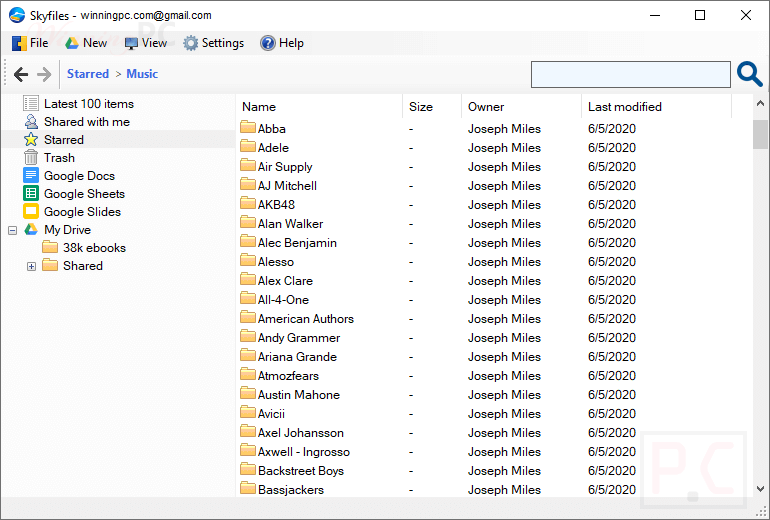
With Skyfiles, you can harness the full power of your Windows applications to edit Google Drive files with ease – not only documents, spreadsheets, and PowerPoint slides, but also images, text files, or any format supported by your local software.
1
Skyfiles Free License Key
Giveaway Details
00
Days
00
Hours
00
Minutes
00
Seconds
- Product name: Skyfiles 4.0
- Website: https://www.skyfiles.net/
- License type: lifetime
- Platform: Windows
- Installer: Skyfilessetup.exe
- License code – last updated: Apr 21, 2023
Click here...
- License #1: 7ZLII-HKA6A-VE5FH-JDVF1
- License #2: TLJFR-P6K26-3BDN3-4ZGDX
The original name of this tool was GDocsDrive. It was renamed to Skyfiles in 2019.
2
How to get the license key?
Instructions
Download and install it by using the download link above (includes the installer and license key, you also can download the installer from the homepage).
After installation, run and register it with the Skyfiles license key in the text file:

Enjoy it!

Skyfiles screenshot:
3
Skyfiles Features
Feature Highlights
- Directly connect Google Drive with desktop apps
- Automatically sync modified files with Google Drive
- A disk-free client for Google Drive
- Secure – OAuth login, SSL encryption
4
Technical Details
Product specification
| Language Support | English, Français, Italian, Spanish, Swedish, and more… |
| Money Back Guarantee | 60-Days |
| Operating System | Windows |
| Shipping | Full version license code will be sent to you within minutes |
| Subscription | Lifetime |
| Support Services |
5
User’s and Editor’s scores
Add your rating





I use this a lot. A good desktop client for Google Drive. Highly recommended.