

Soft4FX Forex Simulator
Lifetime License | 1 user / 2 Metatrader accounts
Applying the Soft4FX Forex Simulator Coupon Code
- Click the Copy button in the coupon box above. The code
WINPC4FXis copied to your clipboard and the Soft4FX checkout page opens in a new tab. - Checkout is handled by PayPro Global, the payment partner linked directly from Soft4FX’s own pricing page.
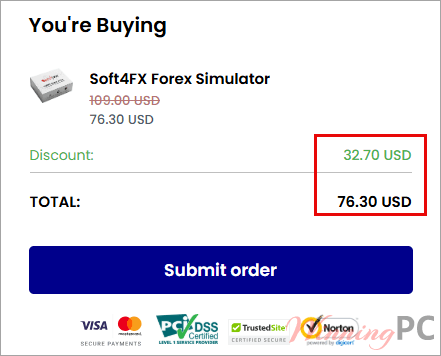
- Check the total reads $76.30 before you enter any payment details. Local VAT or sales tax may be added on top depending on your country.
- Complete the order. Your activation code is emailed immediately after payment, so check your spam folder if nothing arrives within 15 minutes.
Is the Soft4FX coupon legit?
Yes. This is a discount on a genuine license from the developer, not a resold or grey-market key.
No crack or keygen
You download the installer from soft4fx.com itself. The plugin runs in demo mode until you enter the activation code Soft4FX emails you, so nothing is patched or repackaged.
Official publisher checkout
Payment goes through PayPro Global, the same store the “Buy now” button on Soft4FX’s pricing page points to. Your card details never touch WinningPC.
You can test it first
The free demo is unlimited in time and includes every feature, just capped at 5 trades per simulation and 2 sample years of data. Run it before you spend anything.
14-day money-back
Soft4FX refunds within 14 days of purchase with no questions asked. After that window, refunds are limited to unresolvable technical problems.
How well does Soft4FX Forex Simulator work?
The reason Soft4FX Forex Simulator works is that it does not try to replace MetaTrader. It runs inside it. Your templates, your indicators, your drawing tools and your muscle memory all come along, which is a real advantage over browser-based replay platforms that ask you to relearn a new charting interface. Speed control is where the time savings actually come from: you can skip a flat Asian session at high speed and then step candle-by-candle through a London open, forward or backward, on any timeframe.
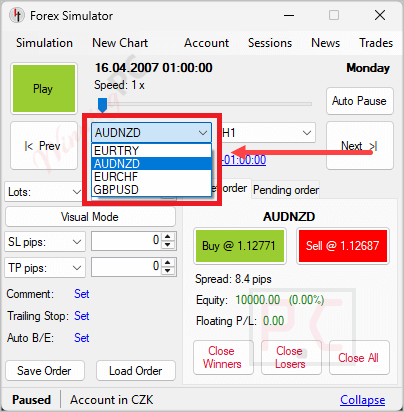
Risk-based position sizing is a quietly useful touch, letting you cap each trade at a set percentage of balance so your practice reps mirror how you would actually size live. The honest limitation is that multi-currency simulation, watching and trading several synchronized pairs at once, is only in the MT5 build. MT4 users get a single-pair simulator.
Key features
- Tick-by-tick replay with full control. Pause, resume, change speed, step forward or backward candle-by-candle, and set automatic pauses when a stop loss, take profit or pending order fires.
- Multi-currency simulation (MT5 only). Trade several pairs at once with all charts synchronized tick-by-tick.
- Built-in economic calendar. Forex Factory data from 2007 onward, filterable by importance and currency, and plottable on your charts.
- Realistic order handling. Pending orders, trailing stops, automatic break-even, OCO rules, partial closes, and order templates so you are not re-entering the same rules every session.
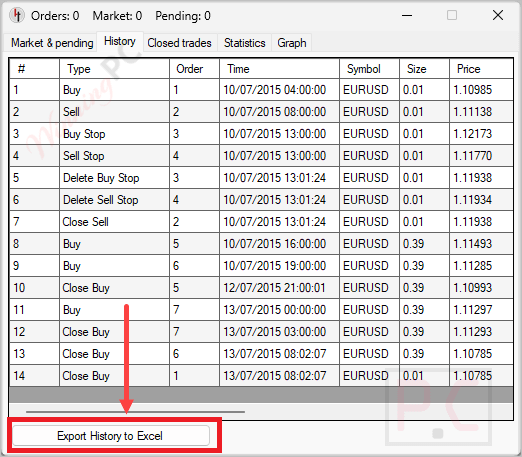
- Save, load and export. Store a simulation and resume it later with every trade intact, then export the history to Excel or an HTML report formatted like a standard MT4/MT5 account statement.
What we liked, what we didn’t
More Soft4FX Forex Simulator screenshots!
Rich charting:
Economic Calendar:

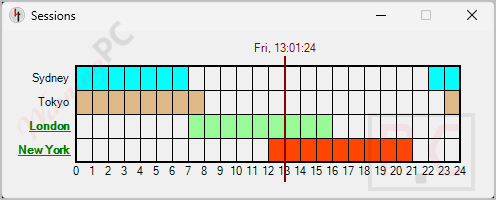
Sessions Window:
Export to Excel:
Free demo or lifetime license: which do you need?
| Feature | Free Demo | Lifetime License |
|---|---|---|
| Price | $0 | $76.30 with code WINPC4FX (reg. $109) |
| Time limit | None, test as long as you want | None |
| Trades per simulation | 5 | Unlimited |
| Historical data | 2 sample years | 10-20 years of tick data |
| Save and load a session | No | Yes |
| MT4 and MT5 versions | Both included | Both included |
| Free updates | Not applicable | Yes |
| MetaTrader accounts | Not applicable | 2 active at a time |
| Refund | Not applicable | 14 days |
| Best for | Checking the interface and whether it fits your platform | Anyone practising more than a handful of setups a week |
Frequently Asked Questions
| Tool | Price | Runs on | Best for |
|---|---|---|---|
| Soft4FX Forex Simulator (our pick) | $76.30 one-time with code | MT4 / MT5 plugin, Windows | Traders who already live in MetaTrader |
| Forex Tester 6 | From around $149 one-time | Standalone Windows app | Automated strategy testing and coded EAs |
| FX Replay | $17.99 to $35 per month | Browser, any OS | Mac users and multi-asset replay |
| MT4/MT5 Strategy Tester (visual mode) | Free | Built into MetaTrader | Quick visual rewinds, no order realism |
| TradingView bar replay | Free tier available | Browser | Chart-only practice without execution |
Frequently Asked Questions
Does Soft4FX Forex Simulator work on Mac?
No. It requires Microsoft Windows. Soft4FX’s own answer is that the only route on a Mac is a virtual machine running Windows. If you want something native, a browser-based replay tool is the practical alternative.
Is $76.30 a one-time payment or a subscription?
One-time. Soft4FX states plainly that there are no monthly or yearly charges and that free updates are included. The 30% code applies to that single payment, not to a first billing cycle.
Is it actually cheaper than a subscription backtester?
Yes, quickly. At $76.30 once, Soft4FX Forex Simulator costs less than five months of a $17.99/month plan and pays for itself against a $350/year plan in roughly three months. Everything after that is free, and you keep the software either way.
Do I have to pay extra for the historical data?
No. Access to the tick data from Dukascopy, TrueFX and HistData is included in the license price. There is no separate data subscription.
How many MetaTrader accounts can one license run?
Two at a time. The license is tied to your MetaTrader account number rather than your computer, so there is no limit on how many machines you install it on.
Is the MT4 version identical to the MT5 version?
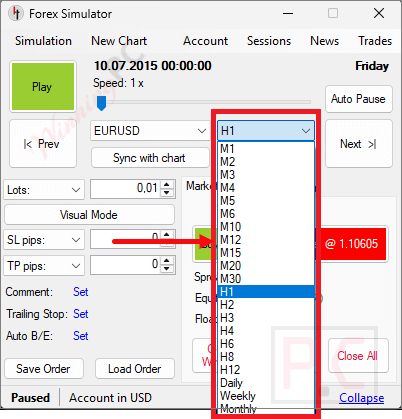
No, and this is worth knowing before you buy Soft4FX Forex Simulator. Multi-currency simulation is MT5-only. MT5 also carries a much wider timeframe list including M2, M3, M4, M6, M10, M12, M20, H2, H3, H6, H8 and H12, while MT4 sticks to the standard set. Both versions are included in the one license, so if you have MT5 installed, use that build.
Can I get a refund if it does not suit my workflow?
Yes, within 14 days of purchase, with no questions asked. After 14 days, refunds are limited to unresolvable technical problems. Running the free demo first is the sensible way to avoid needing one at all.
What you need to run it
| Requirement | MT5 version (v2.0.7) | MT4 version (v1.98) |
|---|---|---|
| Platform | MetaTrader 5 | MetaTrader 4 |
| Operating system | Windows 10 / 11 | Windows 7 / 8 / 10 / 11 |
| Framework | .NET 8 or later | .NET Framework 4.5 or later |
| Processor / RAM / disk | Not specified | Not specified |
| Multi-currency simulation | Yes | No |
Data and export options
| Detail | Value |
|---|---|
| Historical data sources | Dukascopy, TrueFX, HistData (10-20 years, real variable spreads) |
| Instruments covered | 60 forex pairs, gold, silver, bitcoin, ethereum, 12 stock indexes |
| Export formats | Excel spreadsheet, HTML report in MT4/MT5 account-statement format |
| Other requirements | An existing MetaTrader installation; license bound to MetaTrader account number, 2 active accounts maximum |