
 Laura Marano

SoftOrbits Batch Picture Resizer allows performing the seamless conversion between multiple image formats and embedding logos or watermarks in multiple images, as well as resizing pictures in the highest quality possible. In addition, Batch Picture Resizer supports a number of lossless operations, such as flipping, mirroring, and rotating images without losing visual quality.
SoftOrbits Batch Picture Resizer
Resize multiple photos, convert, flip, mirror, or rotate them in batch mode.
- ProductSoftOrbits Batch Picture Resizer
- Websitesoftorbits.net
- LicenseLifetime
- PlatformWindows 11/10/8.1/8/7 (32/64 bit)
- UsageNon-commercial only
- UpdatesNo future upgrades
- SupportNo support
- Updated2026-07-04
Table of Contents
Top Photo Editor Coupon Codes in Aug 2026 (100% Working)

Artistly Commercial - Lifetime
No Monthly Fees | Free Product Updates

Pixci AI Elite Yearly
Business Use License | Free Upgrades

Photoins Photo Enhancer - Lifetime
Unlimited free upgrades and tech support

inPixio Photo Editor
Free customer support
How To Get SoftOrbits Batch Picture Resizer Key Free?
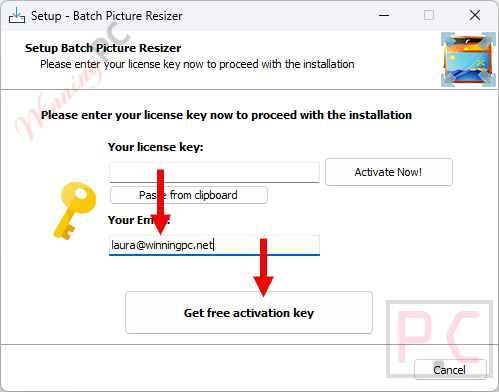
Download the software using the giveaway link above to start the installation. During the process, enter your email address and click “Get free registration key” to proceed.
You’ll be taken to the giveaway site, where you should fill in your basic profile information to unlock your free license.
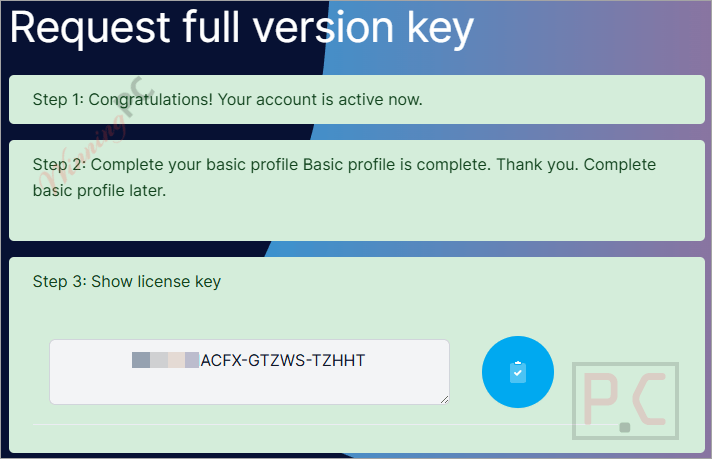
After copying the license code, go back to the installation wizard. Input the key in the space provided and press the “Activate Now!” button to enable the complete features of SoftOrbits Batch Picture Resizer.
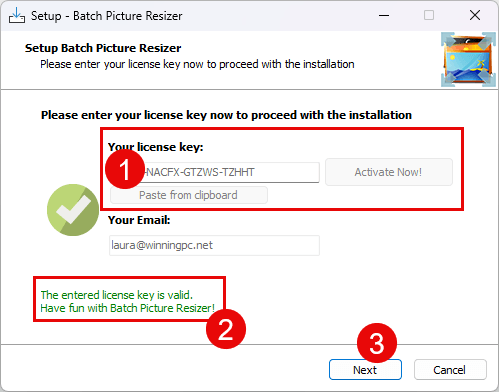
Now you can enjoy the software for a lifetime free with full functions!

SoftOrbits Batch Picture Resizer screenshot:

Add Files SoftOrbits Batch Picture Resizer

Add Watermark

SoftOrbits Batch Picture Resizer Options

In-Depth Review & Features
- Process multiple images in just a few clicks
- Resize pictures in batch mode
- Add text, logotypes, and image watermarks
- Convert images between multiple formats
- GUI and command line are available
- Automatically rotate JPEG images based on EXIF information
- Lossless image rotation, flipping, and mirroring for JPEG files
- Preserves EXIF tags
- Changes in canvas size
- Supports RAW images (CRW, CR2, NEF, PEF, RAF, RAW, DNG, MNG, etc.)
- Batch image renaming
- Prompt-free overwrite or saving into new files
- Automatic level adjustment and color optimization
- Greyscale conversion
- Supports Windows 7 and 8, Explorer menu integration
- Compression rate and DPI change for output files
System Requirements & Details
| Operating System | Windows 11, 10, 8.1, 8, or 7 — 32-bit and 64-bit |
| Processor | Intel Core i3, AMD Ryzen 5, or higher |
| RAM | 4 GB or more |
| Graphics Card | NVIDIA GeForce 8/8M Series, Intel HD Graphics 2000, Quadro FX 4800/5600, AMD Radeon R600, Mobility Radeon HD 4330, Mobility FirePro Series, Radeon R5 M230, or higher |
| Graphics Driver | Up-to-date graphics card drivers required |
| Screen Resolution | 1280 × 768 or higher, 32-bit color |
| Storage Space | At least 1 GB of free disk space |





The same key for all accounts: BPR9-HWNCE-EHZJP-NSBGZ