
 Laura Marano
AnyMP4 4K Converter converts 4K videos to 1080p, 720p, SD, and other popular formats. It also includes editing tools for trimming, cropping, rotating, adding subtitles, adjusting effects, and creating 3D videos.
AnyMP4 4K Converter License Key Free Download
- Product name: AnyMP4 4K Converter
- Website: https://www.anymp4.com/4k-converter/
- License type: 1-year
- Platform: Windows
- Download: AnyMP4-4K-Converter.exe
- Giveaway link: click here
On the AnyMP4 4K Converter giveaway page, fill in the blanks your name and your valid email address in the field provided then click on the “Send” button. You will receive an email from AnyMP4 with the registration code


Click on the above download link to download it for free. Install the software on your computer then register with your email and above registration code

AnyMP4 4K Converter Coupon Codes
AnyMP4 4K Converter for Windows
2 plans · best save 50%
📄 Licensing & Support Details
- 30-Day Money Back Guarantee
- License Instant Delivery by Email
- 100% Clean & Secure Purchase
- Free Customer Support
- Free Technical Support
- Try 7 Days For Free.
📝 How to apply
Click ‘Copy Code’ in the box above. We’ll automatically copy it and send you straight to checkout so you can claim your discount.
AnyMP4 4K Converter: In-Depth Review & Features

Key Features
- Downscale 4K media to 1080p, 720p, or standard SD formats for playback on older devices.
- Upscale standard SD videos to high-resolution 4K.
- Export to formats like H.265/HEVC, H.264/MPEG-4 AVC, TS, AVI, MP4, MOV, and MKV.
- Extract audio (MP3, AAC, FLAC, WAV, etc.) directly from video files.
- Prepare files specifically for Apple devices, Android phones, game consoles, and smart TVs.
- Convert media into formats supported by editing software like Premiere Pro and Sony Vegas.
- Add or replace audio tracks and external subtitles.
- Alter visual effects such as brightness, saturation, contrast, and hue.
- Rotate the media 90 degrees or flip it horizontally and vertically.
- Crop frames to remove unwanted borders and maintain the original aspect ratio.
- Cut and merge multiple video clips into a single file.
- Apply custom text or image watermarks to protect your copyright.
- Generate 3D videos from standard 2D sources using Anaglyph or Split Screen modes.
Pros & Cons
More AnyMP4 4K Converter screenshots:


Frequently Asked Questions
Where can I discover the latest promotions or deals for AnyMP4 4K Converter?
WinningPC is the primary destination to track down active sales, discounts, and promotional codes for this software, right alongside the official AnyMP4 store.
What is the absolute lowest price I can get on AnyMP4 4K Converter right now?
What is the absolute lowest price I can get on AnyMP4 4K Converter right now?
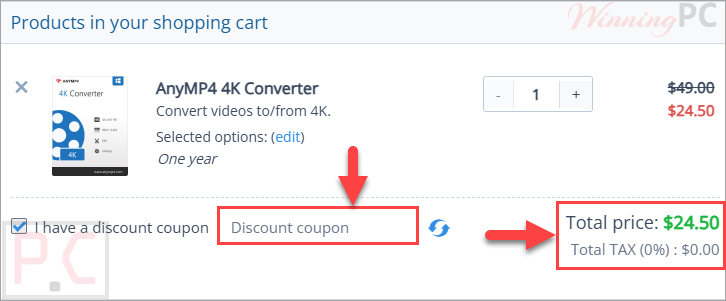
At this moment, you can activate a 50% OFF discount exclusively by using the offers hosted on WinningPC.
Will the output files play on my mobile phone?
Yes, it actively supports converting files for numerous portable devices, including iPhones, iPads, Samsung Galaxy phones, and other Android devices.
Is it possible to grab just the music from a video clip?
Absolutely, you can extract the audio track and save it in various audio formats like MP3, FLAC, WMA, or AAC.
Do I lose visual clarity when changing formats?
No, the software utilizes advanced technology to ensure all outputs maintain perfect image and video quality.
Can I make visual adjustments before converting?
Yes, the built-in editor lets you crop, rotate, flip, and change basic effects like brightness and contrast.
Does the software handle multiple files simultaneously?
Yes, it fully supports batching conversion, allowing you to queue up and process several files at the same time.
Can it create 3D content from standard footage?
Yes, it includes a feature to turn regular 2D video into 3D using Anaglyph and Split Screen options.
System Requirements & Details
| Language Support | English, Français, Italian, Spanish, Swedish, and more… |
| Operating System | Windows 11, Windows 10, Windows 8.1/8, Windows 7, Windows Vista, Windows XP SP2 or later |
| Processor | 2GHz Intel/AMD CPU or above |
| RAM & Storage | 2GB RAM or more |
| Supported Input | 4K video, general video, HD video, and audio formats including MP4, MOV, AVI, MKV, WMV, FLAC, WAV, MP3, AAC, AC3, and more. |
| Supported Output | 4K video, general video, HD video, audio, and 3D video formats, including 4K H.265/HEVC, MP4, AVI, MOV, MKV, MP3, WAV, FLAC, and 3D MP4/MKV/AVI/FLV options. |





If you don’t believe me run the installed renamed FFMPEG.EXE “convertor.exe -L” an see the truth this is a law breaking giveaway. Even if the FFMPEG.ORG binaries are dated from 2013 it’s still illegal.