
 WinningPC
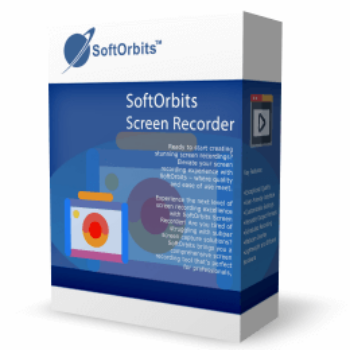
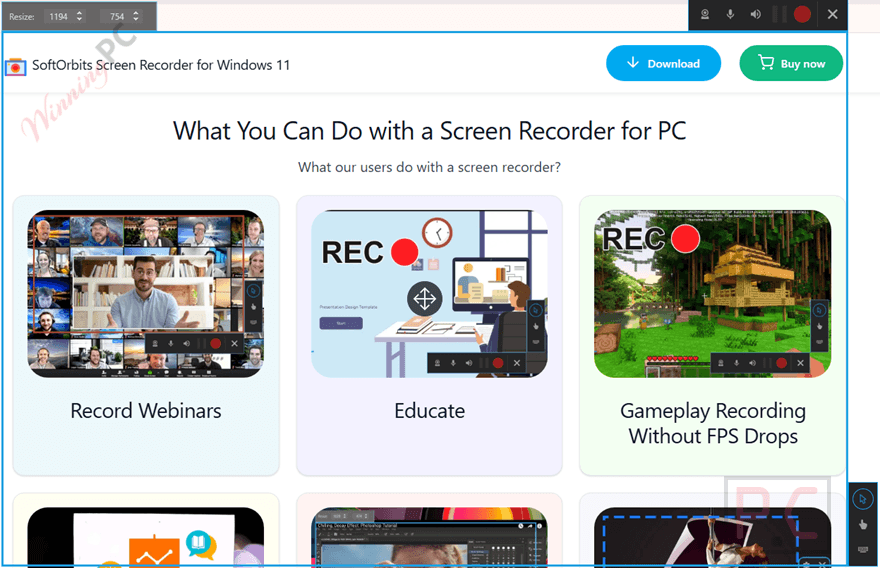
SoftOrbits Screen Recorder allows you to capture your screen effortlessly from your Windows PC in just a few clicks. It’s easy-to-use, with a simple interface and straightforward controls. With this screen recorder application, you are able to create high-quality recordings, easily customize settings, and share your content seamlessly. This tool allows you to record Webinars, create educational content, record Gameplay without FPS drops, generate a presentation, create tutorials, provide customer support, and capture static screenshots of your computer screen.
SoftOrbits Screen Recorder also allows users to record their screen with microphone audio on Windows 11 and add voice narration to their recordings by selecting an audio source. After capture, you can implement trim video to create a shorter recording that can be easily uploaded to YouTube or saved to your device in MP4/AVI format. Another of its best features is the ability to capture 4K/1080p ultra-high-definition videos with no lags or time limits.
Top Screen Recorder Software Coupon Codes in Aug 2026

Edimakor Screen Recorder - Lifetime License
61% off promo code: regular price $89.99, discounted price $34.99

EaseUS RecExperts (Lifetime Upgrades)
50% Off coupon code: regular price $69.95, discounted price $34.97

PassFab Screen Recorder - Lifetime License
61% off promo code: regular price $89.99, discounted price $34.99
Aiseesoft Screen Recorder – Lifetime/1 PC
50% discount code: regular price $62.45, discounted price $31.22
SoftOrbits Screen Recorder License Key Free Download
- Product name: SoftOrbits Screen Recorder for Windows 11
- Website: https://www.softorbits.com
- License type: lifetime
- Platform: Windows
- Giveaway installer: ScreenRecorder.exe&aid=pt70
Click on the giveaway installer link above to download and install the software on your computer. Enter your email address during setup, then click the “Get free registration key” button to visit the giveaway site.
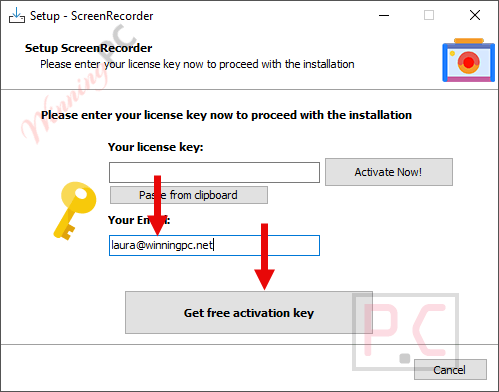
You can claim your license by completing a profile.
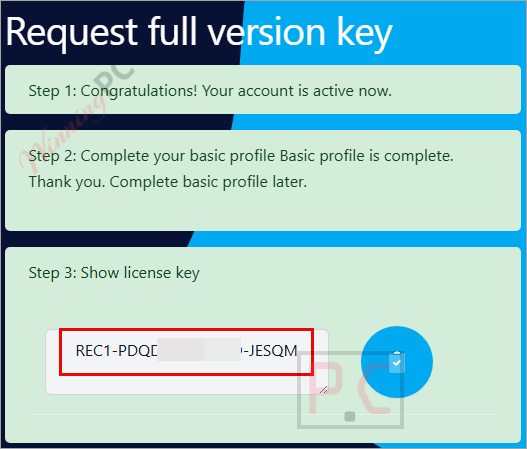
After obtaining the key, copy it, return to the installation window, enter the code, and click “Activate Now!” to register the full version of SoftOrbits Screen Recorder for Windows 11.
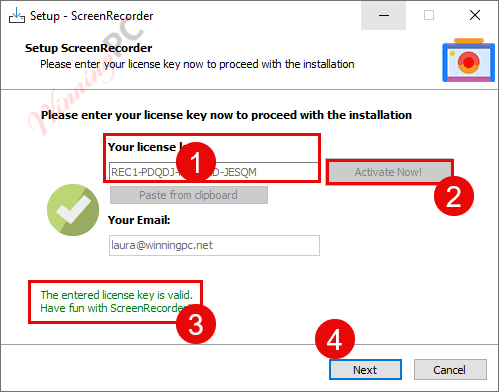
When the installation is done, launch it. On the software’s main screen, click the key icon. Please copy and paste the SoftOrbits Screen Recorder license code, then enter your email address to enjoy the software with full functionality.

SoftOrbits Screen Recorder screenshots:

Start recording
Configure

Main Features
- SoftOrbits Screen Recorder is a versatile screen recording application that simplifies the screen capture process on your Windows PC, ensuring effortless recording with just a few clicks.
- This tool empowers you to produce top-notch recordings, tweak settings to suit your preferences, and effortlessly share your content.
- This tool’s capabilities span a wide range of applications, from recording webinars and creating educational materials to capturing gameplay without the dreaded FPS drops.
- One of its standout features is the ability to record both your screen and microphone audio on Windows 11.
- Post-capture, the software offers the convenience of trimming videos to create shorter, more shareable recordings, suitable for uploading to platforms like YouTube or saving in MP4/AVI formats.
- Moreover, SoftOrbits Screen Recorder excels in capturing 4K/1080p ultra-high-definition videos without any annoying lag or time limitations.
- Utilizing cutting-edge hardware-accelerated codecs, this screen recording software excels at compressing video in real-time while imposing minimal demands on your CPU.
- This tool can also highlight crucial aspects of your presentation by adding shapes directly onto your video.
Technical Details
| Language Support | English, Français, Italian, Spanish, Swedish, and more… |
| Money Back Guarantee | 30-Day |
| Operating System | Windows 7, Windows 8/8.1, Windows 10/11 |
| Shipping | Register code will be sent to your email in minutes |
| Subscription | 1-Month, 1-Year, Lifetime |
| Support Services | Email, Tickets |



Hi, I see no ‘key’ icon anywhere as described by Softorbits – no way to register this. I’ve looked on the Configure GUI..
Clues would be welcome, thanks!