
On this page
SoftOrbits TranscribeIt Giveaway
TranscribeIt: Audio & Video to Text Transcriber
Converts audio and video files to text offline on your Windows PC.
- Product
- SoftOrbits TranscribeIt
- Website
- softorbits.net
- License
- Lifetime
- Platform
- Windows 11/10/8.1/8/7 (32/64 bit)
- Usage
- Non-commercial only
- Updates
- No future upgrades
- Support
- No support
- Updated
- October 2, 2026
Get your unique code by email
License key delivered free to your inbox within minutes.
Protected by Cloudflare Turnstile · Email quality checked by Reoon
All codes have been claimed or the giveaway has closed.
How to Get the SoftOrbits TranscribeIt License Key for Free
- Click the giveaway download link on this WinningPC page to launch the SoftOrbits TranscribeIt installer.
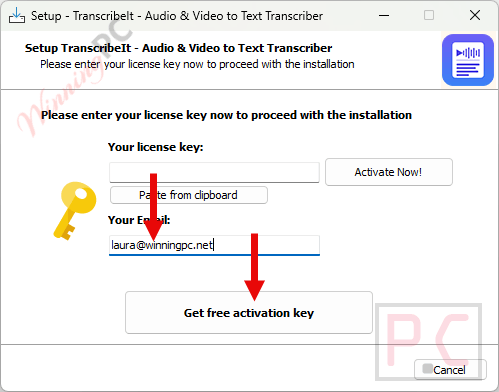
- During installation, enter your email address and click Get free registration key.
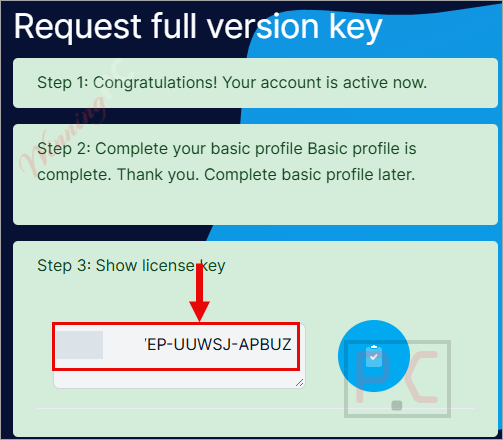
- You will be redirected to the SoftOrbits’s giveaway page. Fill in your basic profile details to unlock the license.
- Copy the license code displayed on the SoftOrbits giveaway page.
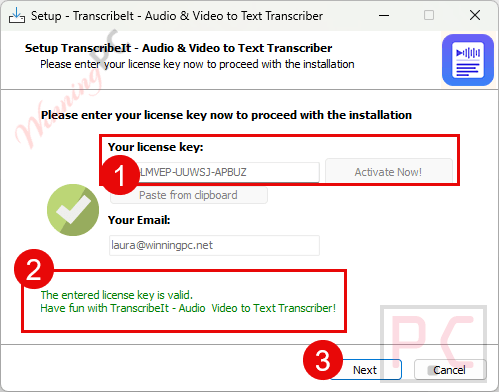
- Return to the installation wizard, paste the key into the activation field, and press Activate Now!
- Done. The full feature set is active at no cost.
Top Speech to Text Converter Softwares Coupon Code

EaseUS VideFlow - Lifetime Upgrades
One license for 1 PC | Lifetime free upgrades | Free remote assistance

VoiceType AI Lifetime Subscription
Transcribe up to 20,000 words per month | Lifetime access | 30-day money-back guarantee
Notta AI PRO - Annually
1,800 transcription minutes/month | AI summary


EaseText Audio to Text Converter for Windows - Personal
24/7 Tech support | Lifetime Free Updates
Is this SoftOrbits TranscribeIt giveaway safe and legit?
Yes. This is an official publisher giveaway run through SoftOrbits’s own registration system, not a third-party key reseller or grey-market listing. A few specifics:
No crack or keygen involved
You install the official SoftOrbits build and activate it with a genuine key generated by the publisher. Nothing is patched, repackaged, or modified.
Official publisher source
The key comes directly from SoftOrbits’s own giveaway infrastructure. WinningPC links to the source; we do not host or distribute the software ourselves.
No payment required
You provide an email address and basic profile details to claim the key. No credit card, no subscription, nothing more.
14-day money-back
If you later decide to upgrade, SoftOrbits accepts refund requests within 14 days of purchase.
Hands-on with SoftOrbits TranscribeIt
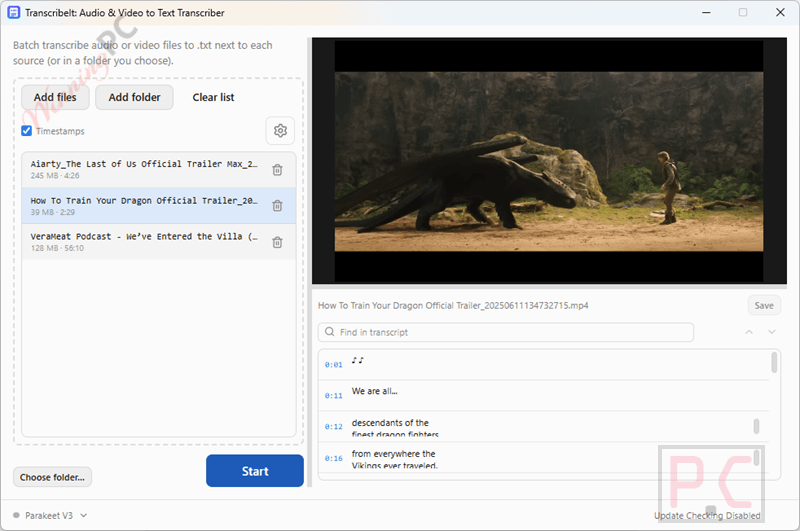
SoftOrbits TranscribeIt’s value is specific: it transcribes recorded files locally, without any upload, which makes it the right tool for NDA recordings, patient notes, or any audio you cannot route through a third-party server. Batch mode works without supervision; drop a folder, hit start, and walk away. The built-in media player earns its place too, since clicking any timestamp jumps the video to that exact moment, which saves real time when you need to check a single passage instead of scrubbing manually. Accuracy, like any local Whisper-class tool, depends heavily on audio quality; clean single-speaker recordings in English perform reliably, while noisy, heavily accented, or overlapping-speaker audio will need more hands-on correction.
Key features
- 100% offline processing: audio and video stay on your machine; no internet connection required after the initial install.
- Batch mode with no per-minute fees: queue an entire folder and process unlimited files daily with no usage caps.
- Clickable timestamps and .srt export: each segment links to the exact video position in the built-in player; export as .srt for subtitle editors.
- 25 languages included: English, Spanish, French, German, Italian, Portuguese, Russian, Japanese, Polish, and more; a 100+ language model is available as a separate download.
- Wide format coverage: video: MP4, MOV, MKV, WEBM, AVI, WMV, TS; audio: MP3, M4A, AAC, FLAC, OGG, OPUS, and WAV.
What we think
How TranscribeIt compares to the alternatives
| Tool | Price | Offline? | Batch? | Best for |
|---|---|---|---|---|
| SoftOrbits TranscribeIt | Free (this giveaway)/ $49.99 | Yes | Yes | Privacy-sensitive recordings, local-only environments |
| Vovsoft Speech to Text Converter | $13.3/lifetime | Yes | Yes | Budget offline transcription on Windows |
| RecCloud | $40.80/yr/Basic | No (cloud) | Yes | Teams needing cloud storage and sharing |
| FlexClip | $100.42/yr | No (cloud) | Limited | Video creators who need auto-captions |
| OpenAI Whisper (open-source) | Free | Yes | Yes | Developers comfortable with terminal/command-line |
If you are comfortable with the command line, OpenAI Whisper does essentially the same job at zero cost. TranscribeIt wraps a similar local model in a desktop GUI with a built-in player and a batch queue; the choice comes down to whether you want a point-and-click interface or are happy running scripts in a terminal.
Frequently Asked Questions
Does SoftOrbits TranscribeIt work completely offline?
Yes. The AI model runs on your local CPU. No audio, video, or transcript text ever leaves your PC. An internet connection is only needed during the initial install and license activation.
How many languages does it support?
25 languages come installed out of the box, including English, Spanish, French, German, Italian, Portuguese, Russian, Japanese, and Polish. A downloadable extension covers 100+ languages.
What audio and video formats does it handle?
Video: MP4, MOV, MKV, WEBM, AVI, WMV, TS. Audio: MP3, M4A, AAC, FLAC, OGG, OPUS, WAV. Output: plain .TXT and timestamped .SRT subtitle files.
How accurate is the transcription?
Accuracy depends on audio quality. Clear recordings generally give better results, while background noise or overlapping voices may require corrections. SoftOrbits does not provide a specific accuracy percentage for TranscribeIt.
Do I need a powerful PC or a dedicated GPU?
No. The model is tuned for a standard CPU, with an Intel i3 or AMD Ryzen 5 listed as the minimum spec. Around 8 GB of RAM is comfortable. A compatible GPU speeds up processing but is optional, not required.
System Requirements & Details
| Field | Value |
|---|---|
| Operating system | Windows 11, 10, 8.1, 8, 7 (32/64-bit) |
| Processor | Intel i3 or AMD Ryzen 5 or above |
| RAM | 4 GB minimum; ~8 GB recommended |
| Storage | 1 GB free disk space or above |
| Display | 1280×768, 32-bit color |
| GPU (optional) | NVIDIA GeForce series 8+, Intel HD Graphics 2000, AMD Radeon R600 series or higher — required only for GPU-accelerated processing |
| Supported input – video | MP4, MOV, MKV, WEBM, AVI, WMV, TS |
| Supported input – audio | MP3, M4A, AAC, FLAC, OGG, OPUS, WAV |
| Supported output | .TXT (plain text transcript), .SRT (subtitles with HH:MM:SS timestamps) |
| Internet | Required for initial install and license activation only |



the comparison matrix is somewhat misleading it says of softorbits “Privacy-sensitive recordings, local-only environments”
but for Vovsoft Speech to Text Converter which is also suitable for “privacy-sensitive recordings” It states Budget offline transcription on Windows.
If you read past the bias it’s actually advertising vovsoft speech to text converter as best overall!
Vovsoft also has a portable edition and you can choose where you want it to be put which you cannot with any softorbits program because they are self serving bad ware developers. I have Vovsoft |Speech to Text Converter which is smaller than this uses similar AI inferences and does not make my computer less secure by just installing the software!