
On this page
SoftOrbits Voice Silence Remover Giveaway
SoftOrbits Voice Silence Remover
Remove Silence from Voice Recordings, Audio and Video
- Product
- SoftOrbits Voice Silence Remover
- Product website
- softorbits.net
- License
- Lifetime
- Platform
- Windows 11/10/8.1/8/7
- Usage
- Non-commercial only
- Updates
- No future upgrades
- Support
- No support
- Updated
- 2026-08-13
Continue on softorbits.com
Share to reveal the official giveaway page, then register there to receive your license.
The limited-time giveaway!
The free license is no longer available.
How to Get the SoftOrbits Voice Silence Remover License Key for Free
- Click the giveaway download link on this page to launch the SoftOrbits Voice Silence Remover installer.
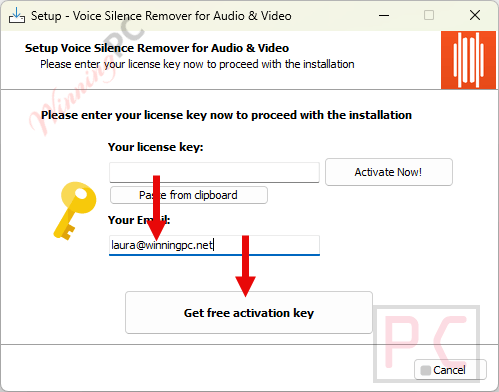
- During installation, enter your email address and click Get free registration key.
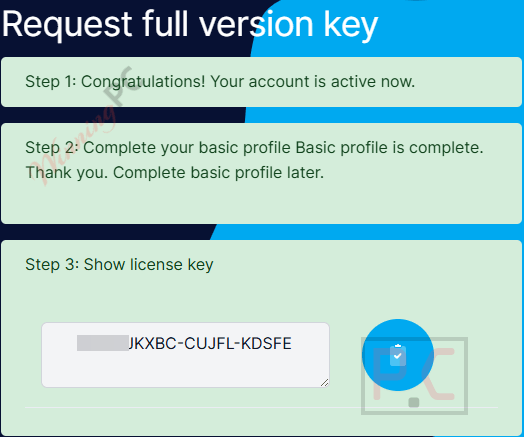
- You’ll be redirected to SoftOrbits’s giveaway page. Fill in your basic profile details to unlock the license.
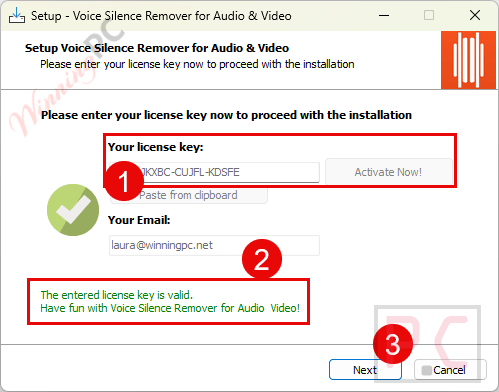
- Copy the license code shown on the giveaway page. Return to the SoftOrbits installation wizard, paste the key into the field provided, and press Activate Now!
- Done. The full feature set is active at no cost.
Top Voice Silence Remover Software Coupon Code

KingShiper Audio Editor - Lifetime/ 2 PCs
One license for 2 PCs | 30-day money back guarantee

Is this SoftOrbits giveaway safe and legit?
No crack or keygen
You install SoftOrbits’s official build and activate with a genuine license key issued through their own giveaway system. Nothing is patched or repackaged.
Official publisher giveaway
SoftOrbits has been shipping desktop software since 2006. The registration happens on their own domain, not a grey-market reseller or key-farm site.
100% offline processing
All the work runs on your own Windows PC. No account is required after activation, and your recordings never leave your machine. That matters if you work with unreleased or confidential audio.
14-day money-back on paid plans
If you later upgrade to Personal or Business, SoftOrbits offers a full refund within 14 days, no questions asked. The giveaway key is free, so there is no financial risk either way.
SoftOrbits Voice Silence Remover Review & Features
SoftOrbits Voice Silence Remover is an essential desktop utility for podcasters, video creators, educators, and anyone who records spoken word content. Every raw recording is full of dead air-the hesitation before you speak, the awkward pauses while you gather your thoughts, and the long breaths between sentences. Instead of scrubbing through a timeline for hours to manually cut out these gaps, this software automates the entire process, tightening your dialogue in seconds.
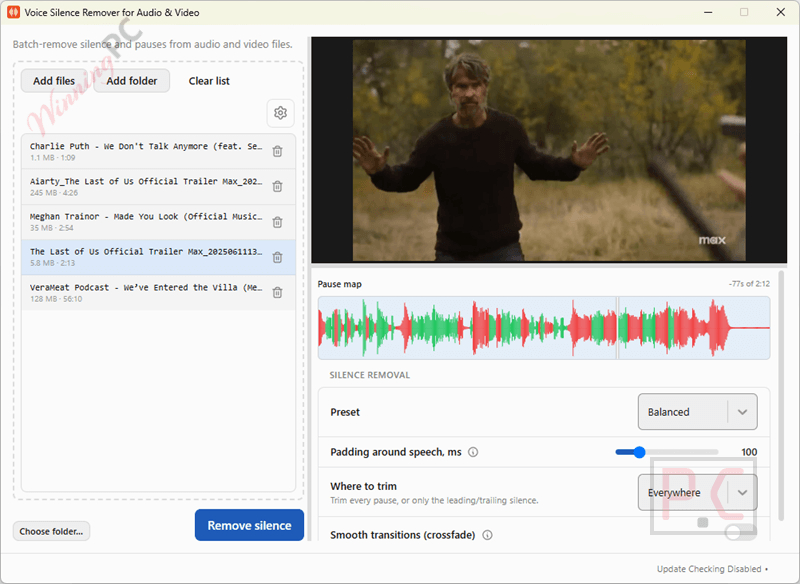
Designed for speed and simplicity, the software requires no video editing experience. You simply load your audio or video files, define what qualifies as a pause (for example, setting the threshold for silences longer than half a second), and the tool automatically strips the dead air away. Because it handles batch processing, you can drop an entire folder of podcast episodes or lecture videos into the application and let it work in the background.
Key features
- Automated Silence Trimming: Instantly cuts out dead air, long breaths, and hesitations without the need for manual timeline editing.
- Audio & Video Support: Works seamlessly with both audio tracks and video files, keeping your visual and audio elements perfectly synced after the cuts are made.
- Batch Processing: Clean up multiple recordings simultaneously. Load a whole folder of media files and let the software process them all at once.
- 100% Local & Private: The software processes all files directly on your Windows PC. You never have to upload heavy media files to a cloud server, ensuring your unreleased content remains completely secure and private.
- Customizable Parameters: You have full control over the cut settings. Easily adjust the volume threshold that defines “silence” and set the exact duration of pauses you want to remove.
What we think
Free License or Paid: Which Should You Take?
| Giveaway (Free) | Personal Paid ($39.99) | Business Paid ($59.99) | |
|---|---|---|---|
| Version | v1.5 only | Latest version | Latest version |
| Future updates | None | Minor-version upgrades | Minor-version upgrades |
| Tech support | None | Unlimited email | Unlimited email |
| Commercial use | No | No | Yes |
| Money-back | N/A (free) | 14-day full refund | 14-day full refund |
| Key delivery | Via giveaway page | ~3 minutes by email | ~3 minutes by email |
If you edit your own podcast, lectures, or personal YouTube content, the free Lifetime key does the job. Note that the paid Personal plan is also non-commercial only — business users and freelancers doing client work need the Business plan at $59.99.
SoftOrbits Voice Silence Remover vs the alternatives
| Product | Price | Auto Silence Detection | Silence Removal | Video Support | Batch Processing | Best For |
|---|---|---|---|---|---|---|
| SoftOrbits Voice Silence Remover | $59.99 (Personal) | ✅ Yes | ✅ Automatic | ✅ Yes | ✅ Yes | Automatic pause removal |
| Soundop Audio Editor | $99/lifetime | ✅ Yes | ✅ Automatic | ❌ No | ⚠️ Limited | Silence removal + audio editing |
| Kingshiper Audio Editor | $25.99/lifetime | ⚠️ Limited | ✅ Yes | ❌ No | ⚠️ Limited | General audio editing |
| AutoAudioRecorder Pro | $28.95/lifetime | ✅ Yes | ⚠️ During recording | ❌ No | ❌ No | Silence-free audio recording |
Frequently Asked Questions
How is this different from Audacity’s Truncate Silence or an ffmpeg command?
Those tools cut by volume level: anything below a set decibel threshold gets removed. Voice Silence Remover reads 30 ms audio frames through a neural voice-activity model, so it identifies where speech actually is rather than where it’s loud. A quiet consonant at the end of a sentence survives. Real dead air goes. On a noisy recording, that difference shows.
Does it handle video files, or only audio?
Both. It supports MP4, MKV, MOV, AVI, and WMV alongside the audio formats. Cuts land on exact frames and the audio follows, so picture and sound stay in sync. Variable-framerate clips are handled too, which is where simpler scripts often fail.
Are my recordings uploaded anywhere during processing?
Nothing is uploaded. All processing runs locally on your Windows PC. No account is needed after activation, and SoftOrbits explicitly states no internet connection is required to use the software.
Can I process a whole folder at once, or only individual files?
Whole folders, subfolders included. Add a folder and it queues every audio and video file inside for an unattended run. There is no stated limit on file size or length.
Can I use this commercially with the free giveaway key?
No. The giveaway license is non-commercial only. Worth noting: the paid Personal plan carries the same restriction. If you edit client work or produce content in a business context, you need the Business plan at $59.99 (discounted from $89.99).
System Requirements & Details
| Field | Value |
|---|---|
| Operating system | Windows 11 / 10 / 8.1 / 8 / 7 (32-bit and 64-bit) |
| Processor | Intel i3, AMD Ryzen 5 or above |
| RAM | 4 GB or above |
| Graphics | NVIDIA GeForce series 8/8M, Intel HD Graphics 2000, Quadro FX 4800/5600, AMD Radeon R600, Mobility Radeon HD 4330, Mobility FirePro, Radeon R5 M230 or higher (up-to-date drivers required) |
| Display | 1280 × 768, 32-bit colour |
| Storage | 1 GB free hard disk space or above |
| Supported input — audio | MP3, WAV, M4A, AAC, FLAC |
| Supported input — video | MP4, MKV, MOV, AVI, WMV |
| Supported output | Same formats as input; trimmed files saved with _nosilence suffix or to a user-chosen folder; source files are never modified |
| Internet required | No; fully offline after activation |



When I downloaded and installed it yesterday it the giveaway build was installer was 1.0 NOT 1.5
Oh a quick aside the system requirements are WRONG this is a 64bit application and is incompatible with 32bit windows 7 to 10.
As usual for softorbits closed source proprietary licensed programs where they abuse FFMPEG.EXE they steal and illegally distribute GPLv3 code making their entire product illegal warez