WinningPC
Without the proper tools, reading and comprehending the vast amount of transaction data stored in SQL Server’s .ldf log files can be challenging. Stellar Log Analyzer for MS SQL is designed to simplify the analysis of SQL Server transaction logs. With its help, database administrators and forensic analysts can easily audit, track, and recover critical database activities. The MS SQL log analyzer allows you to view, search, and export detailed transaction records, including inserts, updates, deletes, creates, and drops, performed on your SQL databases.
In addition to basic log reading, Stellar Log Analyzer for MS SQL can also analyze deleted or dropped table data without requiring a full database restore. Advanced filtering, search, and preview features help you quickly pinpoint specific transactions. Furthermore, its flexible export options let you save logs and data in formats such as MDF, CSV, HTML, XLS, or directly into an SQL database.
Stellar Log Analyzer for MS SQL Coupon Code Oct 2026
Stellar Log Analyzer for MS SQL
40% coupon code: regular price: $599, discounted price: $359.10
Key Features and Screenshots

- Performs Forensic Analysis of SQL Transaction Log: Stellar Log Analyzer for MS SQL scans SQL Server transaction log files (.LDF) along with their associated data files (.MDF) to extract complete records of all transactions. Both DML operations (INSERT, UPDATE, DELETE) and DDL operations (CREATE, DROP) are displayed to help you understand every change made to the database.
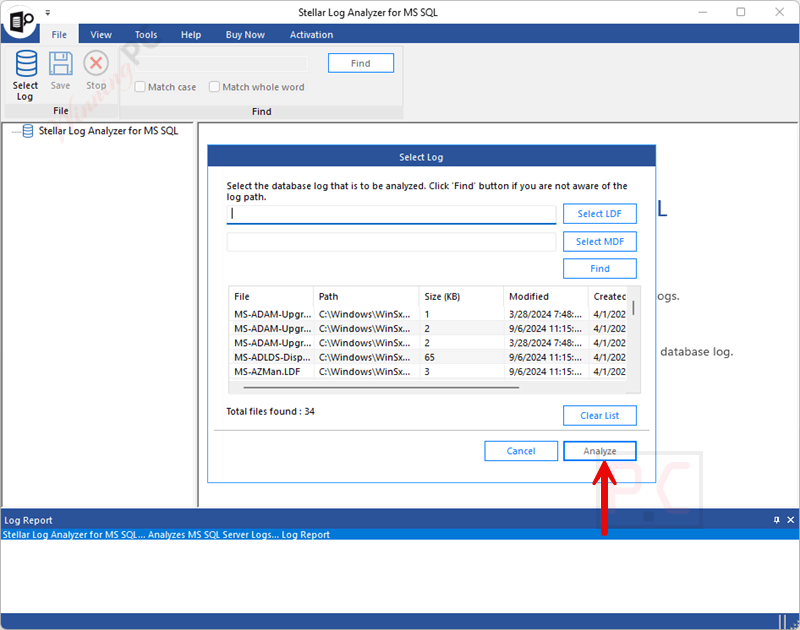
- Create New Database with Recovered Items: It lets you recover deleted or dropped transactions and save them easily. You can choose to create a new database with the recovered items or save them directly to an existing database on the SQL Server, making data restoration simple and flexible.

- Enhanced Preview of Log File Transactions: The tool shows an improved preview of all database transactions along with their associated data once the scan is complete. In the preview window, you can easily view operations performed on SQL database tables, including Insert, Update, Delete, Create, and Drop actions. The details, like a transaction start and end time, transaction name, and detailed query view, are provided, making investigations much easier.
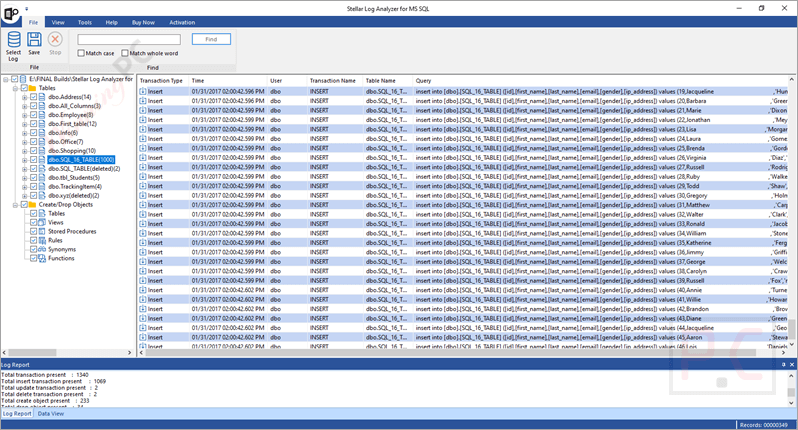
- Multiple File Saving Options: You are allowed to save the analyzed log data and table contents in various readable formats, including MDF, CSV, HTML, and XLS. The SQL Log File Analyzer tool also helps you export the log file data into a new or an existing SQL database.
- Option to Select LDF & MDF Files: This tool automatically detects the associated MDF file if it’s in the same location as the LDF file. However, it allows manual browsing for MDF files if stored separately.
- Fast Search & Filters: You can quickly find the data you need using the intuitive search function with options for “Match Case” and “Match Whole Word”. Date range filters let you narrow results to specific timeframes, making it simple to review only relevant transactions.
- Saves Log File Data for Specified Period: At the end of an analysis or export, you can generate a detailed report summarizing key information about the complete LDF and MDF file saving process, like the selected database version, start and end time of the saving process, etc., to support audits or compliance.

Pros-Cons & Conclusion
Conclusion
Stellar Log Analyzer for MS SQL is a trusted tool for analyzing and viewing transactions of the SQL database LDF files. Its user interface is intuitive, and exports are flexible to help DBAs dive into transaction histories, reconstruct deleted data, and extract queries with context.
This tool delivers real value to help you with investigation, transaction auditing, or undelete recovery. However, for continuous surveillance, pair it with other monitoring solutions.
Frequently asked questions
What does Stellar Log Analyzer for MS SQL do?
It analyzes SQL Server transaction log (.LDF) and data (.MDF) files to show a complete history of database activities like insert, update, delete, create, and drop operations.
Can it recover deleted records?
Yes! It can recover data from deleted rows or dropped tables by reading the transaction logs, even without restoring from a backup.
Is SQL Server required to use the software?
No, SQL Server does not need to be installed on your machine to analyze the log files. You just need access to the LDF and MDF files.
Does the demo version allow me to save data?
The free demo lets you fully analyze and preview transactions, but saving or exporting requires purchasing the licensed version.
What file formats can I export analyzed data to?
You can export transactions and table data to MDF, CSV, HTML, XLS, or directly into an SQL Server database.
How do I get the best price when buying?
Use the WinningPC coupon code STE***R10 at checkout to save 40% off your purchase.
Technical Details
| Language Support | English-only interface |
| Money Back Guarantee | 30-day full refund policy |
| Operating System | Windows 11/10/8.1/8/Server 2012 (64-bit) Intel x64 processor, 4 GB RAM (8 GB recommended), 250 MB disk space |
| Shipping | Register code will be sent to your email in minutes |
| Subscription | 1-Year |
| Support Services | Free email/web-based support (24×5 business hours); secure transaction via Norton encryption |