WinningPC
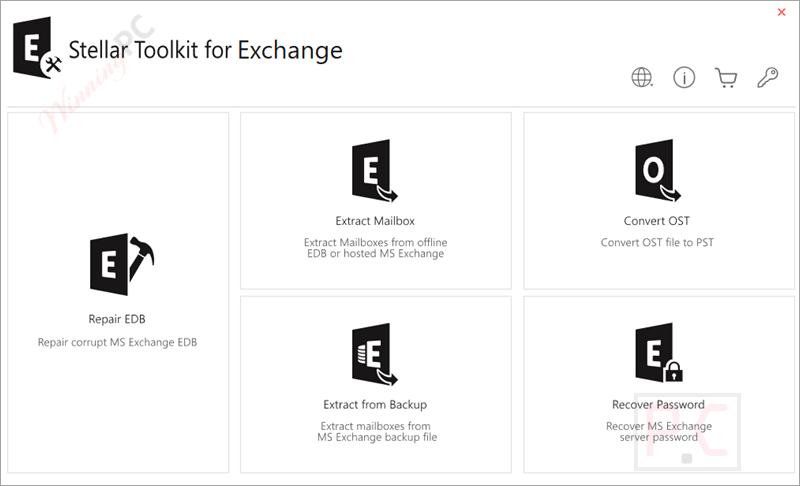
Stellar Toolkit for Exchange is a powerful, all‑in‑one suite that provides Exchange administrators with five vital utilities to repair EDB, extract mailbox, convert OST, extract from backup, and recover password. The toolkit bundles Stellar Repair for Exchange, Stellar Converter for EDB, Stellar Converter for OST, Stellar Extractor for Exchange Backup, and Stellar Password Recovery for MS Exchange, covering every critical Exchange management need. Stellar Toolkit for Exchange is widely compatible with Exchange versions from 5.5 up through 2019 and both ANSI and Unicode databases and supported OS environments such as Windows Server 2022/2019/2016/2012 and Windows 11/10/8.1/8.
Stellar Toolkit for Exchange Coupon Code Oct 2026

Stellar Toolkit for Exchange (1 year Subscription)
37% coupon code: regular price: $999, discounted price: $629.10
Stellar Toolkit for Exchange (Lifetime)
55% coupon code: regular price: $1,999, discounted price: $899.10
Stellar Toolkit for Exchange Key Features
- Exports the Mailboxes to Live Exchange or Office 365: The recovered mailboxes can be exported to Live Exchange or Office 365. You can connect a single or multiple mailboxes by entering the login credentials for Exchange or Office 365, eliminating the need for manual configuration. The source and destination mailboxes, including the Map mailbox option, are listed after a successful login.

- Parallel Processing: Thanks to the parallel processing technique, you can repair, convert, and save up to 8 mailboxes simultaneously, reducing the time required to repair or convert large EDB files to PST, live Exchange, or Office 365. You are allowed to stop mailbox processing by removing it from the processing queue, as well as resume recovery of the removed mailboxes after saving the mailboxes from the queue.
- Prioritize Mailbox Saving: Before exporting to PST, Live Exchange, or Office 365, Stellar Toolkit for Exchange allows administrators to set or change mailbox saving priority. By adjusting the queue order, critical mailboxes can be recovered first for faster, more efficient processing.
- Extract Mailbox: The toolkit includes the EDB to PST converter to export mailboxes from offline or hosted EDB files without dismounting the database. It ensures accurate recovery, supports parallel processing, and exports mailboxes or Public Folders to Live Exchange or Office 365.

- Converts Online & Offline EDB to PST: This toolkit provides a comprehensive solution for exporting mailboxes from both hosted Exchange servers and offline EDB files to PST format. This capability ensures seamless data migration and backup, whether the mailboxes are active or disconnected. It also gives a preview of all connected and disconnected mailboxes, helping users track export status effectively.
- Searches & Restores Specific Mails: This toolkit also allows IT administrators to search for and restore specific emails quickly. Admins can filter by “To”, “From”, “Cc”, “Subject”, “Body”, “Attachment Name”, “Importance”, “Item Type”, etc., using advanced email filtering options like Any Criteria, Exact Match, or Both for precise recovery.
- Allows Selective Export of Mailboxes: The advanced filtering options are provided to refine mailbox scan results before saving. You can include or exclude specific emails, filter by sender ID, and remove items from Junk or Deleted folders. It also supports date-range filters, allowing selective export of only the required mailbox items to PST, Live Exchange, or Office 365.
- Convert OST: This tool features a powerful OST to PST converter that recovers emails, attachments, contacts, calendars, notes, tasks, and more from inaccessible OST files. It supports batch conversion of large files and can export data directly to Live Exchange or Office 365.

- Exports the Data in Multiple Formats: Stellar Toolkit for Exchange enables users to save recovered data in various formats, including PST, EML, MSG, RTF, HTML, and PDF, and easily access it across multiple apps and browsers. Its built-in tools ensure flexible export for seamless data use.
- Extract from Backup: Stellar Extractor for Exchange Backup allows you to recover mailboxes from corrupt BKF, VHDX, and FD backups. It restores all items and saves them in multiple formats (PST, MSG, EML, HTML, RTF, and PDF) or exports directly to Live Exchange and Office 365.

- Exports Exchange Contacts to CSV: Stellar Toolkit for Exchange lets administrators export Contacts from mailboxes or the Global Address List to a CSV file, which can be easily opened and managed in Excel.
- Recover Password: If you have lost or forgotten your Windows Server password, you can use this tool to reset or recover it, allowing you to access the system easily. It helps you reset the password of Windows Server 2000, 2003, 2008, and 2012.
- Restores Deleted Mailboxes: Without complex manual steps, Stellar Toolkit for Exchange efficiently recovers deleted mailboxes by extracting data to a PST file, allowing quick export to Live Exchange or Office 365.
Pricing Plans & Conclusion
Pricing Plans
| Plan | Price | License Type | Key Features |
|---|---|---|---|
| 1-Year | (Save $300) | Multiple Users | Full 5-in-1 suite: repair EDB, convert OST/EDB, extract backups, reset passwords. |
| Lifetime | (Save $1,000) | Multiple Users | Same features, historical retail pricing before discounts. |
Trial & Refund
- Trial & Free Version: The trial (evaluation) version of Stellar Toolkit for Exchange allows users to scan and preview recoverable mailboxes, but does not allow exporting data unless the software is activated with a valid license.
- Refund Policy: Annual subscription and Lifetime license qualify for a 30-day refund window, starting from the purchase date.
Conclusion
Stellar Toolkit for Exchange is a powerful, feature-rich toolkit that is the best fit for mid-to-large organizations or consultants who need a reliable, full-featured Exchange recovery and migration suite. It excels in processing speed, granularity of control, parallel mailbox handling, and export flexibility across formats and destinations (including live Exchange and Office 365).
Frequently asked questions
Can Stellar Toolkit repair a dirty shutdown database?
Yes. The Repair for Exchange module can recover EDB files affected by dirty shutdown errors when native tools like ESEUTIL fail.
Does the toolkit support mailbox export to Office 365?
Absolutely. You can export recovered or converted mailboxes directly to Office 365 or live Exchange with automatic mailbox mapping.
Is there any mailbox size limitation during recovery?
No. The toolkit processes large-sized EDB, OST, or backup files without size restrictions.
Can I preview mailbox items before saving?
Yes. The trial version allows full scanning and preview of mailbox contents, so you can verify recoverable data before purchasing.
How does the parallel processing feature help?
Parallel processing enables simultaneous recovery or export of up to 8 mailboxes, reducing processing time significantly for large deployments.
Can I get a discount on Stellar Toolkit for Exchange?
Yes! Use the WinningPC exclusive coupon code STE**R10 to save up to 55% on your purchase.
Technical Details
| Language Support | English, Deutsch, Français, Italiano, Español |
| Money Back Guarantee | 30-Day |
| Operating System | Windows 11, 10, 8.1, 8 & Windows Server 2022, 2019, 2016, 2012 MS Exchange 2019, 2016, 2013, 2010, 2007, 2003, 2000, and 5.5 |
| Shipping | Register code will be sent to your email in minutes |
| Subscription | 1-Year, Lifetime |
| Support Services | Free 24×5 technical support via email, phone, tickets or chat |