On this page
Get Super Shortcut: Productivity free on Google Play →
Check the price reads $0.00 before you tap Install. It goes through as a purchase, so it stays in your Google account library for good. How app giveaways work
Something not working? Leave a comment and we’ll help.
Super Shortcut: Productivity price, rating and requirements
| App | Super Shortcut: Productivity |
| Developer | Geeks Empire |
| Store | Google Play |
| Regular price | $0.99 (US Play Store) |
| Price now | $0.00 (US Play Store) |
| Offer ends | [END_DATE] |
| In-app purchases | Yes — items and prices not published on the listing |
| Requires | Android 8.0 and up |
| Rating | 3.3 stars, 425 reviews |
| Installs | 10,000+ |
| Last updated | 2 September 2025 |
Super Shortcut: Productivity is fast to install
The split shortcut is the part worth having: one icon opens two apps together in multi-window, which Android’s own Recents menu makes you rebuild by hand every single time. Getting there is where people fall over.
The split feature needs Accessibility Service access, the interface doesn’t follow normal Android conventions, and the most recent reviews on the listing are from users who never got it working at all — one from February 2026 describes the app list disappearing behind a spinning gear until nothing responded. That gap between long-time users who say they couldn’t live without it and people who bounce off in the first ten minutes is what the 3.3-star average across 425 reviews is measuring.
Key Features
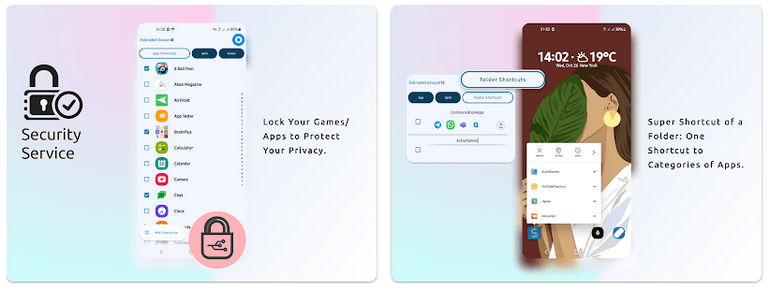
- One home-screen icon opens a popup menu of your chosen apps, leaving the rest of the screen as wallpaper
- Split shortcuts launch a pair of apps together in multi-window from a single tap
- Fingerprint lock on individual apps and games
- Your existing icon pack and theme carry through into the shortcut menu


![Passport Photo: ID Photo Print App for Free [Android]](https://winningpc.com/wp-content/uploads/2024/08/passport-photo-id-photo-print-767x770.png "passport photo id photo print")