
Tunelf Spotify Music Converter (for Windows & Mac) is a great software to convert Spotify music from OGG Vorbis to MP3, WAV, FLAC, AAC, M4A, and M4B. It provides two more output formats so you can enjoy them on many players or devices you want. In addition, Tunelf Spotify Music Converter can preserve original ID3 tags and metadata info, such as title, artist, album, genre, and so on.
Top Spotify Music Converter Software Discount Code
MusicFab Spotify Converter (Lifetime)
Get the best price on Lifetime License: regular price $99.99
Leawo Prof. DRM Spotify Converter - Lifetime
65% discount code: regular price $59.95, discounted price $20.96

Sidify Music Converter for Windows - Lifetime Plan
31% discount code: regular price $129.90, discounted price $89.90

Allavsoft for Windows Lifetime
82% Off coupon code, regular price $99.99, discounted price $18

MusicFab All-In-One (Lifetime)
10+ products - 1 License for 3 Computers; 30% off coupon code: regular price $369.99, discounted price $259.99
Tunelf Spotify Music Converter License Key Free
- Product name: Tunelf Spotify Music Converter 1.1.0
- Website: https://www.tunelf.com/
- License type: 1-year
- Platform: Windows
- Giveaway link: n/a
- Registration code
Last updated: Sep 29, 2020Click here...
- License #1: 2c31c52300a50b73b408da4d080ad72a41d10eb9c8 Installer (updated: Sep 29, 2020)
How to get the license key?
Download the giveaway installer by the above download link and install Tunelf Spotibeat Music Converter on your computer.
Copy the registration code and register the software with your email address:

You have to install the Spotify app on your computer to use this software:
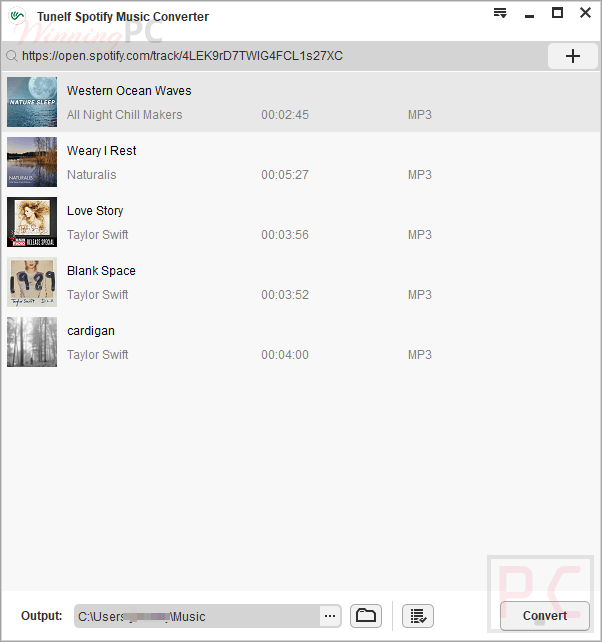
Tunelf Spotify Music Converter – Download and convert Spotify music:

Main Features
- Download Songs from Spotify
- Download Spotify Playlists/Albums
- Listen to Spotify Podcasts Without Wi-Fi
- Play Spotify Radio Stations Offline
- Convert Spotify to MP3, AAC, WAV, FLAC, etc.
- Retain ID3 Tags and Metadata Info
- Support Multi-Devices or Players
Technical Details
| Language Support | English, Français, Italian, Spanish, Swedish, German, Japanese, Chinese, and more… |
| Money Back Guarantee | 30-Day |
| Operating System | Mac OS, Windows |
| Shipping | Instant Delivery by Email |
| Subscription | Lifetime |
| Support Services | Email, Training |





Doesnt work….
Send the link then
This works. You have to be logged in or create an account. Then you have to go to where it says “1. Giveaway Details” then go to where it says “members area”. Click on “installer” in the green writing to download the program from mega.nz The version is 1.1.0 (that’s important). After installing it, open it, and go to the top right corner and click on the menu, click on “Register” then enter giveaway@winningpc.com in the Licensed E-mail box. Then go back to 1. Giveaway Details” then to “members only” and copy the license and paste it in the Registration Code box. Then click the “Register” option below it. The key was I had to use the version 1.1.0 from the installer on this page. A later version of the program I tried didn’t register.
https://gyazo.com/f94d4df694e008cf1ebad8a48dd96cbd
Doesn´t work, yes I first had 1.4 version. Then I followed your guide, got 1.1 version .
Still invalid
Nice. It’s work
Worked perfectly, if it doesn’t work check the instructions and the email properly, thanks a lot.