On this page
Vset3D Pro Coupons & Pricing

You may also like:
How to Use the Vset3D Pro Coupon Code
- Hit the Copy button on WinningPC to grab the code WIN***GPC10.
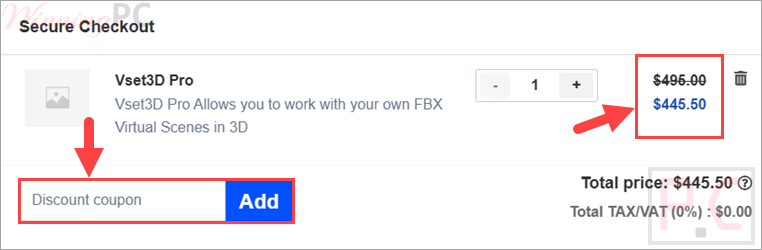
- A Virtualsetworks checkout page opens with the coupon field shown.
- Paste WIN***GPC10 into the coupon box and confirm the total drops to $445.00.
- Complete payment through 2Checkout (Verifone) to finish your order and get your download.
Is the Vset3D Pro coupon safe to use?
No crack or keygen
You download Virtualsetworks’ own official build and activate a genuine license. Nothing is patched or repackaged.
Official publisher store
The code applies to Virtualsetworks’ own site (virtualset.com), not a grey-market key reseller.
Reputable payment processor
Checkout runs through 2Checkout (Verifone), an established payment platform, so your card details are handled securely and never touch WinningPC.
Read the refund terms first
The store’s policy lists downloadable software as non-returnable, so treat this as a non-refundable purchase. The safest move is to run the free version before you pay.
Vset3D Pro Review & Features
Virtualsetworks Vset3D Pro is a technology solution specializing in the field of virtual graphics, or in short, this tool helps you create a virtual movie studio right in your workspace. Although it is a product developed for new users, Vset3D still possesses many significant advantages. The most prominent in the list of Vset3D’s features is the ability to apply artificial intelligence to the photo editing process. Thanks to that, you can create a movie with extremely impressive graphic quality without having to spend too much money. Savings is also a special competitive factor of Vset3D compared to other software, meaning that you will not necessarily have to pay too much for similar features on Vset3D.
Key features
- Real-time 3D virtual sets with no rendering time
- Built-in real-time chroma keyer for green-screen work
- FBX set import, so you can load your own 3D scenes
- NewTek NDI (3 in / 4 out) and native Blackmagic DeckLink in/out
- Real-time shadows, reflections, depth of field, plus SkyDome and animated clouds
- Internal capture tool exporting 4K H.264 video.
What we think
Screenshots


Frequently Asked Questions
Is Vset3D Pro a one-time purchase or a subscription?
It looks like a one-time purchase at around $495 (or $445 with the code), bought through the Virtualsetworks store. The raw offer doesn’t spell out whether that price includes future version updates, so confirm the exact license terms at checkout before paying.
Is there a free version of Vset3D?
Yes. Virtualsetworks offers a free Vset3D edition for Windows, though it’s watermarked and more limited than Pro. It’s the smartest way to check the software runs well on your machine before you spend anything.
What are the system requirements?
Windows 10 or 11 (64-bit), an Intel i7/i9 or AMD Ryzen CPU, and ideally an NVIDIA GeForce RTX graphics card for real-time work. 8 GB RAM is the floor; 16 GB or more is recommended for complex sets.
Does Vset3D work with OBS, vMix or NDI?
Yes. It sends and receives video over NewTek NDI and supports native Blackmagic DeckLink capture, so it connects to OBS, vMix and similar tools on the same network. Many users run Vset3D and OBS on two linked machines for smoother performance.
Can I get a refund on Vset3D Pro?
Probably not. The store’s return policy lists downloadable software among its non-returnable items, so once you buy and download, a refund is unlikely. Try the free version first to avoid disappointment.
What’s the difference between Vset Pro and Vset3D SHOW?
Vset3D SHOW (around $695) is the higher tier, adding volumetric lighting and DMX fixture control on top of what Pro offers. If you don’t need stage-lighting integration, Pro is the more sensible pick.
Vset3D Pro vs the alternatives
| Tool | Price | Key trait | Best for |
|---|---|---|---|
| Vset3D Pro (our focus) | $445 with code (reg $495) | Real-time 3D trackless sets, no render, NDI + Blackmagic. | Semi-pro/pro live virtual studios on Windows. |
| Vset3D 2025 Free | $0 (watermarked) | Same engine, limited/watermarked. | Testing the workflow before you buy. |
| OBS Studio | Free, open-source | Chroma key + NDI compositing, but no true real-time 3D sets. | Streamers who only need a basic green screen. |
| vMix | Tiered, paid | Live production suite with lighter (2.5D) virtual sets. | All-in-one live switching on Windows. |
System Requirements & Details
| Field | Value |
|---|---|
| Operating system | Windows 10 / 11 (64-bit) |
| Processor / RAM/disk | Intel i7/i9 or AMD Ryzen; 8 GB min (16 GB+ recommended); ~2 GB disk, SSD advised |
| Graphics | NVIDIA GeForce RTX recommended (real-time ray tracing) |
| Supported input formats | FBX 3D sets; live video via NDI and Blackmagic DeckLink; images, video, and 3D objects. |
| Supported output formats | 4K H.264 capture; NDI out; Blackmagic DeckLink out. |
| Other requirements | Green screen for live chroma key; DirectX 11 GPU |