On this page
Volume Serial Number Editor Coupons & Pricing
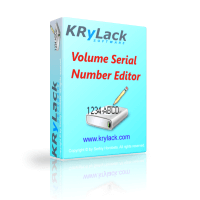
Volume Serial Number Editor
A one-time purchase with free lifetime upgrades.
Volume Serial Number Editor Command Line
A one-time purchase with free lifetime upgrades.
Volume Serial Number Editor + Command Line
A one-time purchase with free lifetime upgrades.
Volume Serial Number Editor UNLIMITED License
A one-time purchase with free lifetime upgrades.
How to Use the Volume Serial Number Editor Coupon Code
- Click on the “COPY” button above to open the Volume Serial Number Editor checkout page.
- On the checkout page, the price is dropped by 25% immediately.
- Complete your purchase. Krylack will send your license key to your email address.
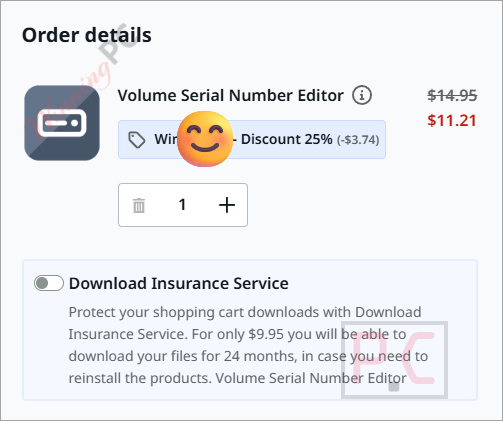
Is the Volume Serial Number Editor coupon legit?
Yes. WINNINGPC25 is a legitimate discount code for Krylack’s official store, not a grey-market reseller or bundled key site.
No crack or keygen
You buy a genuine license key that activates the publisher’s own signed installer. Nothing is patched or repackaged.
Official Krylack store
The purchase goes through Krylack’s own checkout at krylack.com – WinningPC has no access to your payment details.
Secure HTTPS checkout
Krylack’s store uses an encrypted connection; your card or payment data never passes through this page.
Code-signed installer
Krylack notes that antivirus software sometimes flags disk utilities by category heuristics, not because anything is actually wrong. The installer is code-signed and downloaded directly from krylack.com.
Volume Serial Number Editor Review & Features
Volume Serial Number Editor is a hyper-focused utility, and that focus is its biggest strength. The GUI edition keeps it simple: open the app, pick a drive from the list, see the current serial, type a new one, and confirm. The whole operation takes under a minute. If you’re a sysadmin handling more than a handful of machines, the command-line edition (volsn) is where things get genuinely useful – it does the same job from the console, so you can drop it into a deployment script and run it across an entire fleet without touching a mouse.
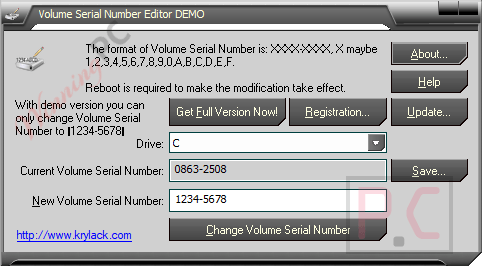
The coverage across NTFS, FAT, FAT32, and exFAT means it handles virtually every Windows volume you’ll encounter, including USB drives and removable media. One thing worth knowing before you buy: this tool changes only the volume serial number – the logical identifier Windows assigns at format time. Volume Serial Number does not touch the drive’s physical hardware serial, which is a different thing entirely.
Key features
- Change any drive’s volume serial number instantly, without reformatting or disturbing your files.
- Back up the current serial number before making changes, so you can restore it with equal ease.
- Supports NTFS, FAT, FAT32, and exFAT volumes, including removable media.
- Command-line edition (volsn) for scripting and automation across multiple machines – native 32-bit and 64-bit builds included.
- Offline activation – no account needed, license key arrives by email after purchase.
What we think
Which Volume Serial Number Editor Plan Should You Buy?
| Plan | Price (with code) | Interface | Best for |
|---|---|---|---|
| GUI | $11.21 | Desktop app | Occasional manual changes on your own machines |
| Command Line | $9.71 | Terminal (volsn) | Sysadmins who script everything and don’t need a GUI |
| Bundle (GUI + CLI) | $14.96 | Both | The practical default – GUI for ad hoc work, CLI for automation |
| Unlimited Company License | $112.46 | Both | Organisations deploying across 10+ computers |
Recommendation: For most buyers, the Bundle at $14.96 is the right call. You get both editions on one license, and the price gap over the GUI-only plan is small enough that having the CLI option in reserve is essentially free.
Volume Serial Number Editor vs the alternatives
| Tool | Price | Interface | File Systems | Best for |
|---|---|---|---|---|
| Volume Serial Number Editor (GUI) | $11.21 with WINNINGPC25 | GUI + CLI | NTFS, FAT, FAT32, exFAT | Anyone who wants a GUI and/or scripting ability |
| VolumeID (Sysinternals / Microsoft) | Free | CLI only | FAT and NTFS disks | Sysadmins already comfortable in the terminal |
| Windows format command | Free (built-in) | CLI | All | Reformatting only – this destroys your existing data |
The honest answer: if you’re a sysadmin comfortable with the command line and you only need to handle NTFS or FAT drives, VolumeID from Sysinternals does the core job for free. Volume Serial Number Editor is the better pick if you want a GUI, need exFAT support, or plan to use both manual and scripted workflows from a single purchase.
Frequently Asked Questions
What’s the cheapest way to buy Volume Serial Number Editor?
The Command Line edition is the lowest single-edition price at $9.71 (with code WINNINGPC25). The Bundle at $14.96 is better value if there’s any chance you’ll want the GUI too.
Does changing the volume serial number delete my files?
No. Volume Serial Number Editor changes the serial number directly and leaves everything on the drive exactly as it was. You can also back up the current serial first, so rolling back takes one click.
Is this a one-time purchase, or does it auto-renew?
One-time purchase. All editions – including the Unlimited Company License – come with free lifetime upgrades and do not auto-renew.
Which file systems does it support?
NTFS, FAT, FAT32, and exFAT, including removable media like USB drives and SD cards formatted to those systems.
How many computers can I install it on?
The standard licenses (GUI, Command Line, Bundle) are for single-machine use. If you need to deploy across more than 10 computers, the Unlimited Company License at $112.46 (with code) covers your whole organisation.
How do I activate the license after purchase?
Krylack emails your Volume Serial Number license key after payment. Open the app, choose the license entry option, paste the key, and you’re done. Activation is fully offline – no account or internet connection required.
System Requirements & Details
| Field | Value |
|---|---|
| Operating system | Windows XP, Vista, 2008, 7, 8, 8.1 (x86 & x64), 10, 11 |
| Processor | Pentium 150 MHz or faster (recommended: 250 MHz+) |
| RAM | 16 MB minimum (recommended: 32 MB+) |
| Disk space | At least 2 MB free |
| Other | Microsoft or compatible mouse (recommended); Microsoft HTML Help Update |
| Supported input (volumes) | NTFS, FAT, FAT32, exFAT – including removable media |
| Supported output | Modified volume serial number written directly to the volume |
| Internet required | Not required after activation; activation is fully offline |