
On this page
WorldVerb Giveaway
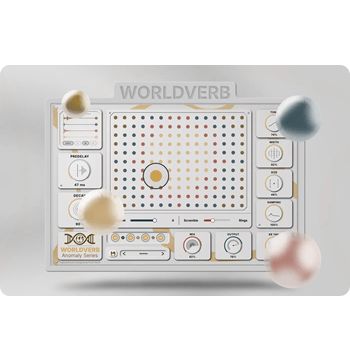
WorldVerb
Good sounds, strange ideas Audio plugins for producers and sound makers.
- Product
- WorldVerb
- Product website
- pleatechaudio.com
- License
- Full license - all 173 spaces, all 7 blend operators unlocked
- Platform
- Windows · VST3 only
- Commercial use
- CC0 source IRs - exported spaces can be used in commercial work, sample libraries, or released music
- Updates
- Free updates included
- Support
- Developer support for installation and workflow questions
- Updated
- 2026-08-26
Continue on pleatechaudio.com
Share to reveal your free license code, then activate it inside the app.
The limited-time giveaway!
The free license is no longer available.
How to Get the WorldVerb License Key for Free
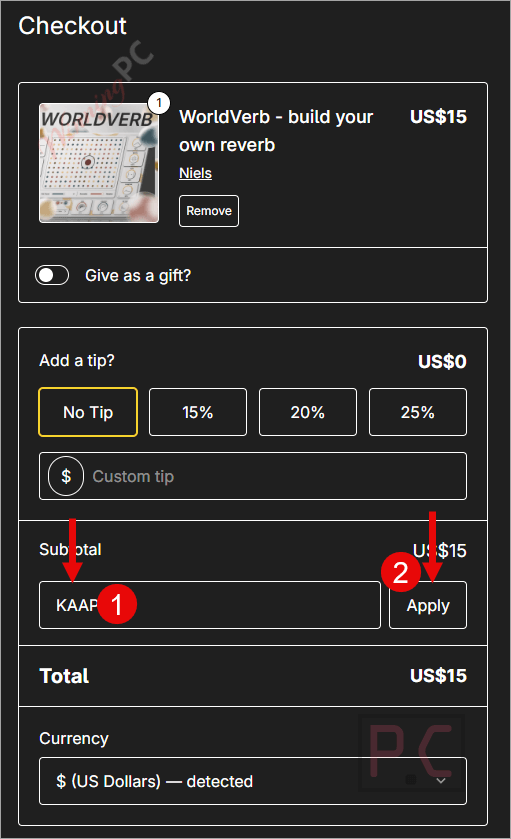
- Please copy and paste the redemption code in the “Discount code” field on the Gumroad checkout page.
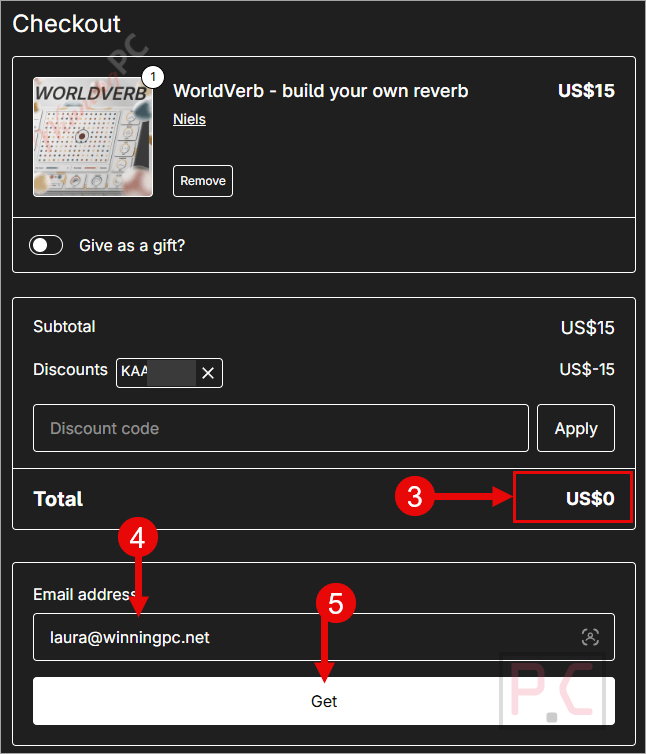
- The price drops to $0.00. Enter your email address and complete the order. No payment details required.
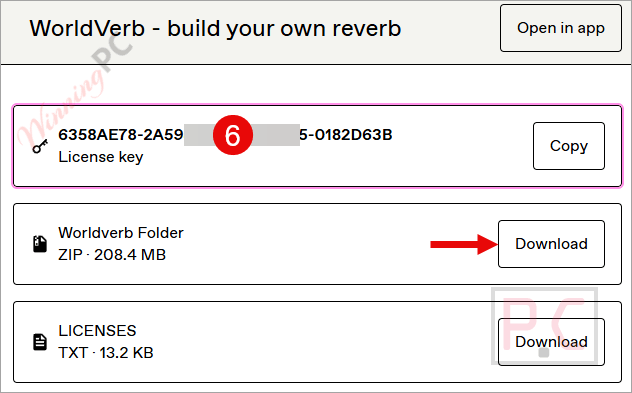
- Gumroad emails your license code. Download the VST3, install it on Windows, and enter the code to activate.
Is this WorldVerb giveaway safe and legit?
Yes. WorldVerb is a real plugin from Pleatech Audio, distributed through Gumroad – a well-established creator marketplace used by thousands of independent developers worldwide.
No crack or keygen
You receive a genuine license through Gumroad’s official checkout. Nothing is patched or repackaged – it’s the same build anyone pays $15 for.
Official developer giveaway
The discount code is provided directly by Pleatech Audio, not a reseller or grey-market key source.
Secure HTTPS checkout
Gumroad handles the transaction on its own encrypted platform. No payment details touch WinningPC.
Zero financial risk
The license costs $0 during the giveaway, so there’s nothing to lose by claiming it.
Hands-on with WorldVerb
Among the audio production software available for creative sound design, WorldVerb takes an unusual approach to convolution reverb. Most convolution reverbs work the same way: you pick a room, move a knob or two, and call it done. WorldVerb is built on the premise that that’s a creative dead end.
The 173-space grid is navigated with a drag ring, not a dropdown. The real distinction is the blend operators. Choosing Series feeds one room directly into the next – a room inside a room. Carve spectrally subtracts overlapping frequencies so two spaces stop competing. Scatter explodes one room into granular particles and distributes them across the other’s tail. These aren’t just routing variations; each produces a result that no standard reverb plugin can replicate.
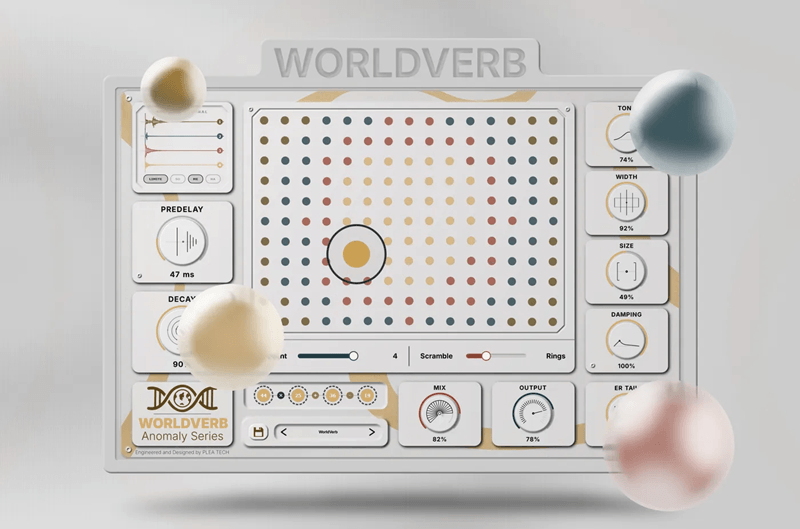
The Draggable Waveform is a practical bonus. It renders the merged tail as a color-coded visualizer, and you can drag it straight into your DAW or sampler as a WAV file. Every source IR is CC0, so that exported file is commercially usable from the moment you drop it in a session.
The limitation worth knowing upfront: VST3, Windows only. No AU, no AAX, no macOS. That’s a hard cutoff for a significant portion of the production community.
Key features
- 173-space selection grid: Drag a ring to select up to four real captured acoustic spaces simultaneously; right-click any IR to swap it.
- 7 blend operators (Layer, Series, Carve, Morph, Shimmer, Scatter, Split): Each produces a fundamentally different acoustic result, not just a volume blend.
- Drag-and-drop Merge Rack: Reorder the chain instantly; Node Scroll lets you dial in each space’s discrete mix level with a mouse wheel.
- Draggable waveform export: Drag the color-coded tail visualizer straight out of the plugin as a rendered WAV file.
- Merged Limiter (Soft, Medium, Hard): Automatic protection for your master bus when blending multiple spaces produces volatile output levels.
- CC0 source IRs: All 173 base impulse responses are CC0; anything you build and export is yours for commercial use with no extra steps.
Frequently Asked Questions
Does WorldVerb work on macOS?
No. WorldVerb is Windows-only and ships in VST3 format only – no AU, no AAX. It won’t load in Logic Pro, Pro Tools, or any Mac-exclusive host.
Does the free giveaway license include updates?
Yes, according to the giveaway terms. Pleatech Audio specifies that the free license includes free updates as new features are released. A dark mode interface is mentioned as an upcoming addition.
Is WorldVerb worth $15 if I miss the giveaway?
For Windows VST3 producers doing ambient, film scoring, or experimental sound design, yes. The blend operators – especially Scatter and Series – cover creative territory that standard convolution reverbs don’t reach. If you only need a basic room reverb for mixing vocals, a free convolution loader will do the job with less complexity.
What’s a “blend operator” and why does it matter?
A blend operator is how WorldVerb combines two or more acoustic spaces. Layer stacks them traditionally. Series feeds one room into the other (a “room within a room”). Carve removes overlapping frequencies so they don’t muddy each other. Shimmer shifts one space an octave up before merging. Each operator produces a fundamentally different sonic result – it’s not just mixing levels.
System Requirements & Details
| Field | Value |
|---|---|
| Operating system | Windows |
| Plugin format | VST3 only |
| Supported input formats | 173 built-in CC0 impulse responses (WAV-based). Custom IR loading not confirmed |
| Supported output formats | WAV (drag-and-drop export from the waveform visualizer directly into your DAW or sampler) |
| Internet connection | Required for Gumroad purchase and license activation |
| Other | No macOS, no AU, no AAX |




Key is invalid
It seems that the giveaway has already ended.
On clicking the exposed “Claim page” link it goes to an unpopulated chechout page with no vst3 plugin in it and no place to insert the 100% discount code. Please fix ASAP!
Thank you for your feedback. I have updated the URL to https://pleatechaudio.com/plugins/worldverb.
Thanks, got it downloaded, installed and activated following instructions and it appears in Audacity after rescanning plugs… never know if I’ll use it but it was painless to get and does NOT rely on emails getting through even though it does ask for an email address. Just testing it.. the Preview does not Preview the selected data in the track but some fixed sound embedded in the plugin which is a disappointment as one cannot fine tune it using the track data to what we want. Maybe if the developer is participating in the giveaway they can consider letting the preview work on the live track data like effect previews normally do in any DAW! Oh hang on I know what’s happening by default the MIX control is set to FULL reverb effect and virtually nothing of the original signal … that’s a MISTAKE Mix needs to set to single figure percentage to hear it as a reverb effect on the original sound otherwise its just a noise with none of the original content audible. Admittedly the original tracks recording off the TV via laptop mic array was not maxing out the levels but peaked at about -6db from clipping it should have been more than adequate for default usage. Developer if you want better initial feedback for your vst3 plugin I suggest you rebuild it with either a 5% default mix level or alter the scale of the MIX to a logarithmic scale or some such and certainly NOT force it to be 100% by default! The defaults on initializing the plugin and low Output of 74% makes this a chore to use, having to correct it on changing from one preset to another… I hope once the developer fixes these problems we will be offered an update or told of the update assuming the license allows updates to future versions… or they re-offer the updated fixed version as a reward for our testing this what I consider to be first beta test release… these faults should have been caught by developer in private alpha testing before they released it as a commercial plugin IMHO as it did not take long for me to notice the bugs and then figure out what was actually wrong.