
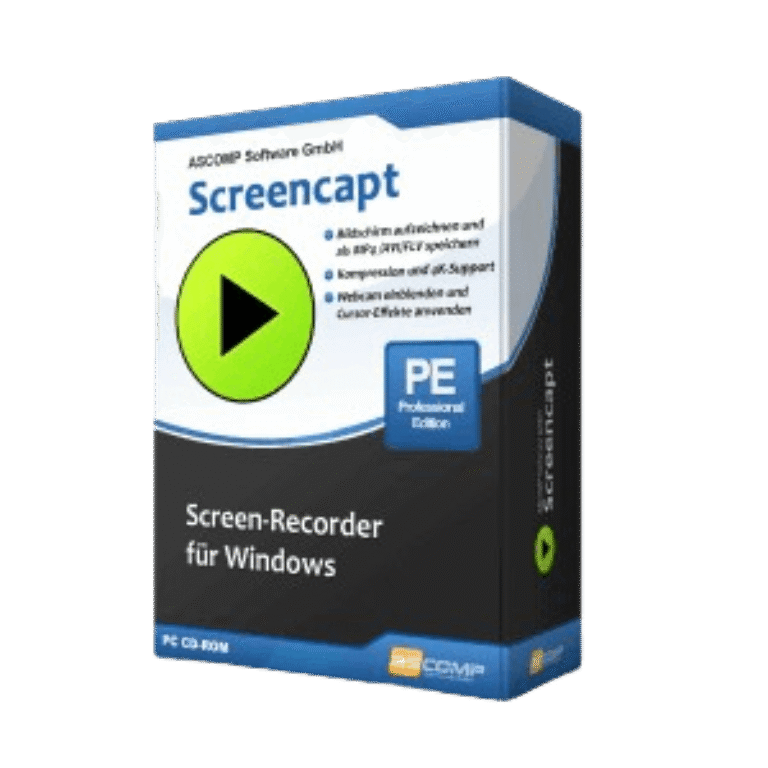

ASCOMP Screencapt Professional Giveaway
ASCOMP Screencapt Professional
Create high-quality screen recordings and capture your desktop professionally with Screencapt for Windows.
- Product
- ASCOMP Screencapt Professional
- Product website
- ascompsoftware.com
- License
- Lifetime
- Platform
- Windows 11, 10, 8.1, 8, 7, Server 2022/2025, Server 2016/2019
- Usage
- Non-commercial only
- Updates
- Free updates for 1 month
- Support
- Free tech support for 1month
- Updated
- 2026-09-24
Continue on ascomp.de
The publisher handles registration and license delivery on its official website.
The free license is no longer available.
ASCOMP Screencapt Professional Plans & Coupon Codes
ASCOMP Screencapt Professional
Lifetime license (lifelong use; including updates, download & support for two years)

ASCOMP All-in-One Pack
Free update & Free technical customer for 24 months

Is this ASCOMP Screencapt Professional giveaway safe and legit?
Yes. This is a legitimate offer delivered directly through ASCOMP’s own platform.
No crack or keygen
You download the official installer from ASCOMP’s customer area after registering. The key is a genuine license tied to your account, not a patched or repackaged build.
Official publisher giveaway
The offer comes from ASCOMP Software themselves, not a third-party reseller or grey-market key shop.
Secure HTTPS checkout
If you choose the paid route with the discount code, payment is handled on ASCOMP’s own encrypted store. WinningPC never sees or handles your card details.
No financial risk on the free license
The giveaway key costs you nothing; no payment information is required to claim it.
How to Get ASCOMP Screencapt Professional Key Free
- Fill in your name and email address on the ASCOMP Screencapt Professional giveaway form (link in the button above).
- Check your email inbox for a message from ASCOMP with your Customer ID and Password.
- Log in to the ASCOMP customer area at ascompsoftware.com using those credentials.
- Download the full installer for ASCOMP Screencapt Professional from your account page.
- Install the software on your PC, then enter your Customer ID when prompted to unlock and activate your lifetime license.


Hands-on with ASCOMP Screencapt Professional
ASCOMP Screencapt Professional has a 120 FPS ceiling, and that is the number that stands out here. For tutorials and webinars you’ll rarely push past 30 FPS, but for gameplay capture that extra headroom means motion stays sharp where a lower-framerate recorder would blur. The H.264 output keeps file sizes reasonable without a visible quality penalty, and the three-format choice (MP4, AVI, FLV) covers most post-production workflows.
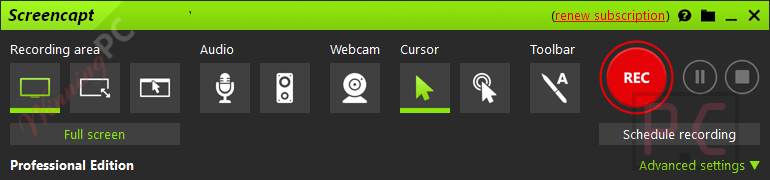
Webcam overlay and live draw/annotation are built into the same interface rather than requiring a separate plugin, which makes the setup cleaner than you’d expect at this price point. The main thing to know going in: Screencapt captures, it does not edit. Once your recording is done, you will need a separate tool to trim clips or add titles. For pure capture it does the job well. As a one-stop production suite, it is not.
Key features
- Flexible Recording Options: ASCOMP Screencapt Professional is an advanced screen recording software for Windows, designed to capture any screen activity effortlessly. It provides versatile recording options, allowing users to record the entire screen, specific areas, or individual windows. This software also supports integrated audio, enabling the inclusion of system sounds or live commentary, making it ideal for creating detailed tutorials, presentations, and more.
- Integrated Audio Recording: It can be used to record all system audio, including application sounds, alerts, and notifications. You also can use it to record audio from an external or built-in microphone, allowing you to add live commentary, voiceovers, or narrations to your screen recordings.
- Webcam Integration: A standout feature is the ability to incorporate a webcam feed into the screen recording. This function is useful to help you add a personal touch to tutorials, webinars, and presentations.
- Cursor Effects: For viewers to follow along in instructional videos with ease, this tool can help you highlight cursor movements and clicks with customizable effects. You can change the color and size and click animations of the cursor. It also gives an option to hide the cursor during the recording.
- High-Quality Video Output: Another unexpected feature is that it uses the H.264 video codec to ensure high-quality video compression, balancing excellent image quality with efficient file sizes. It also supports saving recordings in popular formats like MP4, AVI, and FLV.
- Advanced Recording Settings: Another important feature of this software is the ability to set the frame rate for recordings up to 120 FPS for capturing high-paced activities such as gaming or detailed motion in videos.
more ASCOMP Screencapt Professional screenshots!


What we think
Frequently Asked Questions
What are the main features of ASCOMP Screencapt Professional?
The main features include full-screen recording, selective area recording, integrated audio, webcam overlay, cursor effects, high-quality video output, and advanced recording settings like frame rate control.
Can I record audio along with my screen recording?
Yes, you can record system sounds as well as microphone input during your screen recording sessions.
Can I record audio along with my screen recording?
Yes, you can record system sounds as well as microphone input during your screen recording sessions.
What video formats does Screencapt Professional support for output?
You can save your recordings in MP4, AVI, or FLV formats.
Where can I get a discount on ASCOMP Screencapt Professional?
You can use the coupon code UMA65-85***RBX-ME5L on WinningPC to get 65% off on Screencapt Professional.
How does it compare to OBS Studio?
OBS is more powerful for streaming setups and gives you more control over output formats, but the configuration takes real time to learn. Screencapt is simpler: pick your capture area, hit record, and you are done. OBS is the better pick for complex multi-scene setups; Screencapt wins on speed and ease for straightforward recordings.
System Requirements & Details
| Operating system | Windows 11, 10, 8.1, 8, 7; Windows Server 2016/2019/2022/2025 |
| Processor | Intel compatible or Windows on ARM |
| RAM | 2 GB minimum (4 GB recommended) |
| Disk space | 50 MB |
| Supported input | Screen/window/region capture and webcam video (not a file converter; no file input formats apply) |
| Supported output formats | MP4, AVI, FLV (H.264 codec; up to 120 FPS) |
| Other | Internet connection required for license activation and registration |



6A649-C5M7L-WM8LJ-APC
ERROR:
License key is expired!
Please use the latest license key: XEEZY-MAHFI-DC9EN-SFROG
ERROR:6A649-C5M7L-WM8LJ-APC
License key is expired!
Extend License
until 2027/03/28 for
only 14,90 €
lifetime ???
Extend update time, not license.