Laura Marano

BeLightSoft Concealer is a secure and easy-to-use encryption software for Mac that helps you hide and protect sensitive data, including passwords, credit card details, software licenses, private files, and notes. Using military-grade AES-256 encryption, Concealer stores your information in card-based formats for fast access and full control. Just one master password, and everything stays locked away and accessible only to you. In my view, it’s straightforward, safe, and truly a lifesaver for Mac users.
Concealer for Mac Plans & Coupon Code (100% Working)

Concealer for Mac - Single License
get deal for product, regular price $19.99
Concealer for Mac - Family Pack (up to 5 seats)
Get started with $34.99

BeLight Software - Non-Profit and Educational Licenses
Below you can find current educational, government and other non-profit organizations pricing for BeLight Software products.
Key Features and Screenshots
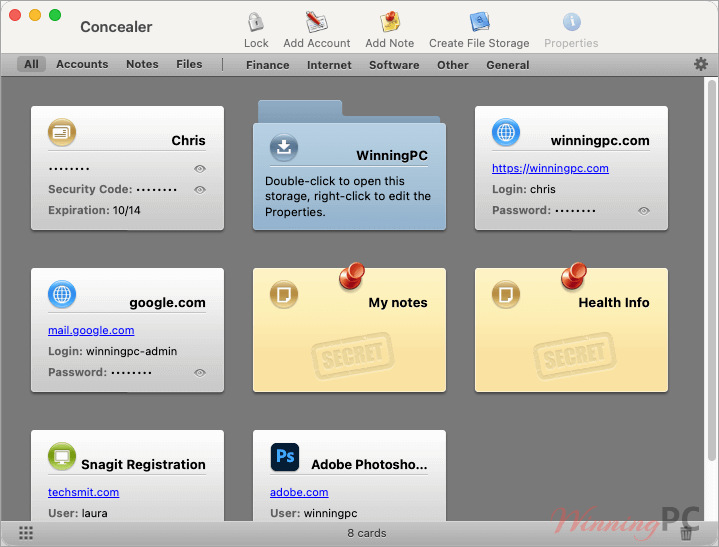
- Master & Vault Passwords: Use a master password for everything, or assign separate ones for each file vault.
- Ready-Made Templates: Six templates for credit cards, websites, software licenses, and more.
- Three Card Types: Store info using Accounts, Notes, or File Storage cards.
- AES-256 Encryption: Industry-standard 256-bit encryption ensures top security.
- Custom Icons: Choose from 60 icons or use your own to personalize cards.
- Drag & Drop: Easily add files and text by dragging them into the app.
- Auto-Lock: Automatically locks when you’re away from your Mac.
- Password Assistant: Generate strong passwords and check their strength.
- Remote Storage: Move your encrypted data to a USB or network disk for portability.
- Export: Export login info and notes as text files.
- Advanced Search: Find any card quickly with built-in search.
- Text Formatting: Format notes right inside Concealer for easy reading.
- File Hiding: Encrypt and conceal files and folders with a few clicks.
- Quick Sorting: Organize and filter by card type or content category.
Pros and Cons
How to Use (Step-by-Step Guide)
Step 1. Install Concealer on your Mac and set a master password.
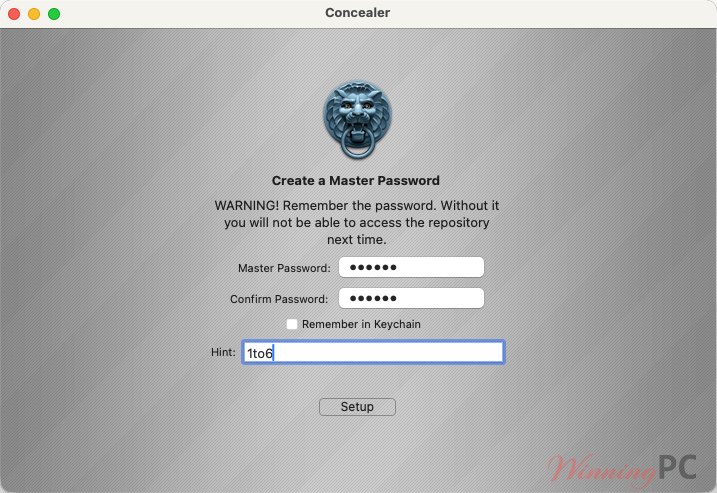
Step 2. To save logins or cards → + → Account → pick a template → fill fields → Save.

Step 3. Do the same when you want to hide files or secure notes.
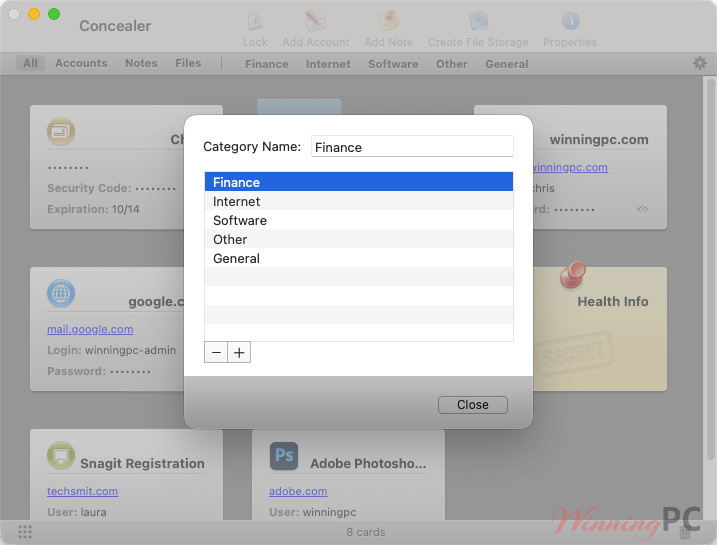
Step 4. Create categories if you want cleaner filtering.
Step 5. Lock when done (or let Auto-lock kick in).
Frequently Asked Questions
What is Concealer used for?
It’s an encryption tool for Mac that helps you securely store passwords, credit card numbers, software licenses, private files, and notes using AES-256 encryption.
Can I use Concealer for free?
Yes. The free trial has no time limit, but you can only store a limited amount of information.
Does it sync with iCloud or mobile devices?
No. This software is designed for Mac only and stores your repository locally.
What happens if I forget my master password?
If you forget the master password, your data cannot be recovered.
Can I export my data from Concealer?
You can export account details and notes to text files.
Where can I get the best discount on Concealer?
You can always visit WinningPC to grab the latest deals and coupon codes for Concealer, ensuring you get the best price available.
Why Choose WinningPC
- Why Trust? We are committed to providing 100% valid and verified coupon codes, so you can always shop with confidence.
- Found an Invalid Coupon or a Better Deal? If you encounter an invalid code or a better offer, please let us know. Our team updates all discount information regularly to ensure accuracy.
- Official Authorization: We only share authentic discounts from trusted software developers.
- No Fake Discounts: Unlike some sites, we never use misleading deals. The final price you see is the true discounted price.
- Secure Purchases: All transactions are processed on the official vendor’s website, ensuring authenticity and data protection.
- Extra Support: If you face order or vendor issues, contact us. We’ll liaise with the vendor to help resolve your problem quickly.
Technical Details
| Language Support | English and German. |
| Money Back Guarantee | The registration code will be sent to your email in minutes |
| Operating System | macOS 10.10 or higher, Apple silicon or Intel processor. |
| Shipping | Register code will be sent to your email in minutes |
| Subscription | Lifetime |
| Support Services |