
Vovsoft XML to CSV Converter Giveaway
Vovsoft XML to CSV Converter
Convert XML (Extensible Markup Language) files into CSV (Comma-Separated Values), XLS and XLSX formats..
- Product
- Vovsoft XML to CSV Converter v1.4
- Product website
- vovsoft.com
- License
- Lifetime
- Platform
- Windows 11, 10, 8/8.1, 7, Vista (32-bit & 64-bit)
- Installer
- xml-to-csv-converter.exexml-to-csv-converter-portable.zip
- Usage
- Non-commercial only
- Updates
- No future upgrades
- Support
- No support
- Updated
- 2026-09-07
Continue on vovsoft.com
Share to reveal your free license code, then activate it inside the app.
This giveaway ended on .
30% Off Vovsoft XML to CSV Converter - Lifetime Updates
Vovsoft XML to CSV Converter Coupon Code

Vovsoft XML to CSV Converter - Lifetime Updates
Lifetime license | All future updates
Vovsoft Universal License
115+ programs | Lifetime license | All future updates
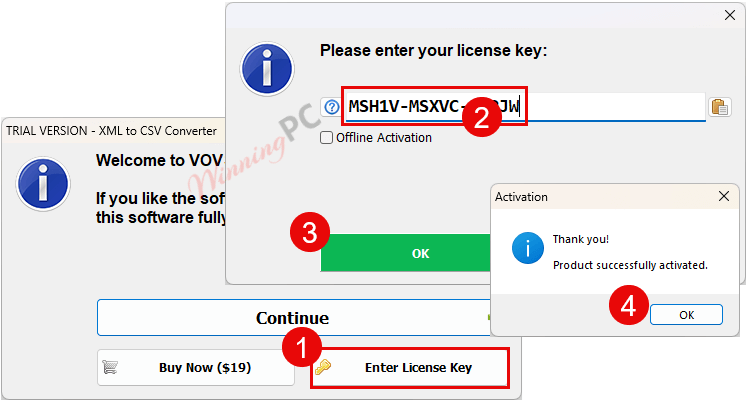
How to get Vovsoft XML to CSV Converter License for Free
- Click the download button on this page to get the Vovsoft XML to CSV Converter installer.
- Run the installer on your Windows PC. Setup takes under a minute.
- Open Vovsoft XML to CSV Converter, find the activation or registration option, and paste the license code above.
- Your Lifetime license is active. The giveaway closes September 13, 2026 – register before that date.
Hands-on with Vovsoft XML to CSV Converter
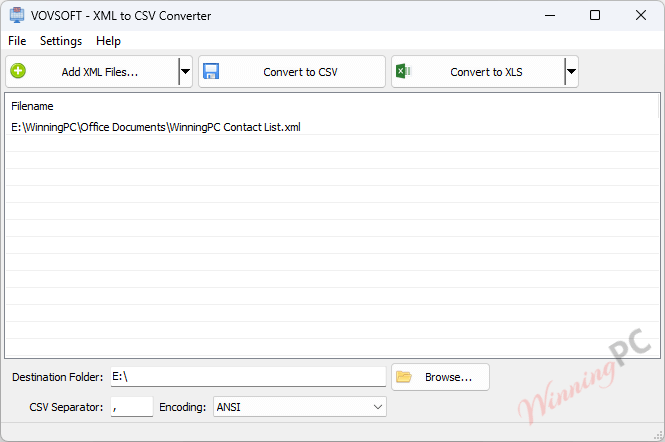
Vovsoft XML to CSV Converter converts XML files into spreadsheet-friendly formats while keeping all processing on the local computer. It supports batch conversion of multiple files or folders, lets users choose a delimiter, and automatically maps XML tags and attributes to columns. It is useful for handling regular XML exports from CRM, ERP, inventory, or customer databases. It focuses on conversion rather than advanced data transformation, so complex or inconsistent XML structures may require cleanup afterward.
Key features
- XML to CSV, XLS, and XLSX: three output formats from one tool, covering Excel and Calc workflows.
- Batch conversion: process entire folders of XML files in a single pass.
- Flexible CSV delimiters: choose comma, semicolon, or other separators to match your downstream tool.
- 100% offline: no internet connection required; no files leave your computer.
- Drag-and-drop queue: add individual files or whole folders by dragging them in.
- Portable edition: run the app from a USB drive without installation.
- Unicode/UTF-8 support:handles special characters and non-English text correctly.
pro & Cons
Frequently Asked Questions
What does Vovsoft XML to CSV Converter do?
It converts XML files into CSV, XLS, or XLSX formats so you can easily open and analyze them in Excel, Google Sheets, or similar tools.
Can I convert multiple XML files at once?
Yes, the batch processing feature allows you to do that.
Does it support non-English characters?
Yes, it fully supports UTF-8 Unicode, including Asian, European, and special characters.
Is my data safe when using this tool?
Yes. Conversion happens entirely on your machine – no internet connection is used, and no files are uploaded anywhere. This makes it a better fit than cloud-based converters when the XML contains financial records, customer lists, or anything you would not send to a third party.
What output formats does it support?
It exports to CSV (with a choice of delimiter), XLS, and XLSX. That covers direct use in Microsoft Excel, Google Sheets, and LibreOffice Calc without additional steps.
Is there a portable version?
Yes, a portable edition is available so you can run the software without installing it.
Does WinningPC offer a discount for this software?
Yes! WinningPC provides an exclusive 50% coupon code, helping you get the software at half price.
System Requirements & Details
| Operating system | Windows 11, 10, 8/8.1, 7, Vista (32-bit & 64-bit) |
| Supported input formats | XML |
| Supported output formats | CSV (customizable delimiter), XLS, XLSX |
| Internet connection | Not required – fully offline |
| Installation size | 3.53 MB (Installer), 2.21 MB (Portable) |
| Language | English |